Offline source reader | preserved content, not new verification
Global Controls & Header Bar | David Vogel
Preserved third-party source, not an ORMAN project instruction. Complete extracted article text is followed by every retained figure and its separately labeled project observation. Original files remain unchanged. For PDFs, use the original page images when extracted glyphs are unclear. Linked external audio/video and external repository trees were not part of the retained snapshot.
Vital Software Synthesizer
Vital User Guide
Global Controls & Header Bar
On this page
Global Controls & Header Bar
The following commands apply to knobs and sliders in Vital. These shortcuts are based on macOS and may differ on Windows or Linux.
Click
: Displays the parameter value and label (if available).
Cmd + Click-and-Drag
: Provides fine-grained control for adjusting parameters.
Opt + Click
or
Enter Value
from the context menu: Manually enter a value for the parameter.
Double-click
or
Set Default Value
from context menu: Resets a parameter to its default value.
Note settings
The lower-right corner of the interface displays various note settings:
Voices
(
1 to 32
): Determines polyphony, or how many notes can be played simultaneously. Higher values increase CPU usage.
Bend
(
0 to 48 semitones
): Sets the pitch bend range.
Vel Trk
(
-100% to 100%
): Adjusts velocity tracking. At 0%, velocity has no effect. At 100%, velocity fully affects the amplitude envelope. At -100%, velocity inversely affects the envelope (higher velocity = lower envelope value).
Spread
(
0 to 100%
): Controls stereo width. At 0%, the output is mono. At 100%, the sound is fully stereo.
Glide
(
0 to 16 seconds
): Adjusts portamento, or the time it takes for a pitch to glide from one note to another. At 0 seconds, there is an instant pitch change. Higher values result in slower pitch transitions.
Slope
(
-8 to 8
): Modifies the
Glide
(portamento) response curve.
-8
: Exponential curve (starts slow, speeds up at the end).
0
: Linear transition (constant glide speed).
8
: Logarithmic curve (starts fast, slows down at the end).
Always Glide
: When enabled, the glide is always on, even when notes are played staccato (detached).
Octave Scale
: When enabled, the glide time increases with larger pitch differences.
Legato
: When enabled and
Voices
is set to 1, playing successive notes does not retrigger the amplitude envelope, allowing for smooth legato transitions while playing monophonically.
Header bar
The header bar contains the following elements:
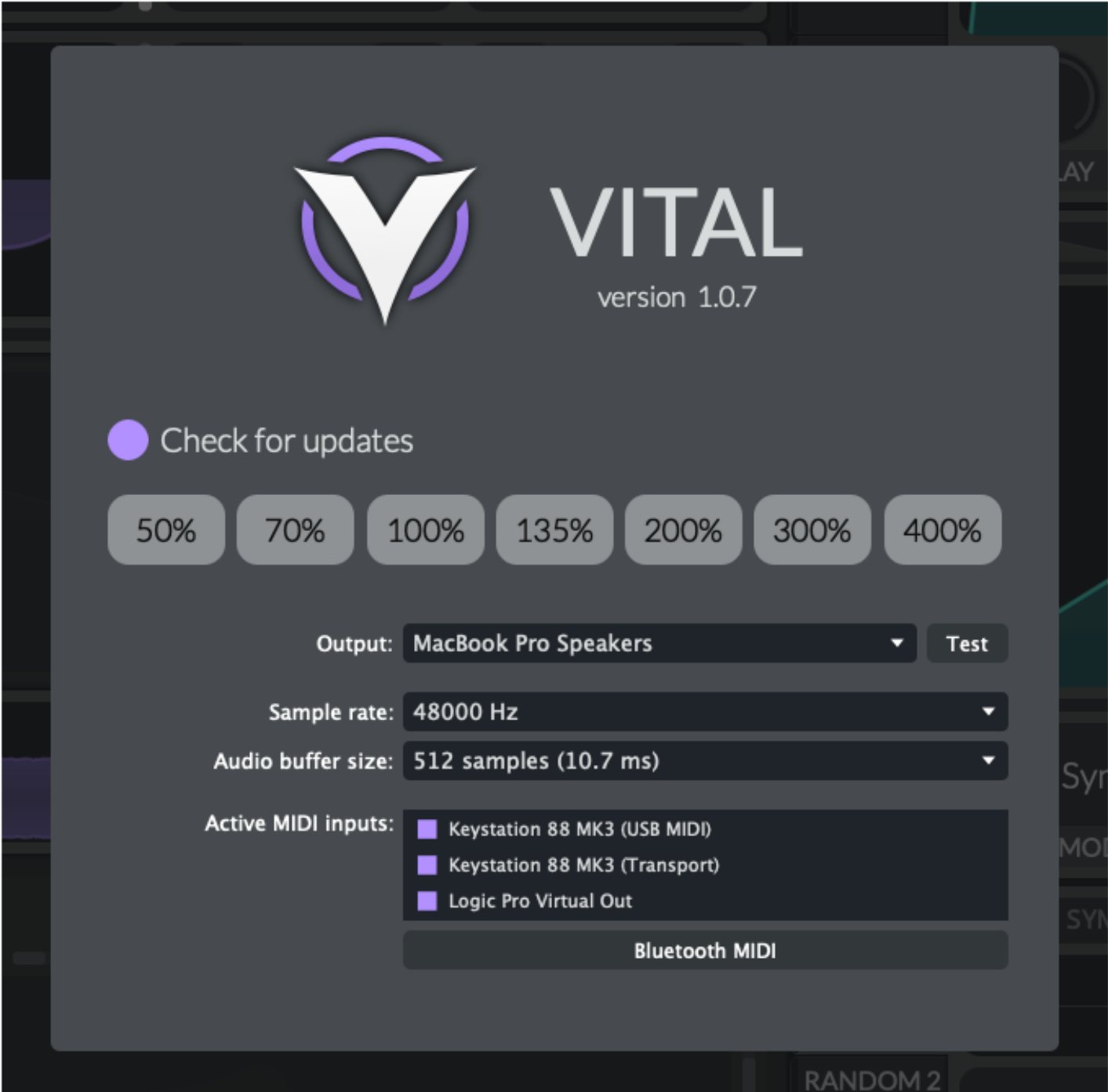
System menu
Use the system menu to choose a predefined zoom level, enable
Check for updates
, and access your system's audio and MIDI settings.
In standalone mode, you can also adjust the zoom by dragging the corners of the main application window.
Main tabs
There are four main tabs accessible in the header bar:
The
Voice
tab gives you access to the
oscillators
,
sampler
, and
filters
.
The
Effects
tab provides access to the effects chain.
The
Matrix
tab is where you can see all the modulation mappings for your patch.
The
Advanced
tab contains various global settings for the synth as well as additional settings for the oscillators.
Presets
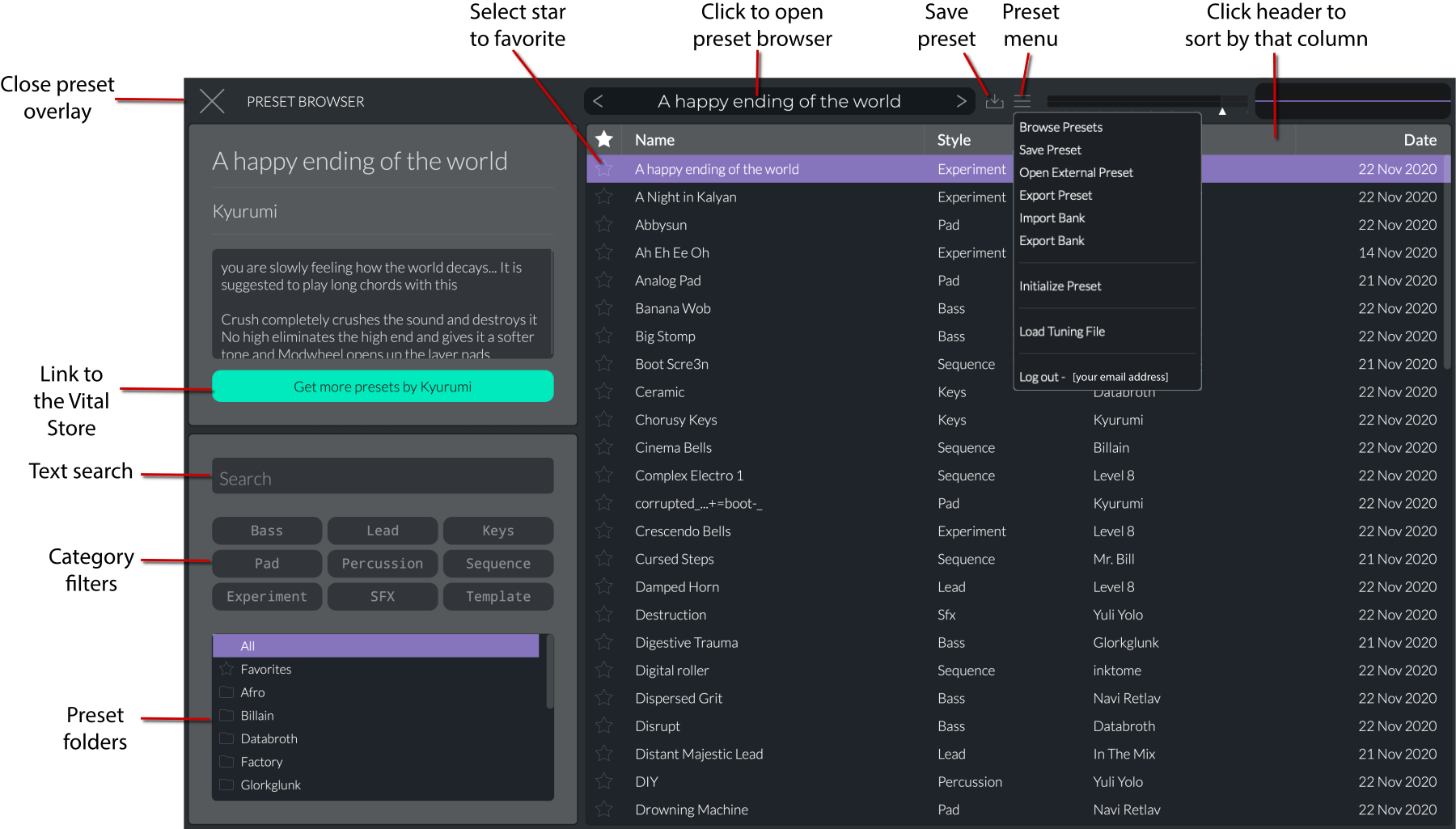
Vital has an extensive preset system which allows you to search by text, category, folder, or favorites as well as save, import, export, and categorize them.
Click on the preset in the header bar to open the preset browser. You can sort the presets by clicking on their column headers. The context menu for the preset browser allows you to open the file location, rename, or delete the preset.
Preset browser and menu
The
Preset menu
has the following options:
Browse Presets
: Opens the preset browser.
Save Preset
: Opens the Save dialog box where you can edit the name, author, and style, as well as add comments.
Open External Preset
: Opens your file browser to load a preset (
.vital
format).
Export Preset
: Opens your file browser to export a preset (
.vital
format).
Import Bank
: Imports a bank of presets (
.vitalbank
format). There are many free banks available, for example:
https://forum.vital.audio/t/february-2021-free-patch-sharing-thread/5074
.
Note that these are ZIP files
. You can rename the extension to
.zip
and extract them as you would any ZIP file. Then you can copy the files to your
Vital
folder under the appropriate subfolders.
Export Bank
: Opens the Export Bank overlay menu. This will display everything that is in your
User
folder. Click the
+
icons to add presets, wavetables, LFOs, and samples to your bank. This will create a ZIP file with the extension
.vitalbank
.
Initialize Preset
: Clears all settings and sets Osc 1 to a saw wave with a simple envelope and LFO.
Load Tuning File
: Loads a tuning file (
.scl
,
.tun
, or
.kbd
format). This allows for different tuning systems besides standard equal temperament. If you don't see these installed on your system, you can download them from the code repository:
https://github.com/mtytel/vital/tree/main/tunings
. Alternatively, you can generate other types of scales at
https://sevish.com/scaleworkshop/?version=2.5.7
and export them as one of the supported file types. Another good resource is
https://www.huygens-fokker.org/scala/
. Once there is a tuning file loaded, you can use this menu to remove it and return to equal temperament.
Log out
: Signs you out of your account
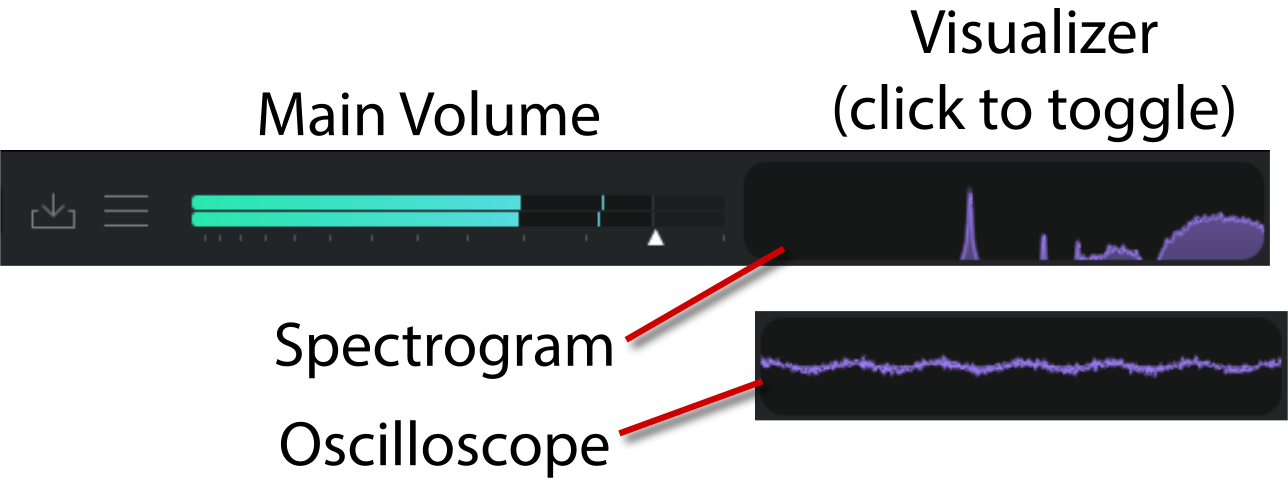
Main volume and visualizer
The main volume control and visualizer are located in the top right corner of the interface. The visualizer can be toggled to show either an oscilloscope or a spectrogram.
V02 | Keyboard controls
Global-Controls-and-Header-Bar.html | documentation and visible configuration; not a new native test
Note settings
Retained observation
Global Voices, Bend, velocity tracking and Spread share a strip with Glide, Slope, Always Glide, Octave Scale and Legato. Record these performance conditions with the patch: inter-note behavior and voice overlap are not wavetable properties. Global Voices is distinct from each oscillator's unison count.
Source SHA-256: 44e1a224d70e44cf2a7d3c5373ecde952052561ba5c588f840a31eb5f64006d0 Image SHA-256: d899ab9ff0fa16df5760da2807fc23c2cfaaa1b65ecc5350400db2555cc6f9a2 Original URL: https://davidmvogel.com/img/vital-images/keyboard-controls.svg
V03 | Header bar
Global-Controls-and-Header-Bar.html | documentation and visible configuration; not a new native test
Header bar
Retained observation
The header distinguishes preset selection, Save, preset menu, master volume and visualizer. A complete instrument is saved here; wavetable editing/export is a different state scope. Keep output level separate from oscillator drive into FX.
Source SHA-256: 44e1a224d70e44cf2a7d3c5373ecde952052561ba5c588f840a31eb5f64006d0 Image SHA-256: 75f30dc1c82c213f30ebfbe6d29d167a1574303192080108d7f2ba7874e4df5d Original URL: https://davidmvogel.com/img/vital-images/header-bar.svg
V04 | System menu
Global-Controls-and-Header-Bar.html | documentation and visible configuration; not a new native test
System menu
Retained observation
The system panel shows version 1.0.7, device, sample rate, buffer and MIDI input settings in the author's standalone session. These are host conditions, not our installed version or current configuration. Use the panel for future live-session provenance without changing it during this review.
Source SHA-256: 44e1a224d70e44cf2a7d3c5373ecde952052561ba5c588f840a31eb5f64006d0 Image SHA-256: befb9318b9bf2da042ac664f2346b725371550417fe345854d510ba7c8478afb Original URL: https://davidmvogel.com/img/vital-images/system-menu.svg
V05 | Four main tabs
Global-Controls-and-Header-Bar.html | documentation and visible configuration; not a new native test
Main tabs
Retained observation
Voice, Effects, Matrix and Advanced appear as peer tabs, with Matrix selected. Retaining a construction requires traversing all relevant tabs; the Voice page alone cannot describe its modulation network or downstream processing.
Source SHA-256: 44e1a224d70e44cf2a7d3c5373ecde952052561ba5c588f840a31eb5f64006d0 Image SHA-256: 16da116aa6372a9c8f50df59cea039608aead8edd18b13c8beb8efb6360a9fc3 Original URL: https://davidmvogel.com/img/vital-images/four-main-tabs.svg
V06 | Preset browser
Global-Controls-and-Header-Bar.html | documentation and visible configuration; not a new native test
Presets
Retained observation
Preset navigation combines name/style/creator/date columns with folders, categories, favorites and search. The menu separates external load, save, preset export and bank operations. This supports retaining named constructions and resource packages without overwriting the original source patch.
Source SHA-256: 44e1a224d70e44cf2a7d3c5373ecde952052561ba5c588f840a31eb5f64006d0 Image SHA-256: 5550c9e1509bd7acdc9f9c07e52edc9737e66014d3ce910fbbd1e0fffea1a2f6 Original URL: https://davidmvogel.com/img/vital-images/preset-browser.svg
V07 | Main volume and visualizer
Global-Controls-and-Header-Bar.html | documentation and visible configuration; not a new native test
Main volume and visualizer
Retained observation
The header visualization toggles between a waveform trace and a frequency plot. The annotation calls the latter a spectrogram, but no time-history axis is shown. Use it for immediate visual feedback, not a saved time-frequency measurement or proof that a transient has disappeared. The master slider is a separate control.
Source SHA-256: 44e1a224d70e44cf2a7d3c5373ecde952052561ba5c588f840a31eb5f64006d0 Image SHA-256: c7ed862387a78f4ff06aa85a445aaafc24aedc4d05d793e4d68aaf07ac099034 Original URL: https://davidmvogel.com/img/vital-images/main-volume-and-visualizer.svg