Offline source reader | preserved content, not new verification
Introduction | David Vogel
Preserved third-party source, not an ORMAN project instruction. Complete extracted article text is followed by every retained figure and its separately labeled project observation. Original files remain unchanged. For PDFs, use the original page images when extracted glyphs are unclear. Linked external audio/video and external repository trees were not part of the retained snapshot.
Vital Software Synthesizer
Vital User Guide
Introduction
Vital User Guide Introduction
Vital is a "spectral warping wavetable synthesizer," meaning it generates sound using
wavetables
and offers advanced tools for manipulating their harmonic content. One of Vital's most distinctive features is its
Wavetable Editor
, which provides a unique and powerful way to shape wavetables.
This guide aims to be a comprehensive resource for learning how to use Vital. It is divided into the following sections:
Global Controls & Header Bar
: Covers global keyboard shortcuts, the header bar, and the preset system.
Modulation
: Covers Vital's modulation capabilities, including the Matrix tab.
Oscillators and Sampler
: Covers the oscillators and sampler found in the Voice tab.
Wavetable Editor
: Covers the Wavetable Editor, which allows you to create and edit wavetables used by the oscillators.
Filters
: Covers the various filters available in the Voice tab.
Envelopes & LFOs
: Covers the Envelopes and Low-Frequency Oscillators (LFOs) in the main UI.
Effects
: Covers the effects chain available in the Effects tab.
Advanced
: Covers the Advanced tab which provides additional global and oscillator settings.
V01 | Vital UI
Intro.html | documentation and visible configuration; not a new native test
Vital User Guide Introduction
Retained observation
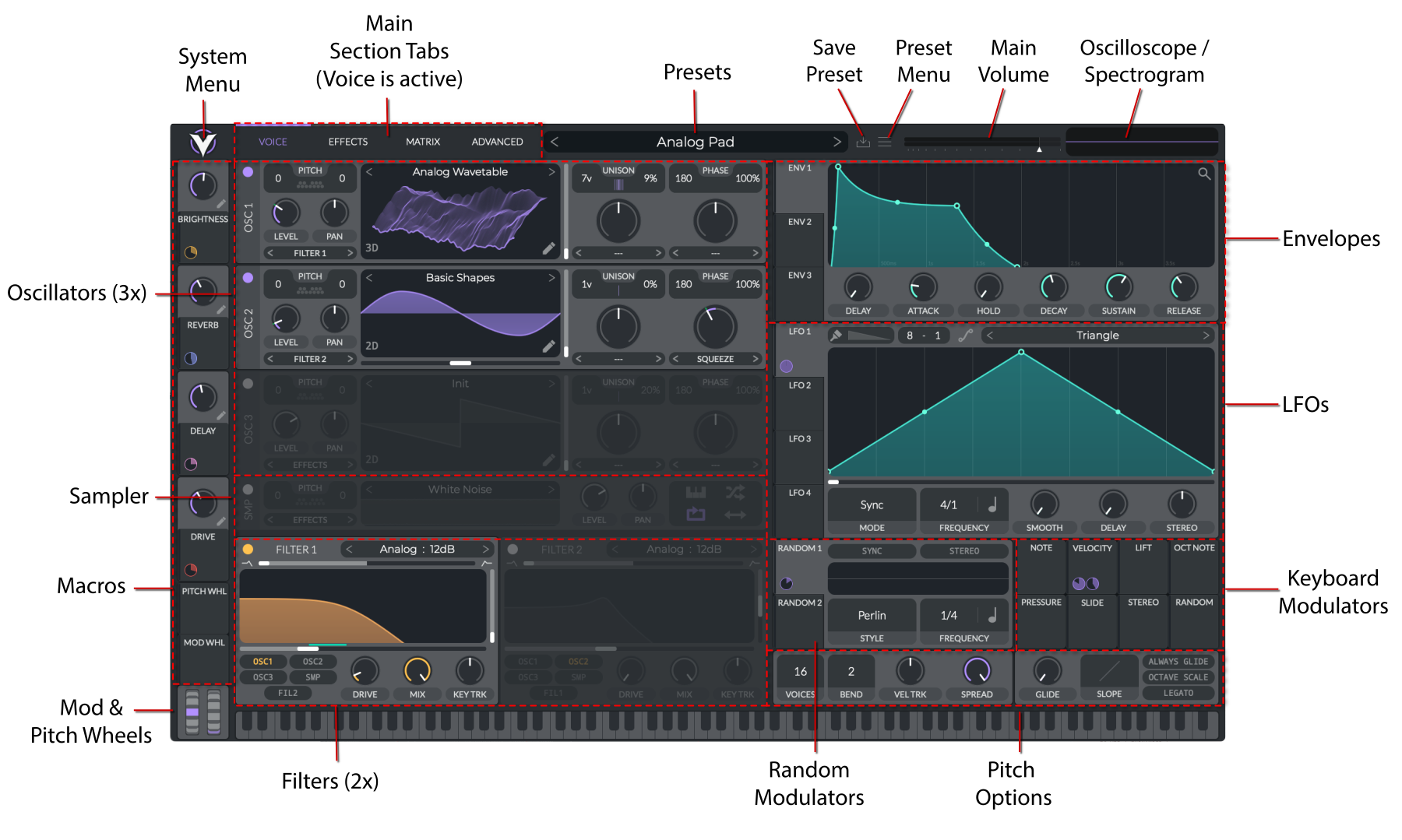
The annotated main UI locates three oscillators, sampler, two voice filters, macros, note/random sources, envelopes and LFOs. This is the complete Voice-page navigation map; Effects, Matrix and Advanced are separate tabs, not absent tools. The example routes different oscillator ingredients through different paths.
Source SHA-256: fad5c488362d5b33a98a561a6e9d888f47717ea352257f4b95b9cede7ff88cd0 Image SHA-256: 5056e40b9d7dec90057092b39a705ef5beb9b2b319ff02cc6d968103cb4dc168 Original URL: https://davidmvogel.com/img/vital-images/vital-main-ui-annotated.svg