Offline source reader | preserved content, not new verification
Modulation | David Vogel
Preserved third-party source, not an ORMAN project instruction. Complete extracted article text is followed by every retained figure and its separately labeled project observation. Original files remain unchanged. For PDFs, use the original page images when extracted glyphs are unclear. Linked external audio/video and external repository trees were not part of the retained snapshot.
Vital Software Synthesizer
Vital User Guide
Modulation
On this page
Modulation
Vital supports extensive modulation capabilities. You can modulate almost any parameter in the synth including using audio-rate modulation. The modulation sources include oscillators, LFOs, envelopes, random modulators, note modulators, and more. You can also drag-and-drop modulation sources onto modulation targets, assign modulators to MIDI controls, and edit the routing in the dedicated
Matrix tab
.
Drag-and-drop modulation
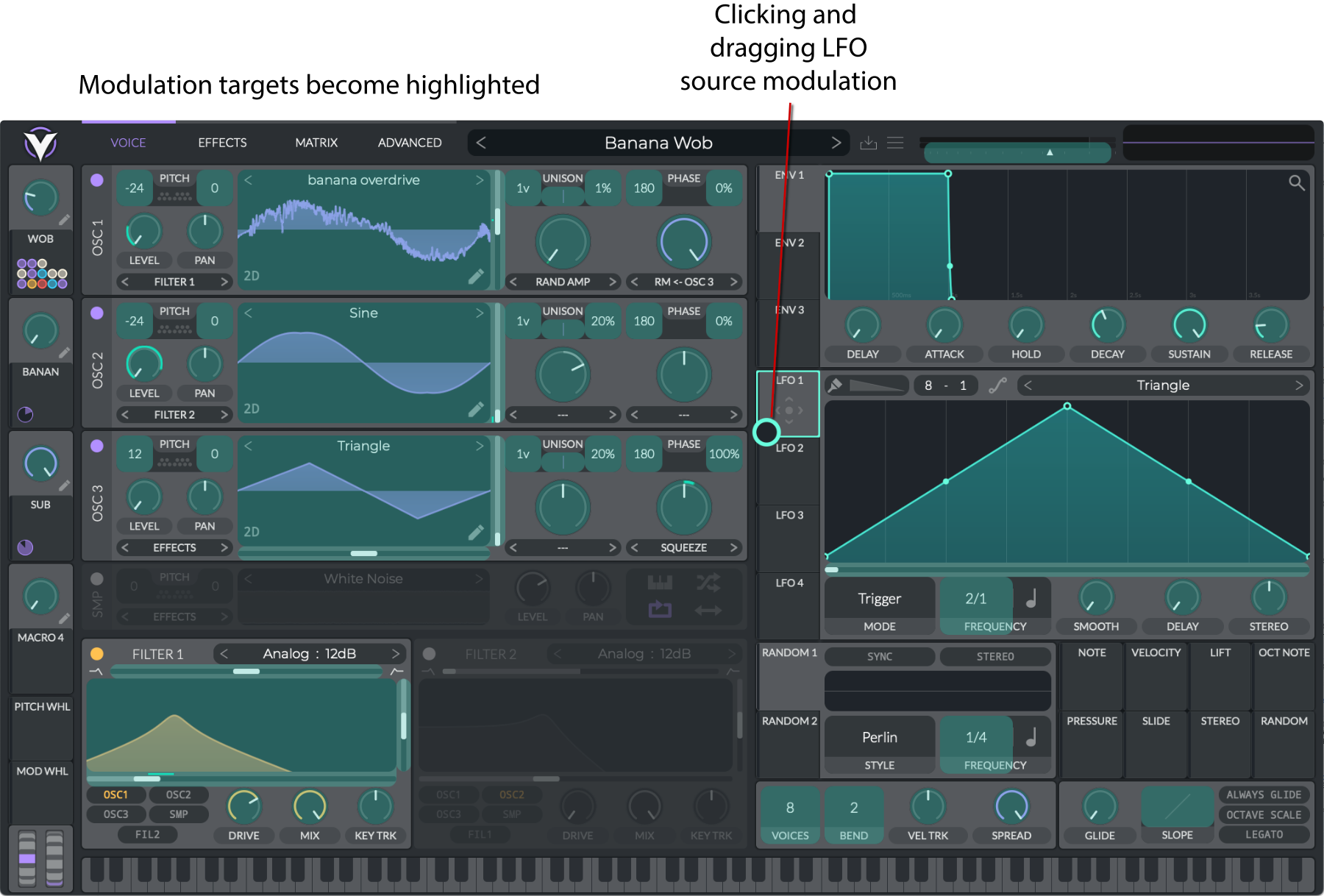
You can drag-and-drop modulation sources onto modulation targets in Vital. The parameters that can be modulated will be highlighted:
When dragging, you can audition the modulation by hovering over the target while playing. The mapping will not occur until you release the mouse.
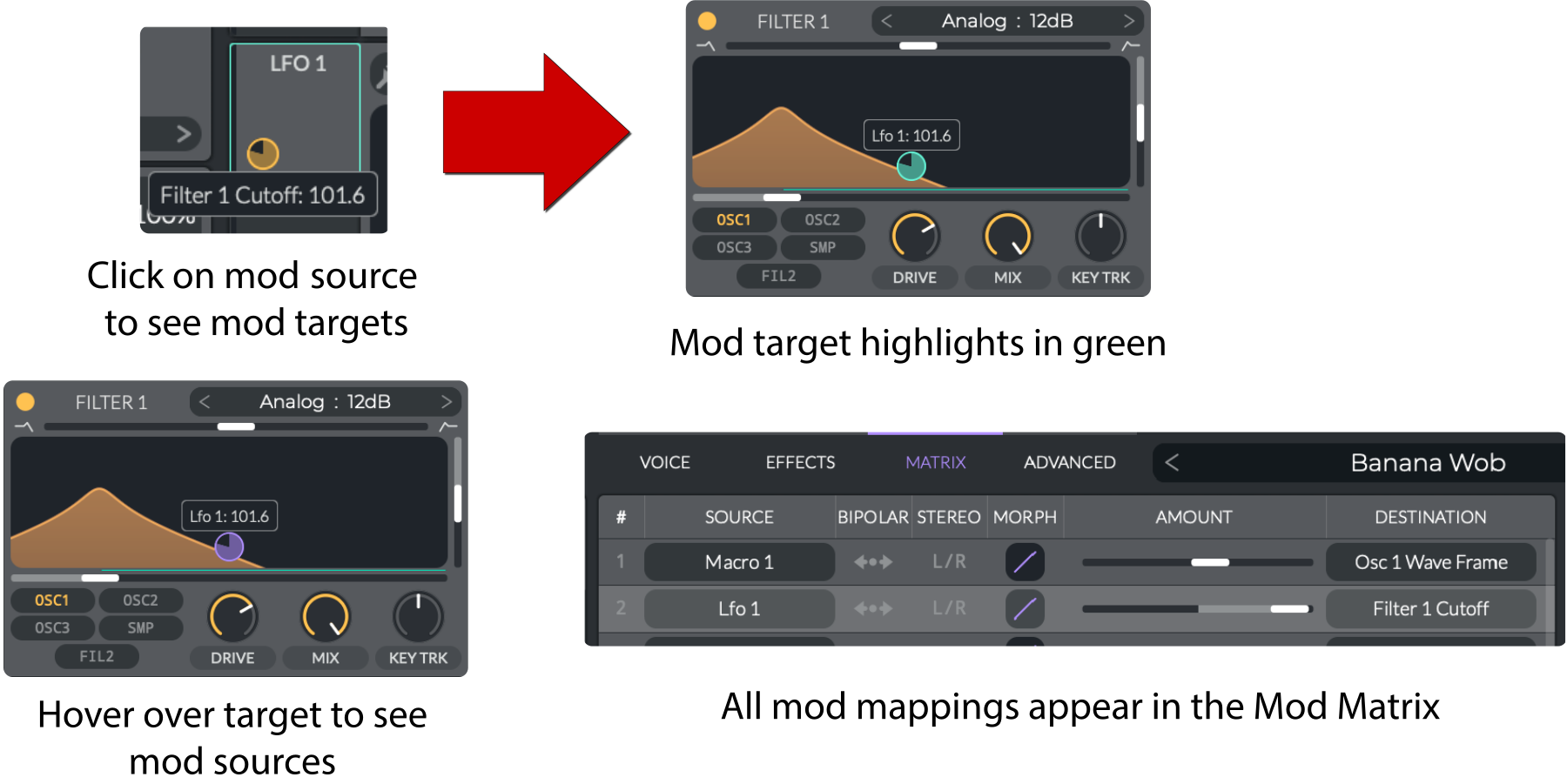
Once a modulation mapping is made, you can click on the source to see the target. If you hover over the target, you will see the source and value. All modulations are shown in the
modulation matrix
. You can adjust the modulation amount as you would a knob.
Modulation matrix
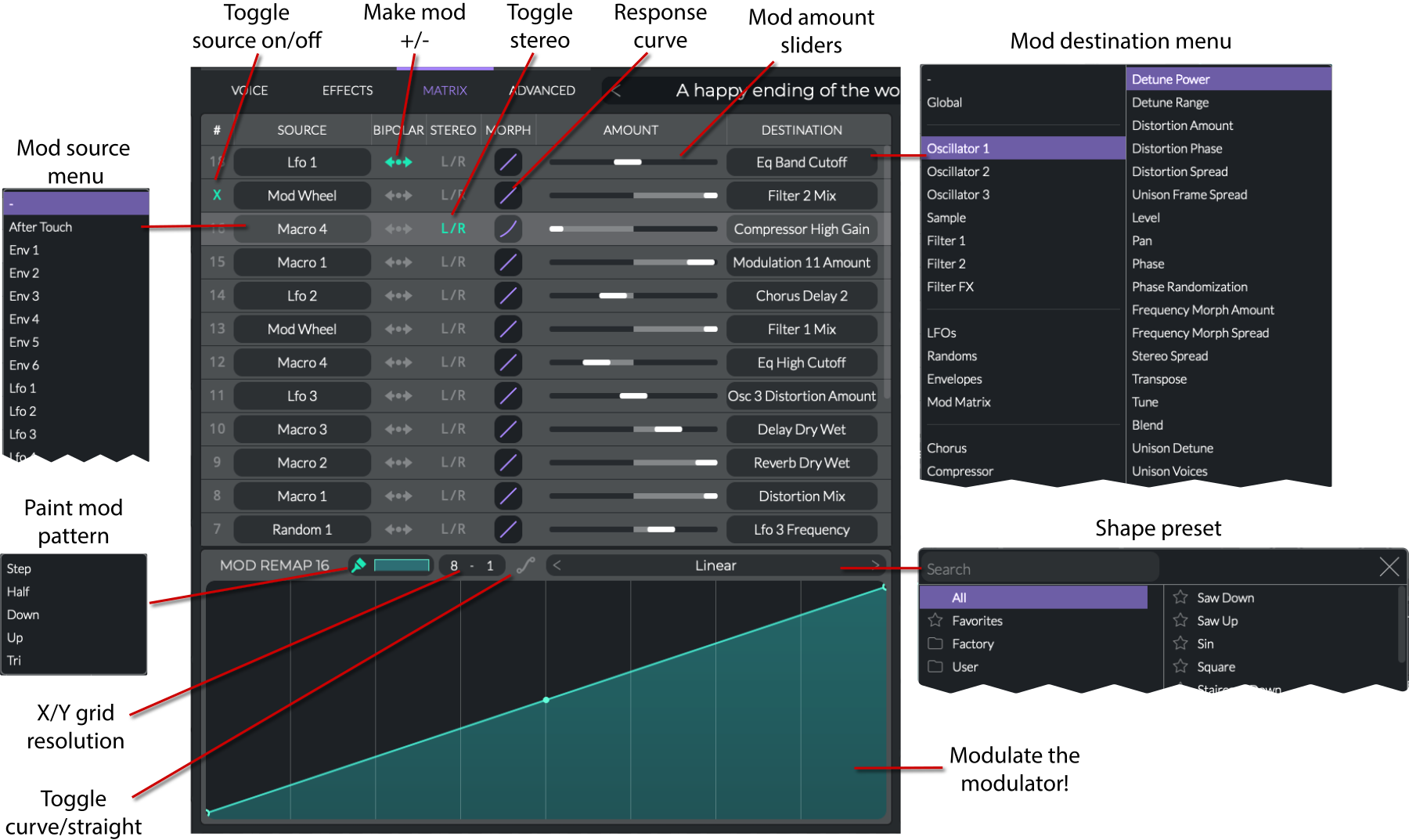
The Matrix tab shows all of the modulation mappings in your preset. It provides options for changing the modulation source and destination via popup menus, toggling the modulation on and off, adjusting the modulation polarity and amount, editing the response curve (linear or logarithmic), and editing the secondary modulation (Mod Remap), which is identical to the
LFO editor
. The context menus allow you to assign MIDI controllers, enter values, and restore default values.
Macros and wheels
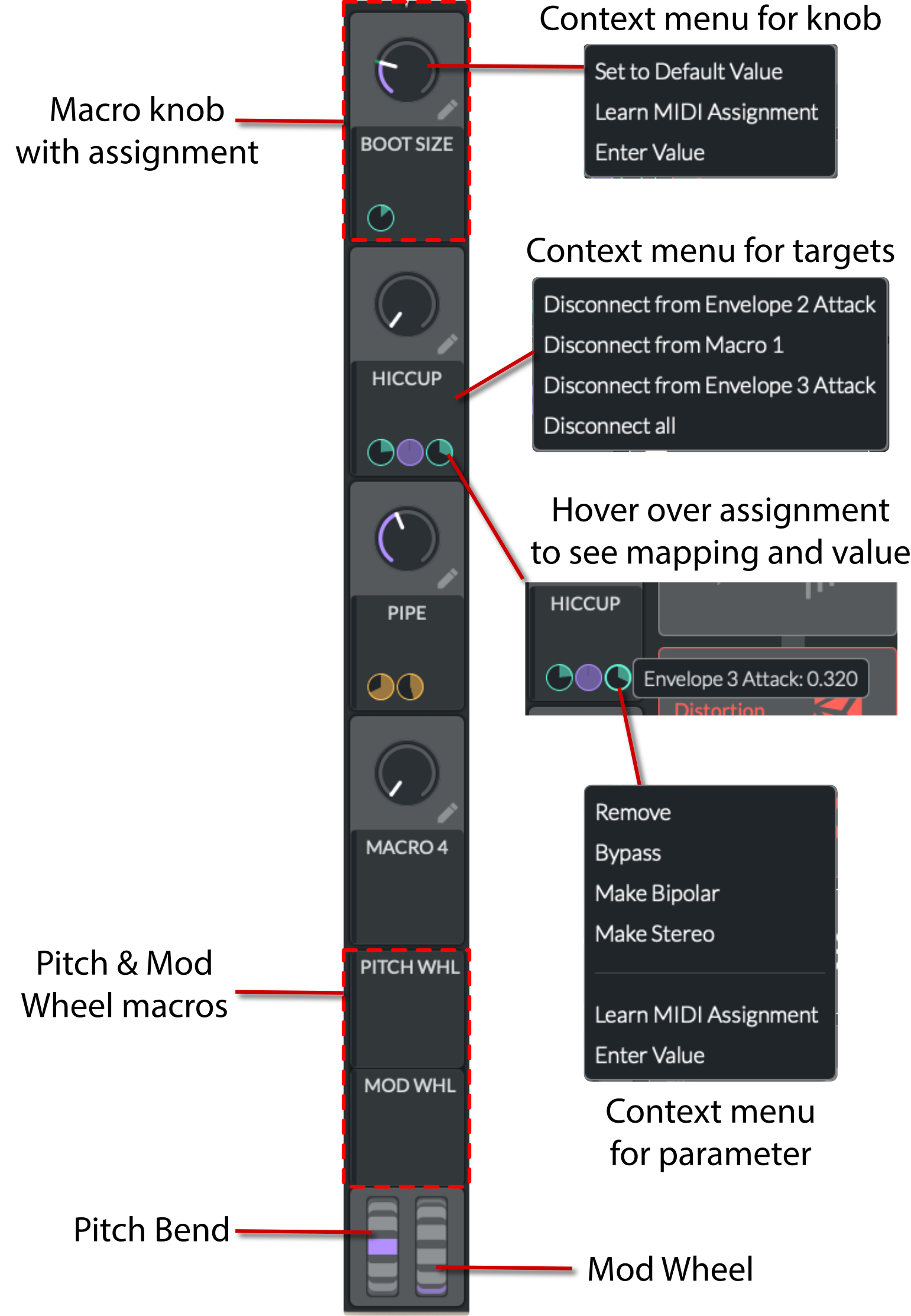
Macros are a way to control various parameters with MIDI-assignable controls. Each macro has an
amount knob
and an
assignable display area
below it for mappings. You can assign a macro to any eligible parameter by dragging the display area to the parameter.
Context menu for macro knobs
Set to Default Value
: Resets the parameter to its default value.
Learn MIDI Assignment
: Move a MIDI controller to assign it to the parameter.
Enter Value
: Manually enter a value.
Context menu for targets
Disconnect from [target]
: Removes the modulation mapping.
Disconnect All
: Removes all modulation mappings.
Context menu for parameter
Remove
: Removes the parameter from the macro.
Bypass
: Bypasses the parameter without removing it from the macro.
Make Bipolar
: Allows the macro to modulate the parameter in both directions.
Make Stereo
: Allows the macro to modulate the parameter in both channels, L/R.
Learn MIDI Assignment
: Move a MIDI controller to assign it to the parameter.
Enter Value
: Manually enter a value.
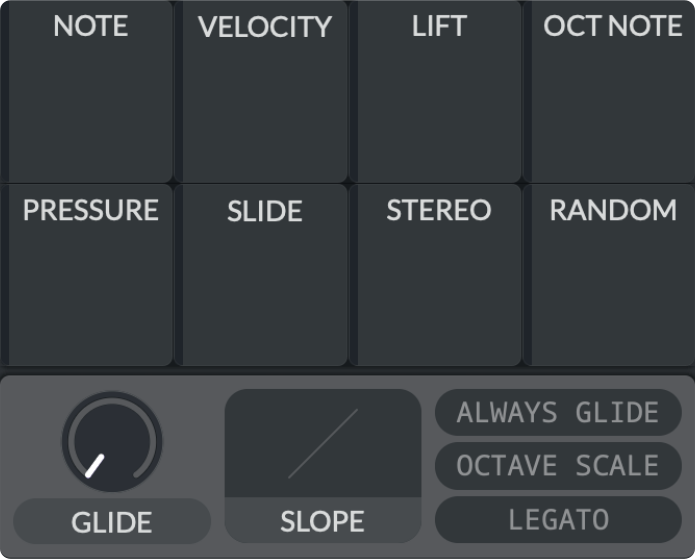
Note modulators
The note modulators can be found towards the bottom right of the UI. They modulate the sound based on the key played.
Note
: Modulates the parameter based on the note played. The higher the note, the higher the modulation.
Velocity
: Modulates the parameter based on the velocity of the note played.
Lift
: Modulates the parameter once the key is released.
Oct Note
: Similar to
Note
, but the amount of modulation resets every octave.
Pressure
: Modulates the parameter based on the pressure applied to the key, also known as
aftertouch
.
Slide
: This is an MPE (MIDI Polyphonic Expression) control that modulates a parameter based on sliding up and down a key.
Stereo
: Modulates the stereo spread based on the note played.
Random
: Modulates the parameter randomly each time a note is played.
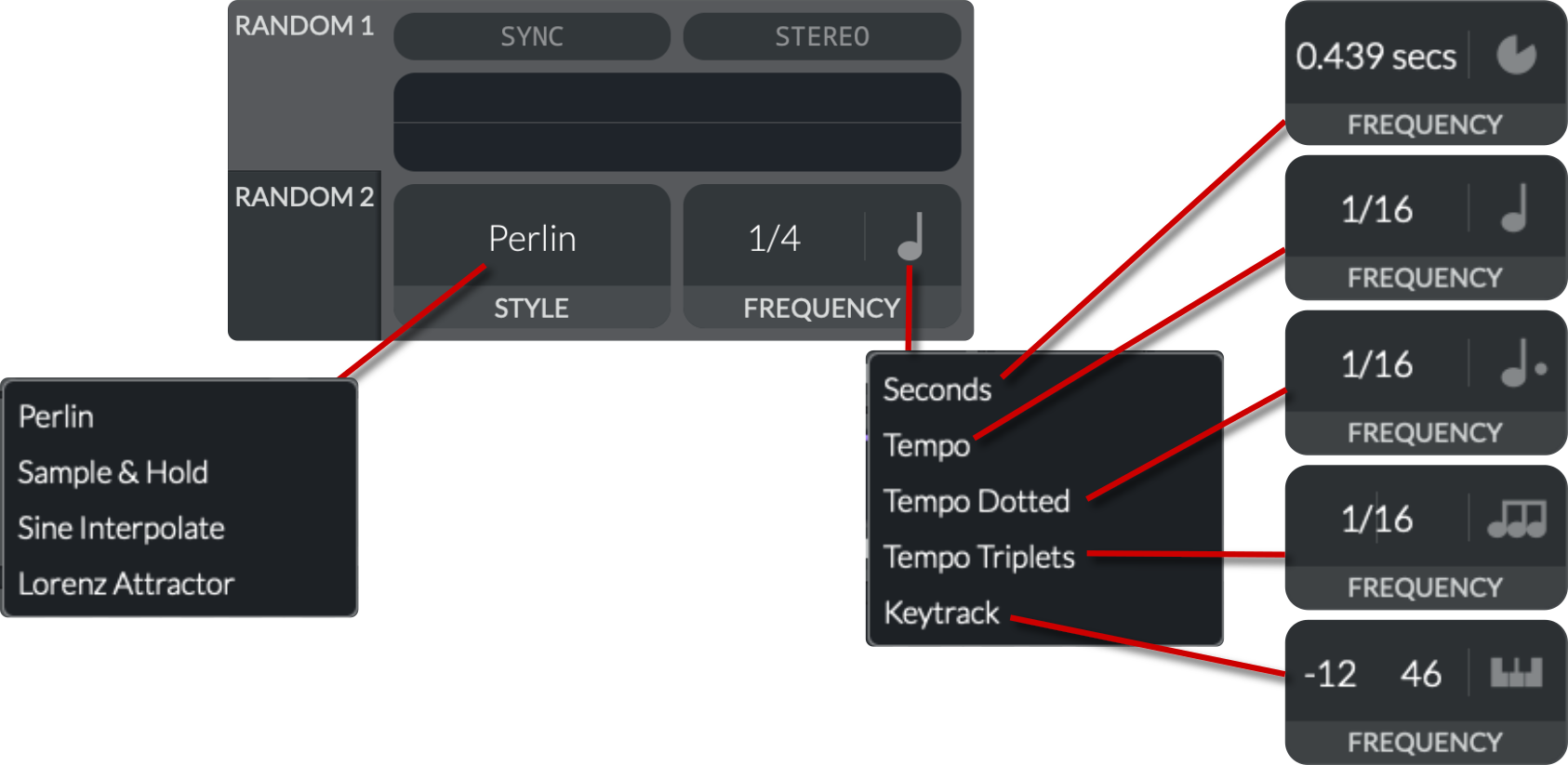
Random modulators
This set of modulators can be found towards the bottom right of the UI. They use a random LFO to generate signals:
Sync
: When enabled, it locks to the host's timeline.
Stereo
: Toggles between mono and stereo modes. In stereo mode, each channel gets a separately generated random signal.
Style
: Selects the random waveform:
Perlin
:
Smooth "noise"
that interpolates gradually between random values.
Sample & Hold
: Stepped random values that jump to new values on each cycle.
Sine Interpolate
: Uses sinusoidal interpolation between random points for a smoother, wave-like feel.
Lorenz Attractor
: Generates chaotic waveforms via the
Lorenz system
, creating a swirling, fractal-like motion.
Frequency
: There are two settings here that change depending on what type of sync is selected:
Seconds
(
0.001 to 128.0 Hz
): LFO repeats every X seconds.
Tempo
(
Freeze, 32/1 to 1/64
): Sets the speed in musical subdivisions of the host's BPM. Choosing "Freeze" stops the LFO.
Tempo Dotted
(
Freeze, 32/1 to 1/64
): Sets the speed in dotted musical subdivisions of the host's BPM.
Tempo Triplets
(
Freeze, 32/1 to 1/64
): Sets the speed in triplet musical subdivisions of the host's BPM.
Keytrack
: Modulates the frequency based on the pitch played.
Transpose
(
-60 to 36 semitones
): Shifts the pitch of the keytracking by a certain number of semitones. It changes the reference pitch for the keytracking, allowing you to adjust the base pitch up or down.
Tune
(
-100 to 100 cents
): Fine-tunes the pitch in cents (1/100th of a semitone).
V08 | Drag-and-drop modulation
Modulation.html | documentation and visible configuration; not a new native test
Drag-and-drop modulation
Retained observation
Dragging LFO1 highlights many eligible targets, including oscillator, filter, envelope, macro and timing controls. Modulation is not limited to frame position. The example also contains an RM dependency in the oscillator section; target highlighting and audio-rate oscillator dependencies are different mechanisms.
Source SHA-256: be591fe81e50e3a17cf3ce8a8db2f2e12466ce5b2de76a85554f63ce905d5a1d Image SHA-256: 989661b6ff87f333d63c0e896007b92eba8fec40e0599be033e6812f369ac178 Original URL: https://davidmvogel.com/img/vital-images/drag-and-drop-modulation.svg
V09 | Mod source and target highlighting
Modulation.html | documentation and visible configuration; not a new native test
Drag-and-drop modulation
Retained observation
Clicking a source highlights its targets; hovering a target exposes contributing sources, and the same assignments appear as matrix rows. Use all three views to recover the actual graph after edits. The example separates Macro1->OSC1 frame from LFO1->Filter1 cutoff rather than treating both as one timbral motion.
Source SHA-256: be591fe81e50e3a17cf3ce8a8db2f2e12466ce5b2de76a85554f63ce905d5a1d Image SHA-256: 9d69c76400d9eb6d4358b9b2e36db3e03d38c6b90bf64d2be28d95bca6653ca6 Original URL: https://davidmvogel.com/img/vital-images/mod-source-target-highlighting.svg
V10 | Matrix tab with source and destination menus
Modulation.html | documentation and visible configuration; not a new native test
Modulation matrix
Retained observation
The annotated matrix explicitly includes Macro1->Modulation11 Amount and Random1->LFO3 Frequency beside oscillator, filter, EQ, compressor and FX mappings. Connection enable, polarity, stereo, Morph, amount and remap each have controls. The destination menu includes Mod Matrix itself: nested control can shape how another source acts, not just add a parallel modulation signal.
Source SHA-256: be591fe81e50e3a17cf3ce8a8db2f2e12466ce5b2de76a85554f63ce905d5a1d Image SHA-256: 14f5f124e568892f42dae16a01d53428e2939ceb0b9bfa4e152cca92179ac120 Original URL: https://davidmvogel.com/img/vital-images/mod-matrix-annotated.svg
V11 | Macros
Modulation.html | documentation and visible configuration; not a new native test
Macros and wheels
Retained observation
A macro's target menu lists Envelope2 Attack, Macro1 and Envelope3 Attack. Macros can coordinate generator timing and other macros, not only FX mix. Per-connection context menus preserve Remove versus Bypass, bipolar/stereo and exact-value entry. Save the graph and mapping ranges, not just macro positions.
Source SHA-256: be591fe81e50e3a17cf3ce8a8db2f2e12466ce5b2de76a85554f63ce905d5a1d Image SHA-256: ef3eb914060d59bec626e3e593da038c062ebee0c4fe2d0be00d1560cc6b848f Original URL: https://davidmvogel.com/img/vital-images/macros.svg
V12 | Note modulators
Modulation.html | documentation and visible configuration; not a new native test
Note modulators
Retained observation
Eight note-related tiles separate Note, Velocity, Lift, Oct Note, Pressure, Slide, Stereo and Random. Use the appropriate input domain for register, strike, release or expressive behavior. The neighboring Glide controls affect transitions between notes and should not be inferred from an isolated-note envelope alone.
Source SHA-256: be591fe81e50e3a17cf3ce8a8db2f2e12466ce5b2de76a85554f63ce905d5a1d Image SHA-256: 6b52869fbb1e97b053a3944b4352cea12ecf8dd9640bdc5e1a4e6db6ccfd8441 Original URL: https://davidmvogel.com/img/vital-images/note-modulators.svg
V13 | Random modulators
Modulation.html | documentation and visible configuration; not a new native test
Random modulators
Retained observation
The random-style menu includes Perlin, Sample & Hold, Sine Interpolate and Lorenz Attractor. Rate can be seconds, straight/dotted/triplet tempo or keytrack, with separate Sync and Stereo. Retain style, rate domain and reset/channel behavior; randomness can be a structured evolving source, not merely per-note detune.
Source SHA-256: be591fe81e50e3a17cf3ce8a8db2f2e12466ce5b2de76a85554f63ce905d5a1d Image SHA-256: b54bb7b94b53a5e6a4cf2511af12549246e12a8288ed54398b210973c392b5d3 Original URL: https://davidmvogel.com/img/vital-images/random-modulators.svg