Offline source reader | preserved content, not new verification
Oscillators & Sampler | David Vogel
Preserved third-party source, not an ORMAN project instruction. Complete extracted article text is followed by every retained figure and its separately labeled project observation. Original files remain unchanged. For PDFs, use the original page images when extracted glyphs are unclear. Linked external audio/video and external repository trees were not part of the retained snapshot.
Vital Software Synthesizer
Vital User Guide
Oscillators & Sampler
On this page
Oscillators & Sampler
There are three oscillators and one
sampler
module in Vital which appear on the Voice tab. These can be routed to the filters, effects, or directly to the main output. Additionally, they can modulate each other using Frequency Modulation or Ring Modulation.
Oscillators
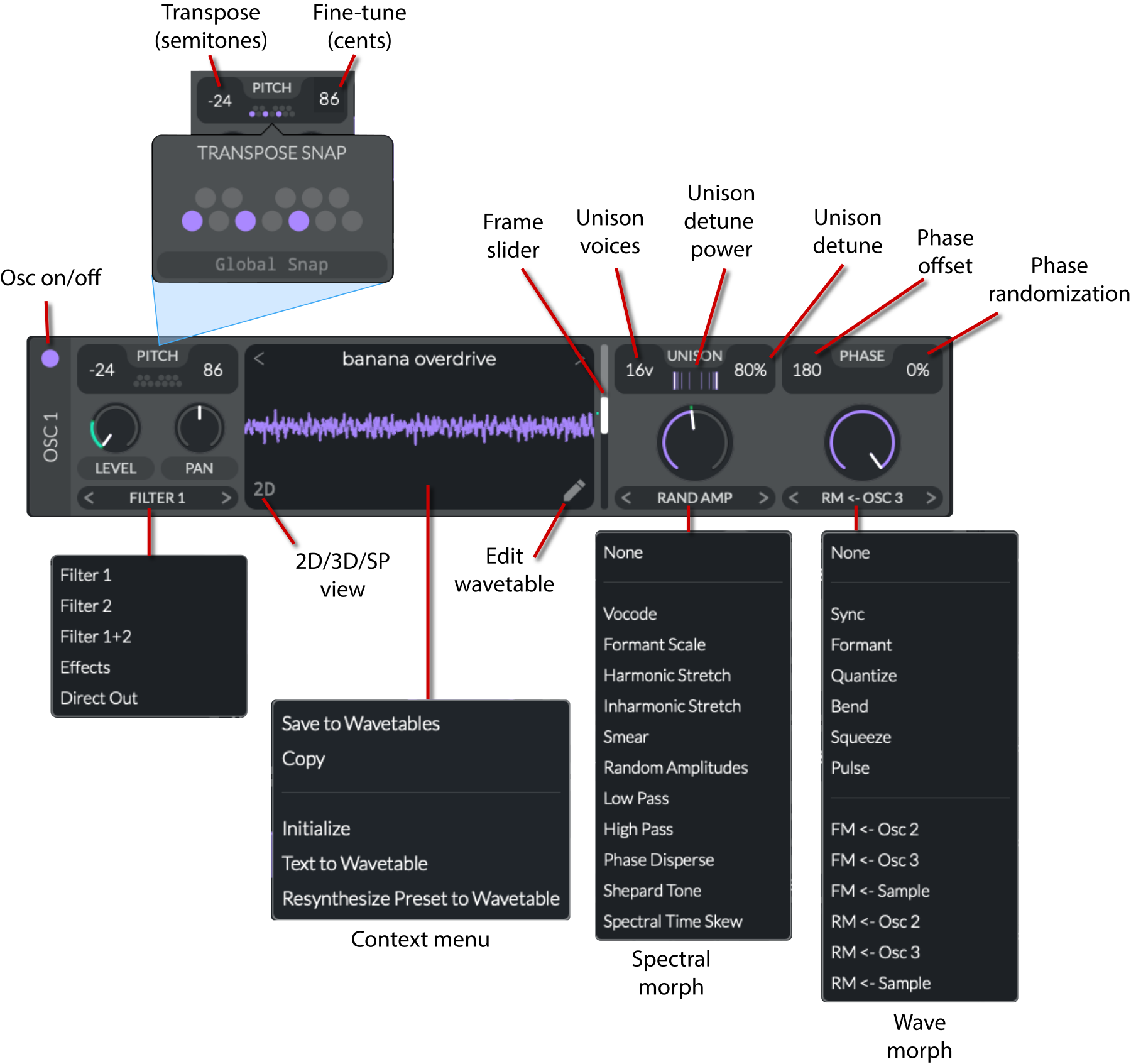
The oscillators support single waves, wavetables, and samples, as well as LFO waveforms that can be copied and pasted. from the LFO editor. There are a wide variety of controls for shaping the sound of the oscillators, including an extensive set of spectral morphing and wave morphing options. To edit the waveforms, you can open the
Wavetable Editor
by clicking on the pencil icon in the oscillator's waveform display.
Each oscillator has the same set of controls and a power button at the upper-left to activate or deactivate it.
Pitch, level, pan, and routing
Pitch
: Controls for the pitch of the oscillator.
Transpose
(
-48 to 48 semitones
): Transpose the oscillator by semitones.
Tune
(
-100 to 100 cents
): Fine-tune the oscillator in cents (1/100th of a semitone).
Transpose Snap
: Restricts the transposition to notes on the grid which is laid out like the octave of a piano. If
Global Snap
is enabled, you can only play notes on the grid.
Level
(
0 to 1
): Sets the volume of the oscillator.
Pan
(
-100% to 100%
): Adjusts the stereo position.
Oscillator routing
:
Filter 1
/
Filter 2
/
Filter 1+2
: Sends audio to one or both filters.
Effects
: Routes directly to the effects section.
Direct Out
: Skips filtering/effects and goes to main out.
Waveform display
You can drag-and-drop samples from your system onto the waveform display to load them. This is described in the
Audio file source
section of the
Wavetable Editor
.
Preset
: Click on the name of the wavetable to choose a preset waveform.
2D/3D/SP
: Toggles between 2D, 3D, and Spectrogram views of the waveform. In 3D mode, you can see the full wavetable. The highlighted waveform is the one currently being played.
Pencil Icon
: Opens the
Wavetable Editor
for the oscillator.
Frame Slider
: Slider to select the frame of the wavetable.
Context menu
:
Save to Wavetables
: Saves the current waveform to the wavetable library.
Copy
: Copies the oscillator's wavetable.
Paste
: Pastes the copied wavetable to the oscillator. You can also copy-paste from the
LFO editor
or the
Mod Remap in the Matrix tab
into the wavetable display, but not vice versa.
Initialize
: Sets the oscillator to a simple saw wave.
Text to Wavetable
: Converts text you type into a wavetable.
Resynthesize Preset to Wavetable
: Converts all of the settings from the preset into a wavetable and pastes it into the current oscillator.
Unison and phase
Note that there are
additional unison settings in the Advanced tab
.
Voices
(
1 to 16
): Number of simultaneously stacked voices.
Detune Power
(
-5 to 5
): Controls the scaling and distribution of the detuning, affecting the perceived width and intensity of the detune effect.
Detune
(
0 to 100%
): Controls the amount of detuning between the voices in the unison.
Phase
: Phase is the starting point of the waveform cycle.
Phase
: Sets the phase of the oscillator.
Randomization
: Adds random phase adjustments to the oscillator which vary the timbre.
Morphing
Spectral Morph
: Note that there is an additional control called
Spect Spread
that is available in the
Advanced tab
.
Vocode
: Applies a vocoder-like filter to partials for unique vowel or formant textures.
Formant Scale
: Shifts partial center frequencies up/down, changing the oscillator's tonal character.
Harmonic Stretch
: Stretches or compresses harmonic spacing, broadening or tightening overtones.
Inharmonic Stretch
: Distorts harmonic spacing to create metallic or bell-like tones.
Smear
: Blurs partial boundaries for softer, diffuse timbres.
Random Amplitudes
: Randomizes partial levels for a noisy, evolving sound.
Low Pass / High Pass
: Attenuates higher or lower partials to shape brightness.
Phase Disperse
: Shifts partial phases, adding a swirling characteristic.
Shepard Tone
: Loops partials so the pitch can continuously rise/fall, creating the "endless gliss" illusion.
Spectral Time Skew
: Skews partials in time, yielding various phase-based effects.
Wave Morph
:
Sync
: Classic hard-sync style morph that restarts the wave cycle within each period.
Formant
: Shifts partial positions while preserving perceived pitch center.
Quantize
: Stepped wave shaping or partial quantization for bitcrush-like sounds.
Bend
: Warps the wave shape for asymmetrical or symmetrical distortions.
Squeeze
: Compresses or expands the waveform horizontally for timbral shifts.
Pulse
: Adjusts the wave's duty cycle to create a pulse or square-like sound.
FM / RM <- Osc[1/2/3]
: Frequency or ring modulation from other oscillators.
FM / RM <- Sample
: Frequency or ring modulation from the
sampler
.
Sampler
The sampler module in Vital allows you to load and manipulate single samples. Unlike the oscillators, it does not provide an editor and has rather limited functionality.
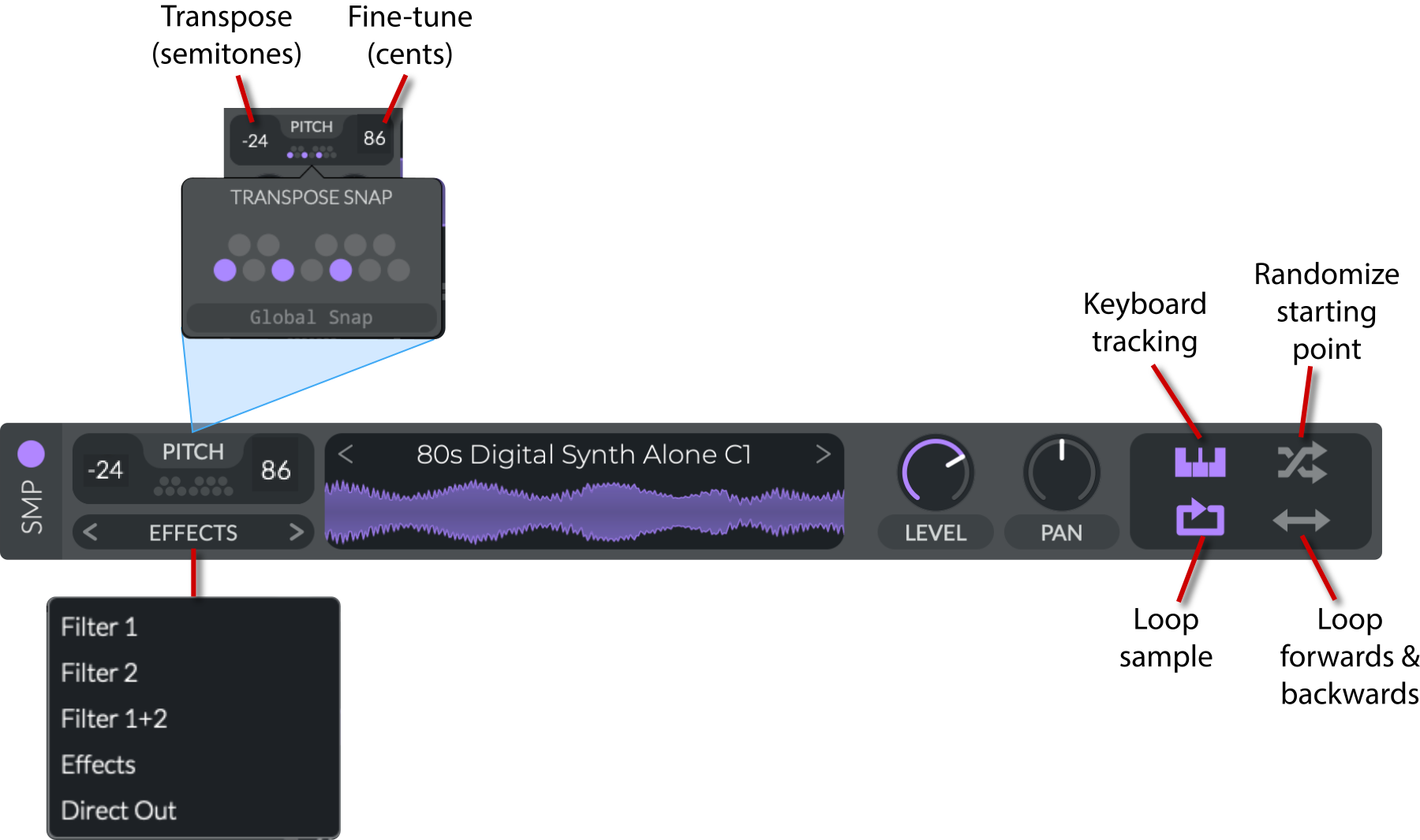
The sampler has the following controls:
Power Button
: Turns the sampler on/off.
Pitch
: Controls for the pitch of the sampler.
Transpose
(
-48 to 48 semitones
): Transpose the sampler by semitones.
Tune
(
-100 to 100 cents
): Fine-tune the sampler in cents (1/100th of a semitone).
Transpose Snap
: Restricts the transposition to notes on the grid, which is laid out like the octave of a piano. If
Global Snap
is enabled, you can only play notes on the grid.
Sampler routing
:
Filter 1
/
Filter 2
/
Filter 1+2
: Sends audio to one or both filters.
Effects
: Routes directly to the effects section.
Direct Out
: Skips filtering/effects and goes to main out.
Waveform Display
: Shows the waveform of the Sampler.
Preset
: Click on the name of the sample to choose a preset waveform.
You can also drag-and-drop samples from your system onto the waveform display to load them.
Level
(
0 to 1
): Sets the volume of the sampler.
Pan
(
-100% to 100%
): Adjusts the stereo position.
Keyboard tracking
(
on/off
): If on, scales the pitch of the sample based on the note played. If off, the sample will always play at its original pitch.
Randomize start
(
on/off
): Randomizes the start position of the sample.
Loop
(
on/off
): Enables looping of the sample.
Loop forwards & backwards
(
on/off
): The sample will loop backwards, then forwards repeatedly.
V14 | Oscillator
Oscillators-and-Sampler.html | documentation and visible configuration; not a new native test
Oscillators
Retained observation
The oscillator diagram separately labels unison count, detune power/distribution, amount, phase and randomization. Spectral modes include Vocode, Formant Scale, harmonic/inharmonic stretch, Smear, random amplitudes, LP/HP, phase dispersion, Shepard Tone and spectral time skew. Wave modes include Sync, Formant, Quantize, Bend, Squeeze, Pulse and FM/RM from other oscillators or Sample. These can operate on simple resources and be modulated independently; direct output and separate filter destinations are visible alternatives to a duplicated L/R construction.
Source SHA-256: 2e2e23a7d2fde066ab9639ebd17cb5329c7fd3d49781bec8b560d108edf64f44 Image SHA-256: 08ef2ba200b52fac2819b79e9f8ff02d4ffd17ca892df546b25dba7f7f3bf818 Original URL: https://davidmvogel.com/img/vital-images/oscillator-annotated.svg
V15 | Sampler
Oscillators-and-Sampler.html | documentation and visible configuration; not a new native test
Sampler
Retained observation
Sample playback separates pitch/snap, output destination, level/pan, keytracking, random starting point, loop and forward/backward loop. A sample may feed filters, effects or Direct Out. Preserve these switches with its amplitude modulation; they determine whether the same resource behaves as onset, pitched layer or bed.
Source SHA-256: 2e2e23a7d2fde066ab9639ebd17cb5329c7fd3d49781bec8b560d108edf64f44 Image SHA-256: 3508959e5ce0c90ec8e3ccfa3c06ba4a394abb017c4bff168584e1ed97715e48 Original URL: https://davidmvogel.com/img/vital-images/sampler.svg