Vital Synth Guide: 9 Tips to Get the Most out of It 🔥
Preserved third-party source, not an ORMAN project instruction. Complete extracted article text is followed by every retained figure and its separately labeled project observation. Original files remain unchanged. For PDFs, use the original page images when extracted glyphs are unclear. Linked external audio/video and external repository trees were not part of the retained snapshot.
Unchanged original document | Complete extracted text
T01 | Vital synth pricing options on website
download (1).html | documentation and visible configuration; not a new native test

Retained observation
The pricing table is a historical screenshot of Basic, Plus, Pro and subscription offers, not current pricing or a reason to purchase anything. It belongs to the source's access context, not its synthesis instructions. Nothing was purchased or installed during this review.
Source SHA-256: 848972af53919d9c9217e858e108c903c62c05e80e464949d1f8325b229da29d
Image SHA-256: 80478153e8904481dc3a6a4314f130b55f6f062accf6abb0e9a3323b77749f78
Original URL: https://www.edmprod.com/wp-content/uploads/2022/02/Screen-Shot-2022-02-10-at-11.18.09-am-1024x655.png
T02 | The Vital synth interface
download (1).html | documentation and visible configuration; not a new native test
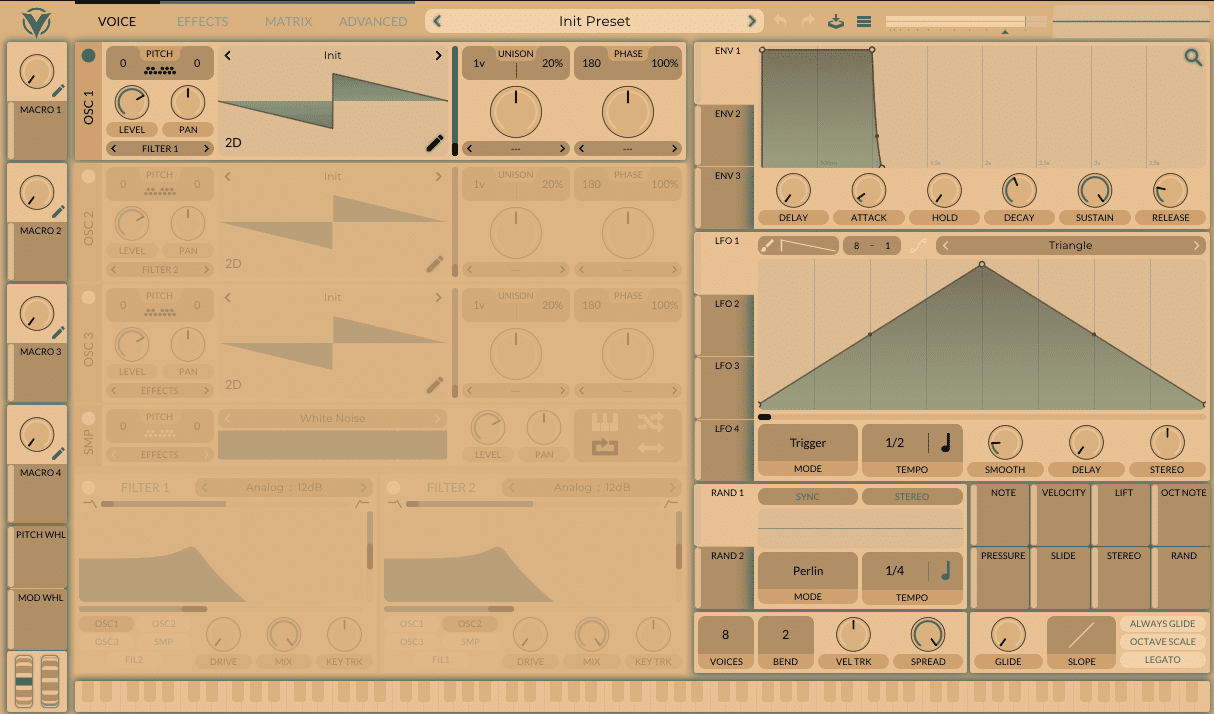
Retained observation
A themed full INIT view retains the oscillator/filter, macro, envelope, LFO and global-control regions. Colors and styling can change without changing these functional roles. Identify controls by labels and layout rather than a fixed color-recognition rule.
Source SHA-256: 848972af53919d9c9217e858e108c903c62c05e80e464949d1f8325b229da29d
Image SHA-256: e0cf553da4179b4cc5ad8826b470a941e02d7916fa9434f5a654a09f47d6ca49
Original URL: https://www.edmprod.com/wp-content/uploads/2024/03/image.png
T03 | Vital synth components
download (1).html | documentation and visible configuration; not a new native test
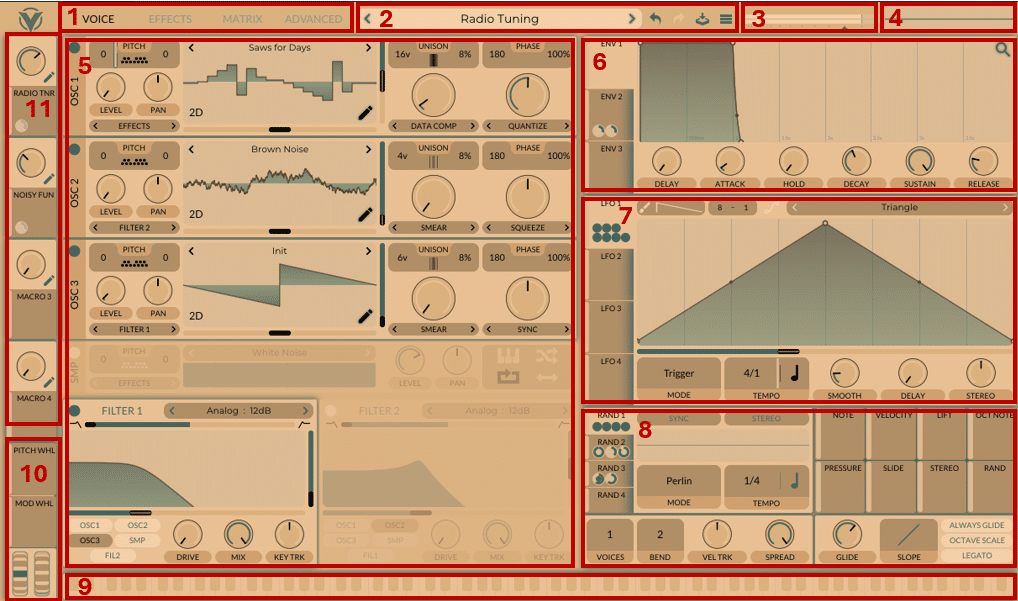
Retained observation
The numbered component map uses an actual Radio Tuning patch with different source resources, morph operations, destinations and voice counts. The overview is not an instruction to duplicate one resource into left/right oscillators. Retain source roles, modulation indicators and routing when interpreting a full patch; global polyphony and per-oscillator unison are separate quantities.
Source SHA-256: 848972af53919d9c9217e858e108c903c62c05e80e464949d1f8325b229da29d
Image SHA-256: 0e853759ee5fad0e5d9d4ffa4a6c304299b0b2046d6a995efa5f75b7a289de6d
Original URL: https://www.edmprod.com/wp-content/uploads/2024/03/image-1.png
T04 | Vital's oscillators and filters
download (1).html | documentation and visible configuration; not a new native test
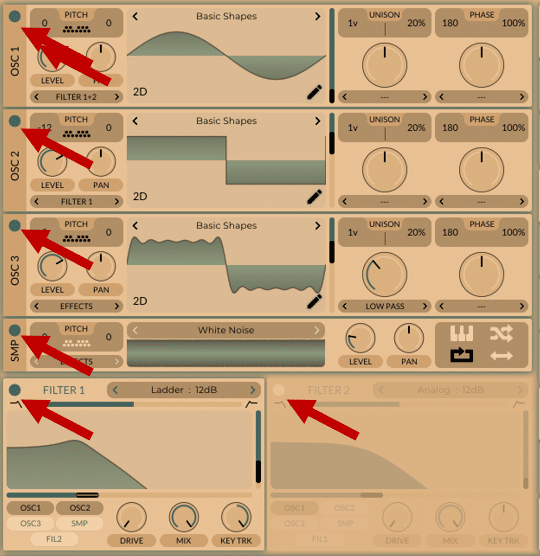
Retained observation
Arrows identify the power buttons of oscillators, sampler and filters, distinct from their level controls. Different oscillator destinations are visible: Filter1+2, Filter1 and Effects. A powered-off source, a silent audible level and a source routed around a filter have different consequences.
Source SHA-256: 848972af53919d9c9217e858e108c903c62c05e80e464949d1f8325b229da29d
Image SHA-256: dad7de4c64e46b61da78a31fc8f86c1db83e66420aa41e6068939f2acf661c07
Original URL: https://www.edmprod.com/wp-content/uploads/2024/03/image-2.png
T05 | Vital synth oscillators
download (1).html | documentation and visible configuration; not a new native test
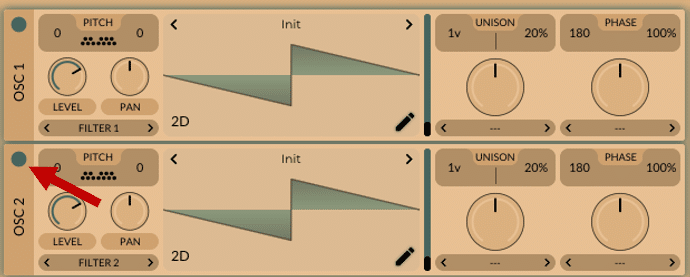
Retained observation
The oscillator-enable example contains two Init resources with separate Filter1 and Filter2 destinations. Resource equality does not imply identical processing or a stereo-pair purpose. Preserve destination, pitch, phase and modulation as part of each oscillator's identity.
Source SHA-256: 848972af53919d9c9217e858e108c903c62c05e80e464949d1f8325b229da29d
Image SHA-256: f86af3d538ec385d625b3ab6ea5e120d98396855556e221e92ce9f804cd76e15
Original URL: https://www.edmprod.com/wp-content/uploads/2024/03/image-3.png
T06 | Vital synth wavetable presets
download (1).html | documentation and visible configuration; not a new native test
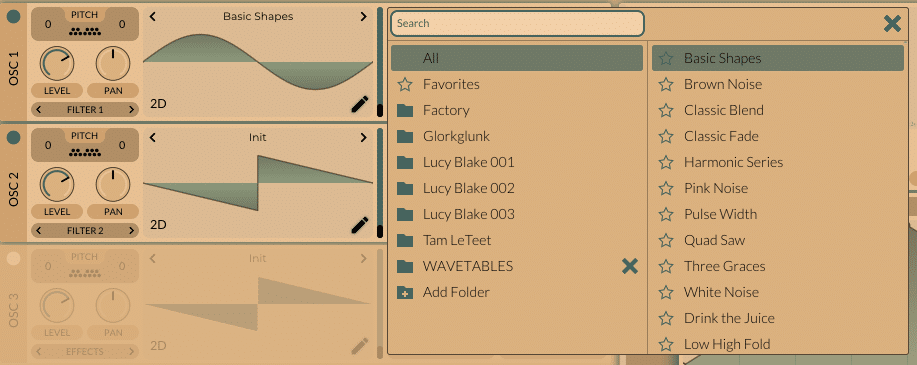
Retained observation
The wavetable browser provides resource folders, search and favorites. Choosing a resource is distinct from choosing an entire preset: the oscillator's processing, modulation and downstream graph remain separate construction state.
Source SHA-256: 848972af53919d9c9217e858e108c903c62c05e80e464949d1f8325b229da29d
Image SHA-256: fca26ff6d1217c5b6a07edc496848324ebe4e09704085c6726d4a7e4e33f21bb
Original URL: https://www.edmprod.com/wp-content/uploads/2024/03/image-4.png
T07 | Vital synth wavetable frames
download (1).html | documentation and visible configuration; not a new native test
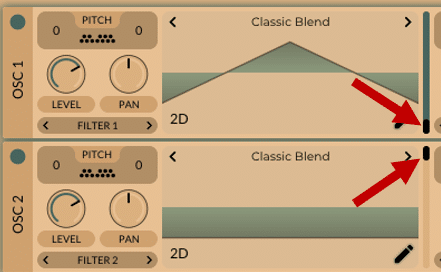
Retained observation
Two Classic Blend instances show different waveforms at different frame positions. The same wavetable name is therefore insufficient to establish that the sources are identical. Compare frame position and its modulation as well as resource content before attributing redundancy to an oscillator pair.
Source SHA-256: 848972af53919d9c9217e858e108c903c62c05e80e464949d1f8325b229da29d
Image SHA-256: 6c525a1173b6fabd699fc1b3c0e7cb4b67c76546e5c30ce0602b73ca70bf0a7b
Original URL: https://www.edmprod.com/wp-content/uploads/2024/03/image-5.png
T08 | Vital synth pitch adjusting
download (1).html | documentation and visible configuration; not a new native test
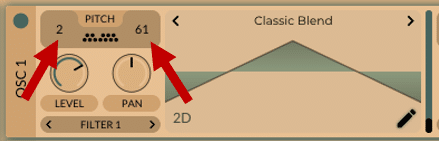
Retained observation
The oscillator has separate coarse and fine pitch fields, illustrated with 2 and 61. These are not wavetable frame indices or unison spread. Preserve pitch offset and fine tuning independently from resource and frame motion.
Source SHA-256: 848972af53919d9c9217e858e108c903c62c05e80e464949d1f8325b229da29d
Image SHA-256: d4eef9f37fb5387c0fc2732fc8fe449372008a5cdd4d4c861790a217316abe6a
Original URL: https://www.edmprod.com/wp-content/uploads/2024/03/image-7.png
T09 | Vital synth filter routing
download (1).html | documentation and visible configuration; not a new native test
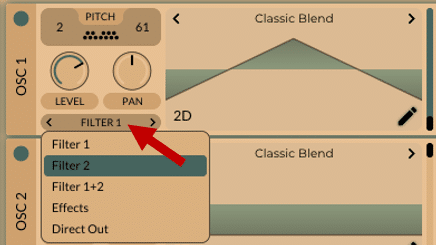
Retained observation
The destination menu explicitly offers Filter1, Filter2, Filter1+2, Effects and Direct Out. This is a branch-selection decision, not only a gain adjustment. Direct Out and Effects do not have the same downstream processing; retain the actual choice when saving or reconstructing an instrument.
Source SHA-256: 848972af53919d9c9217e858e108c903c62c05e80e464949d1f8325b229da29d
Image SHA-256: dd5b4b1a0e73a8fd0861fa8dbcc6266cb796b7ad8492fdfd9dd8010cd57a99aa
Original URL: https://www.edmprod.com/wp-content/uploads/2024/03/image-8.png
T10 | Vital unison section
download (1).html | documentation and visible configuration; not a new native test
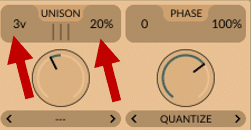
Retained observation
The unison strip separates a three-voice count and 20% detune from phase controls. Voice count, spacing and phase realization are independent dimensions; the Advanced detune range also matters. A displayed percentage alone is not an absolute cents measurement or a complete stereo construction.
Source SHA-256: 848972af53919d9c9217e858e108c903c62c05e80e464949d1f8325b229da29d
Image SHA-256: efc730d4d65d2529cafed585e96966932992aa1bc1fe41c33f036318de7f5095
Original URL: https://www.edmprod.com/wp-content/uploads/2024/03/image-9.png
T11 | Vital morphing knobs
download (1).html | documentation and visible configuration; not a new native test
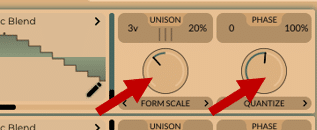
Retained observation
Form Scale and Quantize occupy the two distinct oscillator morph stages. They can coexist with frame selection and unison, with independent amounts and modulations. Do not reduce these operations to another table name or confuse oscillator Quantize with the effects distortion stage.
Source SHA-256: 848972af53919d9c9217e858e108c903c62c05e80e464949d1f8325b229da29d
Image SHA-256: 0aa8e75b8e2642b4206dc244a85eb202028b1ed81bbfed721b38de2f7aa5be2f
Original URL: https://www.edmprod.com/wp-content/uploads/2024/03/image-10.png
T12 | Adding the Vital sampler
download (1).html | documentation and visible configuration; not a new native test
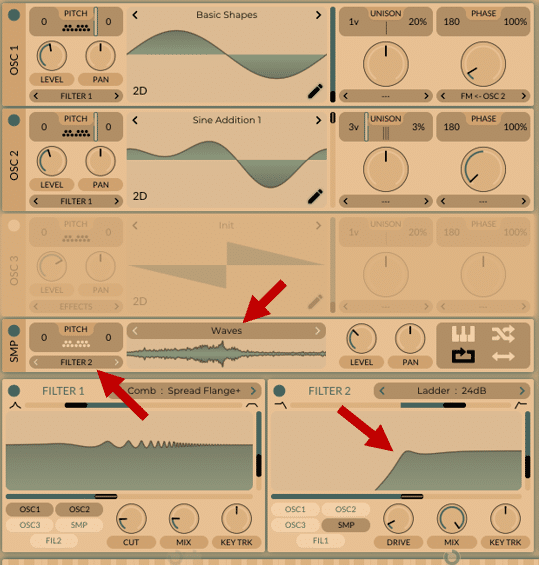
Retained observation
The Waves sample is assigned to Filter2, while oscillators use Filter1 and OSC1 has FM from OSC2. This combines a periodic modulation dependency with a separate sample/filter branch. The sample can supply an independently shaped texture; it need not be mixed into the periodic resource itself.
Source SHA-256: 848972af53919d9c9217e858e108c903c62c05e80e464949d1f8325b229da29d
Image SHA-256: 928982ef1c5bf1c0508ebb56e15a252bbf4887d01eacfdf41b52088be509f3f1
Original URL: https://www.edmprod.com/wp-content/uploads/2024/03/image-11.png
T13 | Applying an envelope
download (1).html | documentation and visible configuration; not a new native test
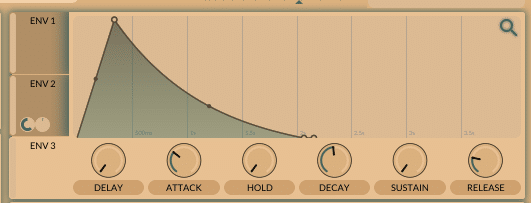
Retained observation
ENV2 is selected with a decaying contour and modulation indicators. Its shape is separate from ENV1's amplitude/lifetime role. The crop supports independent control-envelope design, but does not by itself identify every assigned destination or an exact audible consequence.
Source SHA-256: 848972af53919d9c9217e858e108c903c62c05e80e464949d1f8325b229da29d
Image SHA-256: ee67666bdfdef9030805fb2aafaa82b7b29670e2d583d555e419e631b79bcb98
Original URL: https://www.edmprod.com/wp-content/uploads/2024/03/image-13.png
T14 | Vital synth sample random phase
download (1).html | documentation and visible configuration; not a new native test
Retained observation
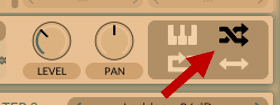
The highlighted sampler control randomizes sample start position. This differs from oscillator phase randomization and from a Random modulation source. It changes which portion of a recorded resource begins playback, a consequential choice for repeatable transients versus varying sustained textures.
Source SHA-256: 848972af53919d9c9217e858e108c903c62c05e80e464949d1f8325b229da29d
Image SHA-256: 95cc79746843c0eb6535452f3101993ddf611a7ea2b7735094d647f879e64a3a
Original URL: https://www.edmprod.com/wp-content/uploads/2024/03/image-14.png
T15 | Vital synth filter 1 knobs
download (1).html | documentation and visible configuration; not a new native test
Retained observation
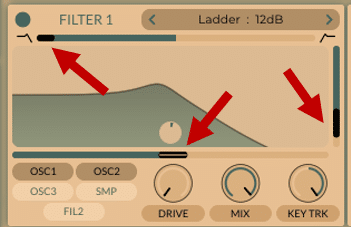
The filter arrows distinguish blend, cutoff and resonance; drive, mix and keytracking remain separate below. A Ladder12 example can therefore change response shape, resonance and excitation independently, rather than serving only as a static brightness control.
Source SHA-256: 848972af53919d9c9217e858e108c903c62c05e80e464949d1f8325b229da29d
Image SHA-256: 4f0aa8368e5696714b04c3f50cef88b1ccf9990b53fd11457cbbad3259d6c163
Original URL: https://www.edmprod.com/wp-content/uploads/2024/03/image-15.png
T16 | Vital ADSR envelope
download (1).html | documentation and visible configuration; not a new native test
Retained observation
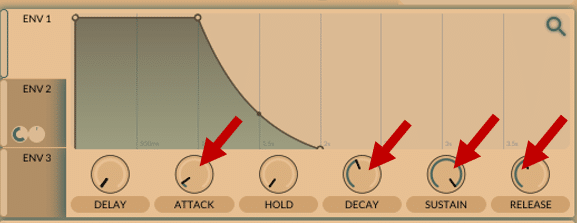
The envelope panel exposes attack, decay, sustain and release together with delay and hold. Sustain is a level, not a duration. A complete trajectory also depends on the note's release time and curve shapes, not just the six displayed values.
Source SHA-256: 848972af53919d9c9217e858e108c903c62c05e80e464949d1f8325b229da29d
Image SHA-256: 07e6337a1b22bab55b8f2ee34864915743ae2f79e34ad2f340abb38babe5c6c9
Original URL: https://www.edmprod.com/wp-content/uploads/2024/03/image-16.png
T17 | Increasing the envelope attack time
download (1).html | documentation and visible configuration; not a new native test
Retained observation
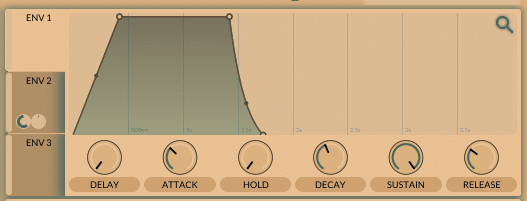
The edited ENV2 shows a lengthened attack. This retains a visible construction step for changing a modulation trajectory without modifying the source waveform. It is an example state, not measured evidence of an acoustic improvement.
Source SHA-256: 848972af53919d9c9217e858e108c903c62c05e80e464949d1f8325b229da29d
Image SHA-256: c39ca78bac5a941834e2771edc0f69c520059d70d3a71cc78a2e753c5ed5e2f1
Original URL: https://www.edmprod.com/wp-content/uploads/2024/03/image-17.png
T18 | Adjusting the envelope settings
download (1).html | documentation and visible configuration; not a new native test
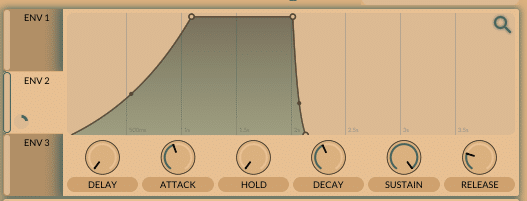
Retained observation
The ENV2 curve now has a different attack curvature, with other visible shape differences including release. Curvature changes the distribution of motion within a segment. This is not a controlled one-variable audio comparison against T17, so do not infer a measured effect size from the pair.
Source SHA-256: 848972af53919d9c9217e858e108c903c62c05e80e464949d1f8325b229da29d
Image SHA-256: b9c993987e4ba34ebdd6210e02cbace454cab86a26d1ad8fa2de9e888ebc7099
Original URL: https://www.edmprod.com/wp-content/uploads/2024/03/image-18.png
T19 | Applying an envelope to a parameter
download (1).html | documentation and visible configuration; not a new native test
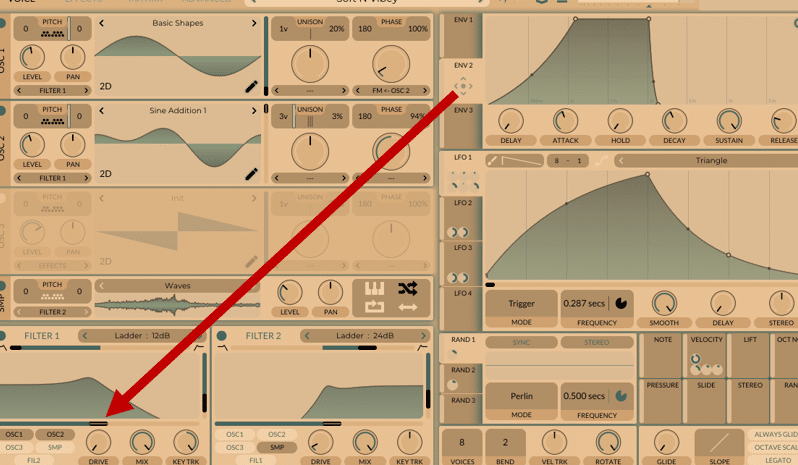
Retained observation
ENV2 is explicitly connected to Filter1 cutoff while ENV1 remains the amplitude envelope. This is a complete moving-spectrum construction: a source enters a filter whose cutoff follows an independently chosen envelope. Brightness and amplitude need not share the same timing or be baked into a complex wavetable.
Source SHA-256: 848972af53919d9c9217e858e108c903c62c05e80e464949d1f8325b229da29d
Image SHA-256: b53966022cad28b84c367174afd0b38060a75cb84b99653bc31ae6fe590c7a94
Original URL: https://www.edmprod.com/wp-content/uploads/2024/03/image-19.png
T20 | LFO trigger mode and frequency
download (1).html | documentation and visible configuration; not a new native test
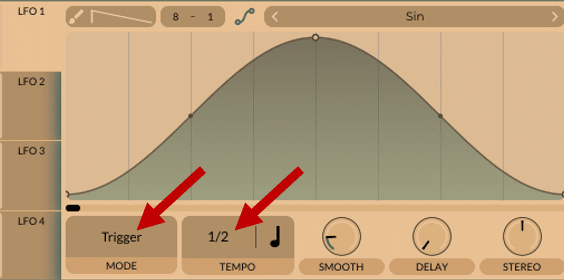
Retained observation
The Sin LFO is in Trigger mode with a 1/2 tempo division; smooth, delay and stereo remain independent controls. Curve shape, playback mode and rate describe different aspects of motion. A shape name alone cannot specify its behavior across note onsets, durations or releases.
Source SHA-256: 848972af53919d9c9217e858e108c903c62c05e80e464949d1f8325b229da29d
Image SHA-256: eb1076567cb1090ca6ffda45b0910d4cdb019b233fc708d5218713b7fac6cbbb
Original URL: https://www.edmprod.com/wp-content/uploads/2024/03/image-20.png
T21 | formant morphing modulation
download (1).html | documentation and visible configuration; not a new native test
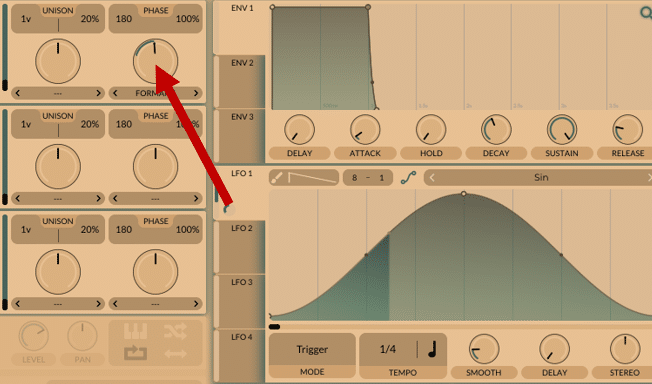
Retained observation
The arrow connects LFO1 to OSC1's Formant waveform-morph amount. This is not the voice Formant filter or spectral Form Scale operation. Source and exact target domain must remain explicit even when several controls use similar words.
Source SHA-256: 848972af53919d9c9217e858e108c903c62c05e80e464949d1f8325b229da29d
Image SHA-256: b5d488195247336643386c25a64f654d41e6f5acbd6ef61cdd14075245c06dff
Original URL: https://www.edmprod.com/wp-content/uploads/2024/03/image-21.png
T22 | Vital synth random modulation generator
download (1).html | documentation and visible configuration; not a new native test
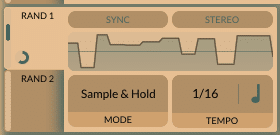
Retained observation
A Sample & Hold Random source shows a stepped trace at 1/16, with Sync and Stereo switches. This supplies discrete changes rather than a smooth periodic LFO. Rate, reset behavior and channel relationship remain separate decisions from the destination and depth of those changes.
Source SHA-256: 848972af53919d9c9217e858e108c903c62c05e80e464949d1f8325b229da29d
Image SHA-256: b6976ac6acca7f79b323875c40dff9727ca05300190ac337082c79537568e478
Original URL: https://www.edmprod.com/wp-content/uploads/2024/03/image-22.png
T23 | macros
download (1).html | documentation and visible configuration; not a new native test
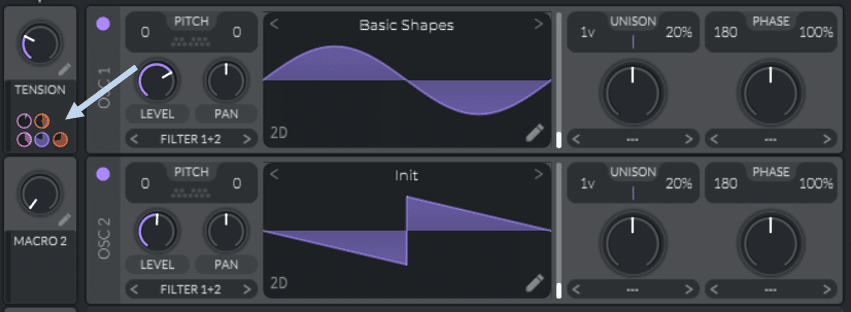
Retained observation
The Tension macro has several assignment rings alongside different source waveforms. A macro coordinates multiple destinations rather than introducing another audio layer. The visible rings establish multiple connections, but the full list of destinations must be retrieved rather than guessed from the label.
Source SHA-256: 848972af53919d9c9217e858e108c903c62c05e80e464949d1f8325b229da29d
Image SHA-256: ff768ed3f6bfb60fb583abde0f8fd389a8b0d5791dc82b0a656de724ad1b018d
Original URL: https://www.edmprod.com/wp-content/uploads/2022/01/pic40.png
T24 | Macros
download (1).html | documentation and visible configuration; not a new native test

Retained observation
Hovering a macro assignment exposes Filterfx Cutoff and a value of 60.88. This provides a concrete way to inspect a destination hidden behind a macro label. Do not silently interpret that displayed number as Hz or copy it as an optimized setting without its parameter scale and base/depth context.
Source SHA-256: 848972af53919d9c9217e858e108c903c62c05e80e464949d1f8325b229da29d
Image SHA-256: 413eaf194d327b43aa00b51521c6c78081569b7b629fd124cc9cb1f967c79660
Original URL: https://www.edmprod.com/wp-content/uploads/2022/01/pic41.png
T25 | Vital synth's effect section
download (1).html | documentation and visible configuration; not a new native test
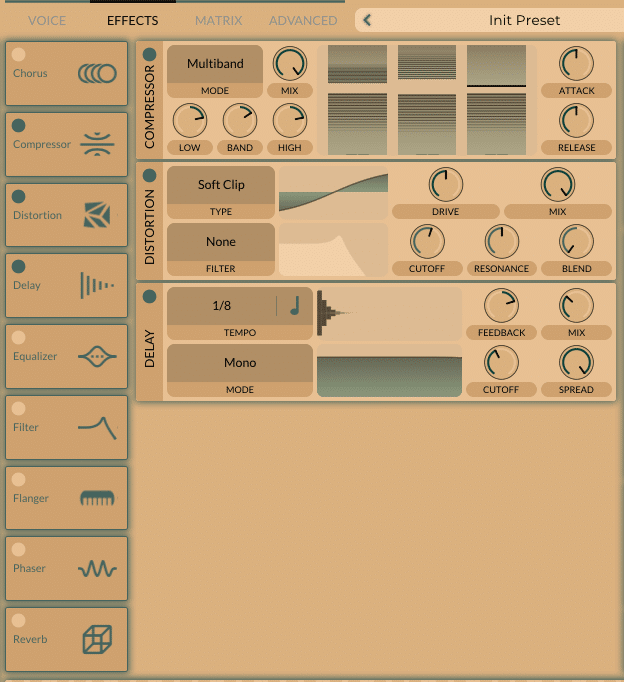
Retained observation
Compressor, Distortion and Delay are active in that visible order; neighboring effects are disabled. The ordered graph, not just the set of effect names, is construction state. Compression before nonlinear processing can change the signal exciting that processing.
Source SHA-256: 848972af53919d9c9217e858e108c903c62c05e80e464949d1f8325b229da29d
Image SHA-256: fcdb92b3f1683ba2baa78d73b003cd81c40e6f63b6b50b2c068419e77bc61cb8
Original URL: https://www.edmprod.com/wp-content/uploads/2024/03/image-23.png
T26 | chorus effect
download (1).html | documentation and visible configuration; not a new native test
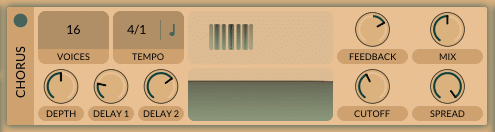
Retained observation
The Chorus panel exposes 16 voices, tempo rate, depth, two delay controls, feedback, mix, cutoff and spread. This is a delayed-signal mechanism with its own motion and spectral treatment, not interchangeable with oscillator unison. Approximate knob angles are not exact parameter values.
Source SHA-256: 848972af53919d9c9217e858e108c903c62c05e80e464949d1f8325b229da29d
Image SHA-256: 650286fbe665a034f69cc83ea312a3a630ada8c58d0688b5e56ae6a4b67e231b
Original URL: https://www.edmprod.com/wp-content/uploads/2024/03/image-24.png
T27 | Vital compressor effect
download (1).html | documentation and visible configuration; not a new native test
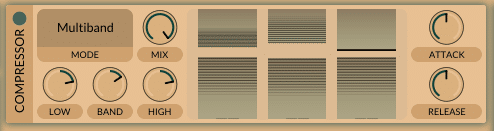
Retained observation
The Multiband compressor has its transfer/detector display as well as attack, release, band gains and mix. The graph contains meaningful interactive controls; the detailed threshold/ratio examples in V45-V49 retain how to interpret them. Do not treat this effect merely as a final volume knob.
Source SHA-256: 848972af53919d9c9217e858e108c903c62c05e80e464949d1f8325b229da29d
Image SHA-256: 3fa6ad04b73b86717fbd52f8a9fed166f3d6a1462755c9e96a18156e9ce46a8f
Original URL: https://www.edmprod.com/wp-content/uploads/2024/03/image-25.png
T28 | Vital synth delay effect
download (1).html | documentation and visible configuration; not a new native test
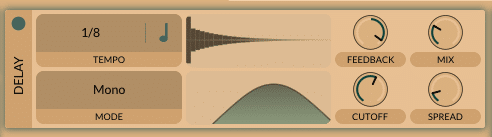
Retained observation
The Mono delay example uses a 1/8 division and a filtered delay path. Timing, feedback, filtering and wet/dry mix control different aspects of the repeats. Mono mode is not evidence that the original source or the whole instrument has no stereo information.
Source SHA-256: 848972af53919d9c9217e858e108c903c62c05e80e464949d1f8325b229da29d
Image SHA-256: 8d666224a40b75123a5294240e9c26c685d08f6f5d1f60a2b229a0a1fa633406
Original URL: https://www.edmprod.com/wp-content/uploads/2024/03/image-26.png
T29 | Vital synth distortion unit
download (1).html | documentation and visible configuration; not a new native test
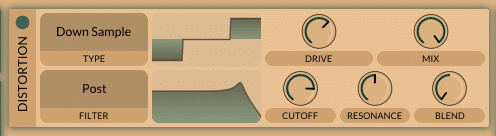
Retained observation
The distortion mode is Down Sample with a Post filter. Amount, wet/dry mix and filter cutoff/resonance/blend are separate controls. Downsampling, bit-depth reduction and clipping are distinct operations; filter position changes whether spectral shaping precedes or follows the nonlinear stage.
Source SHA-256: 848972af53919d9c9217e858e108c903c62c05e80e464949d1f8325b229da29d
Image SHA-256: 95a6b556ec55bd72f09e9c2823a7da1f529466b59f43115678d7fc3db5e86169
Original URL: https://www.edmprod.com/wp-content/uploads/2024/03/image-27.png
T30 | Vital synth EQ effect
download (1).html | documentation and visible configuration; not a new native test
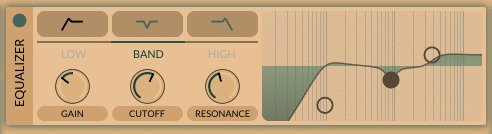
Retained observation
The equalizer shows multiple spectral handles with Band selected and Low/High tabs available. Static balance can be shaped independently of oscillator resources and amplitude dynamics. Preserve the selected band, shape and its parameters rather than reducing the EQ to a single brightness score.
Source SHA-256: 848972af53919d9c9217e858e108c903c62c05e80e464949d1f8325b229da29d
Image SHA-256: 584f230bb84f24b10e384dae36d263533cbf4274cfdce36eac92a2a3c5bea47f
Original URL: https://www.edmprod.com/wp-content/uploads/2024/03/image-28.png
T31 | Vital filter unit
download (1).html | documentation and visible configuration; not a new native test
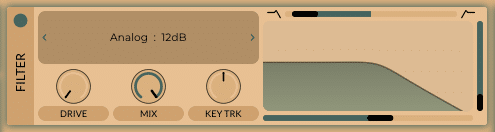
Retained observation
The FX Analog12 filter exposes drive, mix and keytracking controls in an effects panel. It processes a different point in the signal graph from a per-voice filter. Similar curves at these two locations need not behave identically when notes overlap or drive-dependent processing is involved.
Source SHA-256: 848972af53919d9c9217e858e108c903c62c05e80e464949d1f8325b229da29d
Image SHA-256: 5fd89b93868dc20b2c74f784d43086d03fcfa99d7de7d2a2b9756999b4409dc0
Original URL: https://www.edmprod.com/wp-content/uploads/2024/03/image-29.png
T32 | Vital synth flanger
download (1).html | documentation and visible configuration; not a new native test
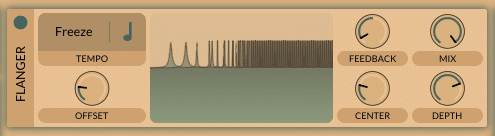
Retained observation
The flanger rate field reads Freeze. Feedback, mix, offset, center and depth can therefore define a static coloration without an obligatory continuing sweep. Preserve frozen versus moving state when interpreting the shape of its response.
Source SHA-256: 848972af53919d9c9217e858e108c903c62c05e80e464949d1f8325b229da29d
Image SHA-256: 964ca9349b91f81721e23d5252655cefeb333a65031840db0cef6849b24d470a
Original URL: https://www.edmprod.com/wp-content/uploads/2024/03/image-30.png
T33 | Vital synth phaser effect
download (1).html | documentation and visible configuration; not a new native test
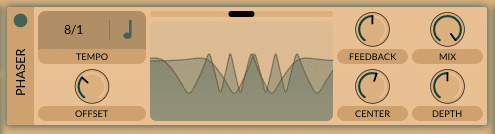
Retained observation
The phaser example shows multiple notches, a blend control and an 8/1 rate. Its response and motion are not the same mechanism as the adjacent flanger. The plot is a configuration/instantaneous-response view, not an audio measurement of the full instrument.
Source SHA-256: 848972af53919d9c9217e858e108c903c62c05e80e464949d1f8325b229da29d
Image SHA-256: baba7a14cedb61536db900b0dc478a72519abab6cbea172b49a918f19afcca7d
Original URL: https://www.edmprod.com/wp-content/uploads/2024/03/image-31.png
T34 | Vital synth reverb unit
download (1).html | documentation and visible configuration; not a new native test
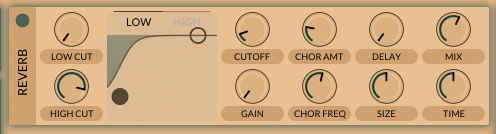
Retained observation
The Reverb panel includes low/high shaping, cutoff/gain, internal chorus amount and frequency, delay, mix, size and time. These are distinct relationships within the reverberant path. A single reverb amount cannot specify its onset, spectral decay, density and modulation.
Source SHA-256: 848972af53919d9c9217e858e108c903c62c05e80e464949d1f8325b229da29d
Image SHA-256: 58663b5c04243accc522cdeb771b46eb798890882fc5c062b0ff876a1778f4d3
Original URL: https://www.edmprod.com/wp-content/uploads/2024/03/image-32.png
T35 | Vital synth matrix view
download (1).html | documentation and visible configuration; not a new native test
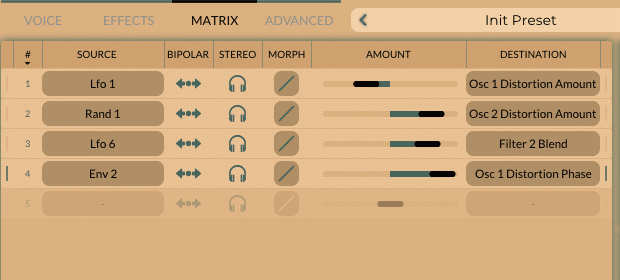
Retained observation
The matrix shows LFO1->OSC1 Distortion Amount, Random1->OSC2 Distortion Amount, LFO6->Filter2 Blend and ENV2->OSC1 Distortion Phase, with polarity/channel controls alongside them. These oscillator distortion destinations are morph controls, not the FX distortion drive. Motion can affect multiple domains with different sources while preserving a simple underlying waveform.
Source SHA-256: 848972af53919d9c9217e858e108c903c62c05e80e464949d1f8325b229da29d
Image SHA-256: 055b8aaacbfa187baa0e00d3274c3a126d0c48e0c477f58fdaae9b3685f2183d
Original URL: https://www.edmprod.com/wp-content/uploads/2024/03/image-33.png
T36 | Vital synth modulation destinations
download (1).html | documentation and visible configuration; not a new native test
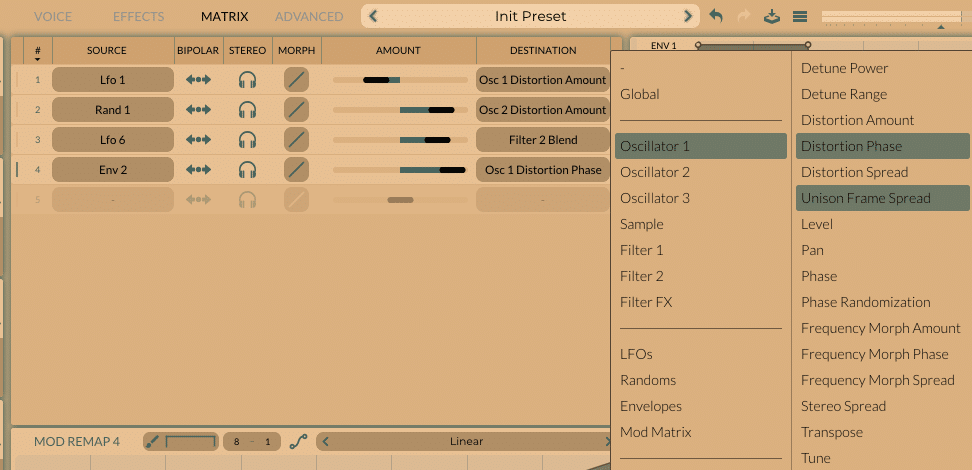
Retained observation
The destination menu exposes oscillators, sampler, filters, FX, LFOs, Randoms, envelopes and modulation-matrix parameters. Oscillator destinations include detune power/range, morph amount/phase/spread, frame spread, level, pan, phase randomization, spectral morph, stereo spread, transpose and tune. This retains the breadth of controllable relationships, not just cutoff and wavetable frame.
Source SHA-256: 848972af53919d9c9217e858e108c903c62c05e80e464949d1f8325b229da29d
Image SHA-256: 90757321eda48bd2837fbeeb682922c41d922fc067ab4c029f18b07c66b54ad3
Original URL: https://www.edmprod.com/wp-content/uploads/2024/03/image-34.png
T37 | Vital modulation remap curve
download (1).html | documentation and visible configuration; not a new native test
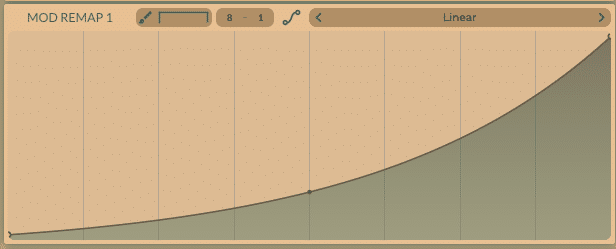
Retained observation
Mod Remap1 has a convex edited curve although its displayed name remains Linear. The mapping transforms source values; it is not an independent timeline. Resource names are insufficient to identify edited point data, just as table names are insufficient to identify a selected waveform.
Source SHA-256: 848972af53919d9c9217e858e108c903c62c05e80e464949d1f8325b229da29d
Image SHA-256: 361ddf4e97f0afa73cee1746739cb5f8b58f31eddfe18920d5fefe83d08bef6e
Original URL: https://www.edmprod.com/wp-content/uploads/2024/03/image-35.png
T38 | Vital advanced settings
download (1).html | documentation and visible configuration; not a new native test
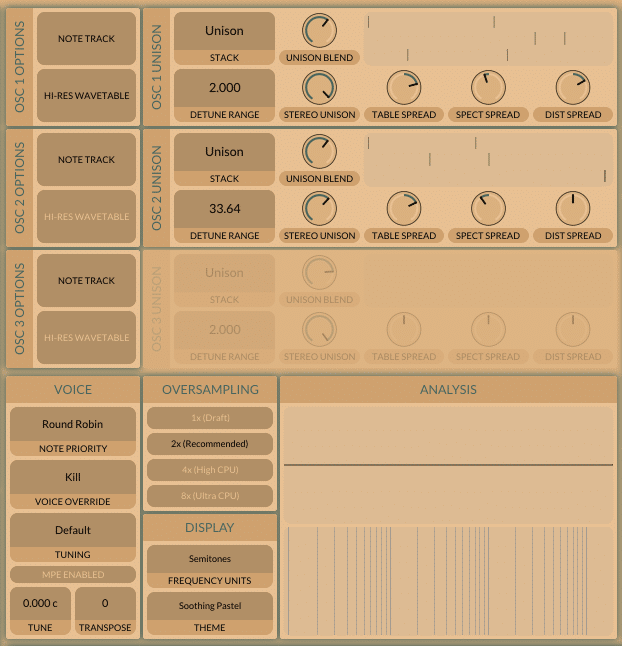
Retained observation
The Advanced panel gives the two enabled oscillators different detune ranges, including 2.000 and 33.64, with separate spread controls. Note tracking, high resolution, voice behavior and 2x oversampling are independent settings. The same primary detune percentage can therefore correspond to different constructions when these Advanced settings differ.
Source SHA-256: 848972af53919d9c9217e858e108c903c62c05e80e464949d1f8325b229da29d
Image SHA-256: 1c553b1ae743d8e8927b14192f0ab7bc43c93f5634a24c3c8d9f9cad0280c560
Original URL: https://www.edmprod.com/wp-content/uploads/2024/03/image-36.png
T39 | Vital synth analysis window
download (1).html | documentation and visible configuration; not a new native test
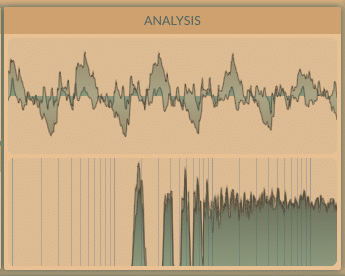
Retained observation
The built-in analyzer displays a waveform and a spectrum. They provide useful live observation surfaces, but this screenshot is not a saved audio trace with known timing, calibration or per-voice data. Computational comparisons should retain actual rendered audio as well as relevant instrument state.
Source SHA-256: 848972af53919d9c9217e858e108c903c62c05e80e464949d1f8325b229da29d
Image SHA-256: 1c9070ed2d2bf0994fb1ab9dd27f3658e156da833e68a91586a7561db4bf7a29
Original URL: https://www.edmprod.com/wp-content/uploads/2024/03/image-37.png
T40 | Vital synth free "Diabloic" skin
download (1).html | documentation and visible configuration; not a new native test
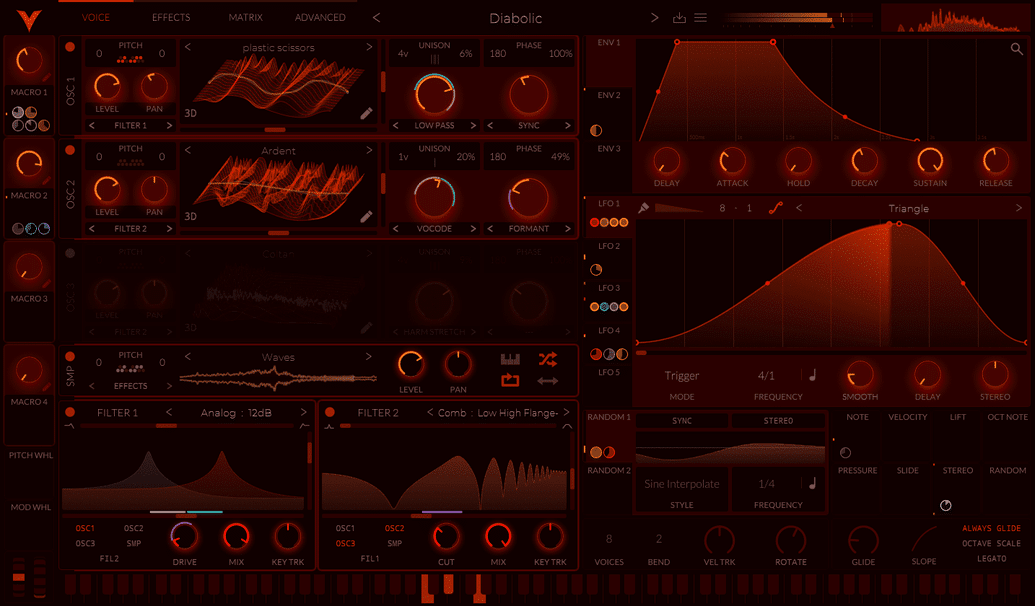
Retained observation
The Diabolic skin illustrates that labels and indicators may have lower contrast under another theme. It does not introduce new synthesis functions. Use the clearer source figures and control labels for mechanism identification rather than inventing settings from barely visible colors.
Source SHA-256: 848972af53919d9c9217e858e108c903c62c05e80e464949d1f8325b229da29d
Image SHA-256: e06314df69158faeb2839c911ec13fc6ff7b204a1b028c25086590e645a01107
Original URL: https://www.edmprod.com/wp-content/uploads/2023/07/image.png
T41 | Vital synth free "Prometium" skin
download (1).html | documentation and visible configuration; not a new native test
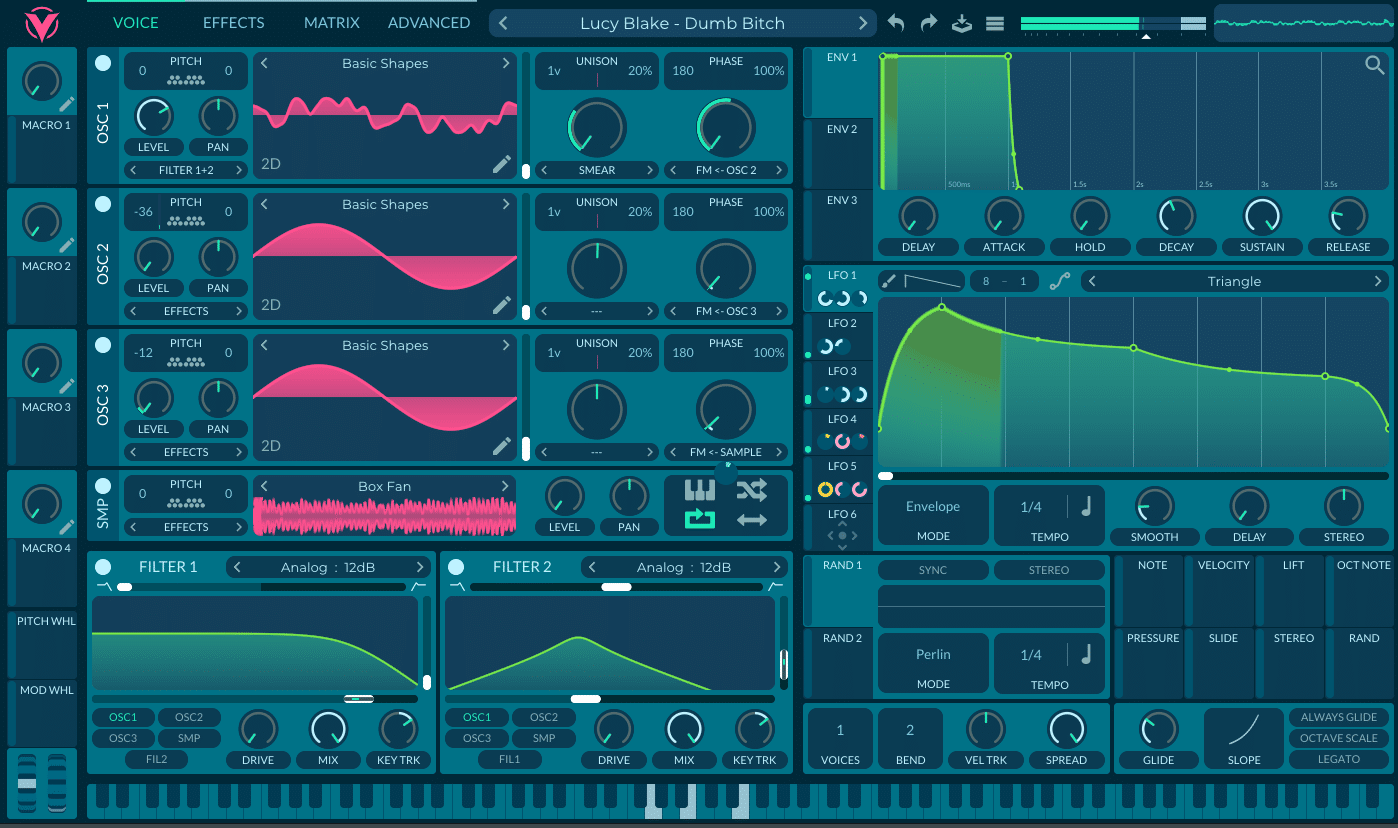
Retained observation
The Prometium-themed example visibly chains OSC1 FM from OSC2, OSC2 FM from OSC3, and OSC3 FM from Sample, with a Box Fan sample resource. Even a theme illustration therefore retains a useful modulation topology: a sample can enter a multi-stage oscillator dependency. The image does not establish its sound, optimal depths or whether this chain is useful for a particular reference.
Source SHA-256: 848972af53919d9c9217e858e108c903c62c05e80e464949d1f8325b229da29d
Image SHA-256: bd2c5b351d57c645eac8d6a8469fd67cef0a404695f3ba371c9e10365df3651e
Original URL: https://www.edmprod.com/wp-content/uploads/2023/07/image-1.png
T42 | free Gumroad skin for Vital
download (1).html | documentation and visible configuration; not a new native test
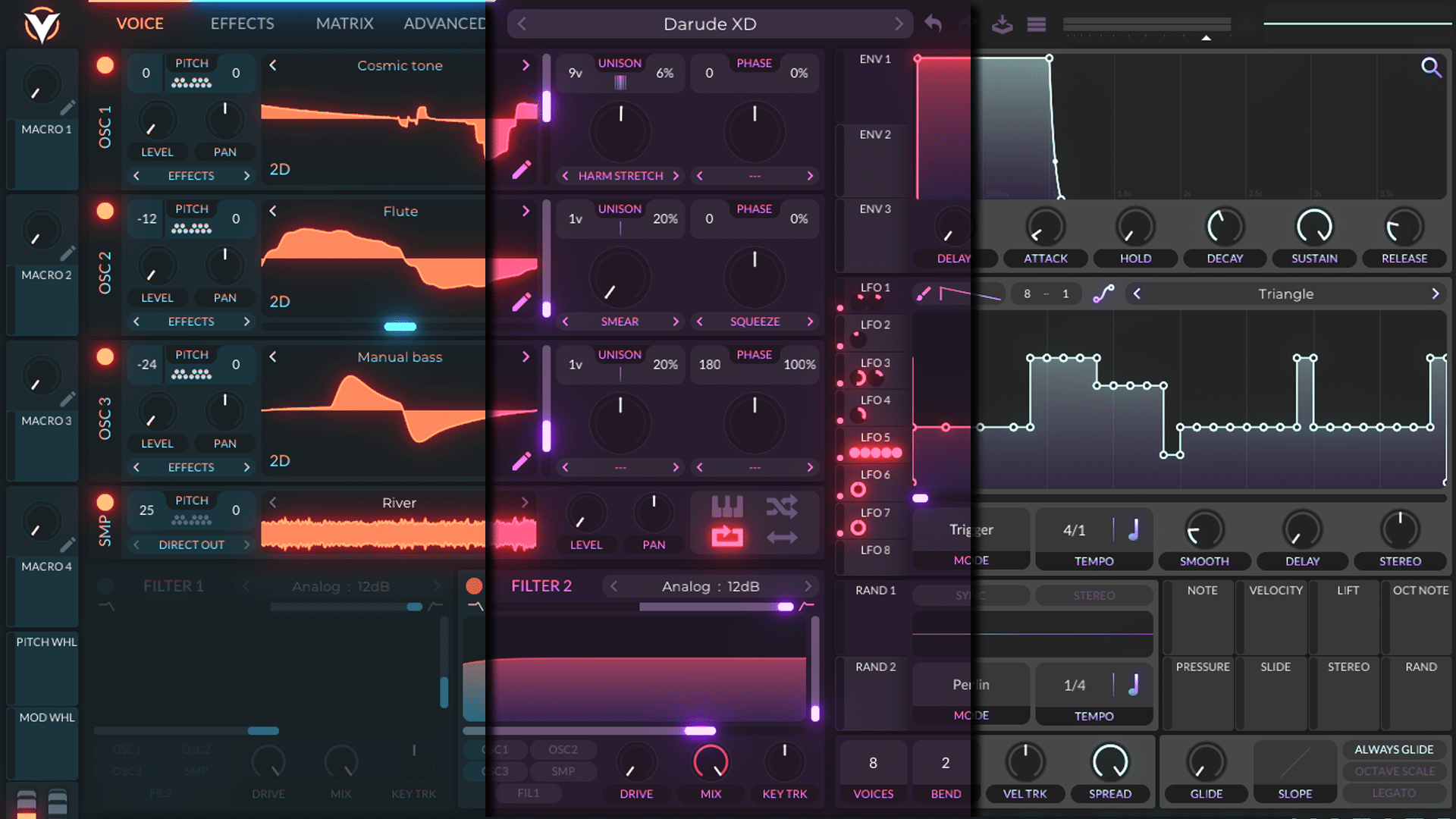
Retained observation
The composite of three skins preserves recognizable functional regions and shows varied source/sample choices, including a Direct Out sample destination. Do not merge settings from different panels into one claimed patch or assume the images are a controlled same-preset comparison. Themes are presentation state, not explanations of audible differences.
Source SHA-256: 848972af53919d9c9217e858e108c903c62c05e80e464949d1f8325b229da29d
Image SHA-256: 5fc57663676e2076a190472c76cbc6fab5404195cfd51e2734f910c119a4c9e7
Original URL: https://www.edmprod.com/wp-content/uploads/2023/07/image-2.png
T43 | Opening the theme menu editor
download (1).html | documentation and visible configuration; not a new native test
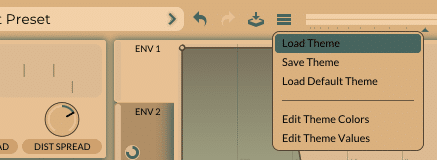
Retained observation
The theme menu exposes loading/saving themes, returning to the default and editing colors/values. This is UI customization, not preset construction or DSP parameter automation. No theme was changed during this review.
Source SHA-256: 848972af53919d9c9217e858e108c903c62c05e80e464949d1f8325b229da29d
Image SHA-256: 8117da5350549562cc26e3f92a75f16d136f8e5f811e9f81baa749ef6c99ba16
Original URL: https://www.edmprod.com/wp-content/uploads/2024/03/image-38.png
T44 | Opening up the "Oscillator" editing menu
download (1).html | documentation and visible configuration; not a new native test
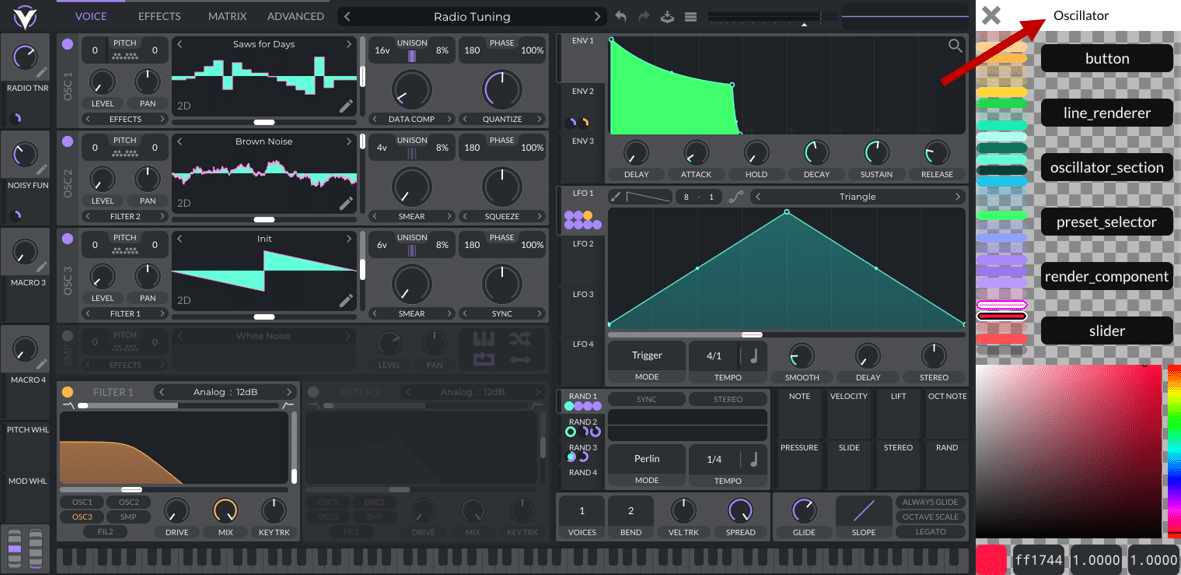
Retained observation
The theme editor lists oscillator-related UI categories such as buttons, line renderers, oscillator sections and preset selectors. These are display styling objects rather than additional signal-processing modules. Preserve this distinction when considering what a controller can infer from the interface.
Source SHA-256: 848972af53919d9c9217e858e108c903c62c05e80e464949d1f8325b229da29d
Image SHA-256: e25724cf1f84e132a3bf14053ef1e4986d84863292012b104f950e50b256cab8
Original URL: https://www.edmprod.com/wp-content/uploads/2023/07/image-5.png
T45 | Editing colors in Vital synth
download (1).html | documentation and visible configuration; not a new native test
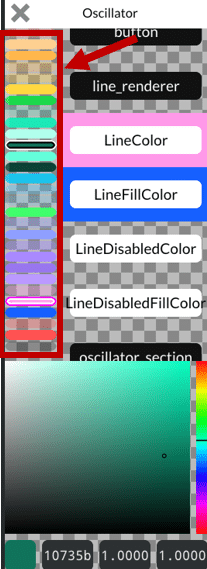
Retained observation
Line, fill and disabled-state colors are editable properties. The same logical enabled/disabled state can have different visual colors under another theme. Reliable inspection must use control identity and state, not one hard-coded purple/gray threshold.
Source SHA-256: 848972af53919d9c9217e858e108c903c62c05e80e464949d1f8325b229da29d
Image SHA-256: e2dcfa53154cf9157d06afc5cafe0f38053fa83bf76afc3a3032c9cf7e7bac03
Original URL: https://www.edmprod.com/wp-content/uploads/2023/07/image-6.png
T46 | My own "Custom Pastel" skin
download (1).html | documentation and visible configuration; not a new native test
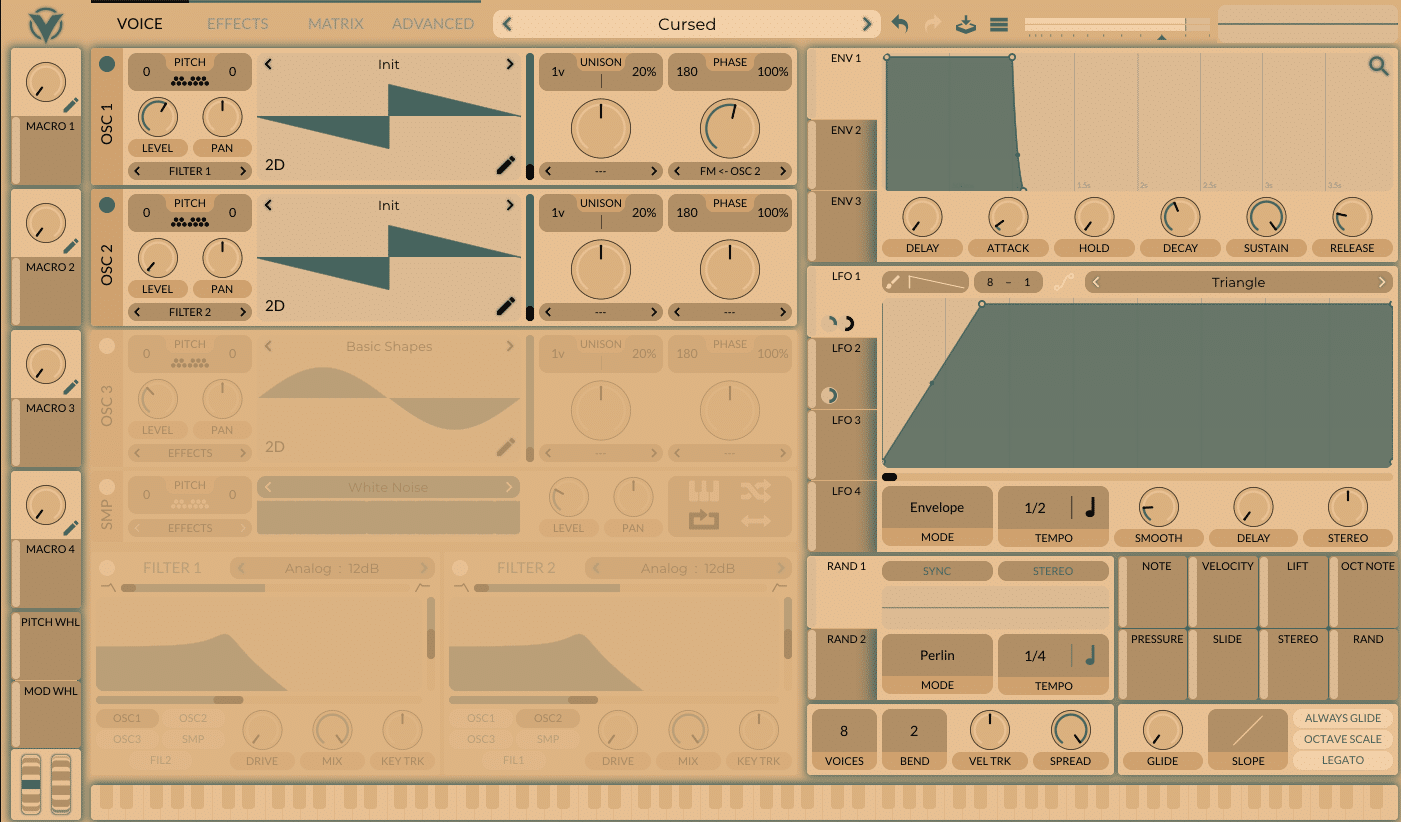
Retained observation
The Custom Pastel example retains OSC1 FM from OSC2 and an Envelope-mode LFO with a rising/plateau shape. The functional construction is still recognizable under the theme. This is a visible state example, not an audio comparison or proof of how that named preset sounds.
Source SHA-256: 848972af53919d9c9217e858e108c903c62c05e80e464949d1f8325b229da29d
Image SHA-256: 1d2c6a784553d38c4816f42c12b74b51f463e494b74bbc5f4aaf936c40ea148f
Original URL: https://www.edmprod.com/wp-content/uploads/2023/07/image-7.png
T47 | Vital synth transpose snap
download (1).html | documentation and visible configuration; not a new native test
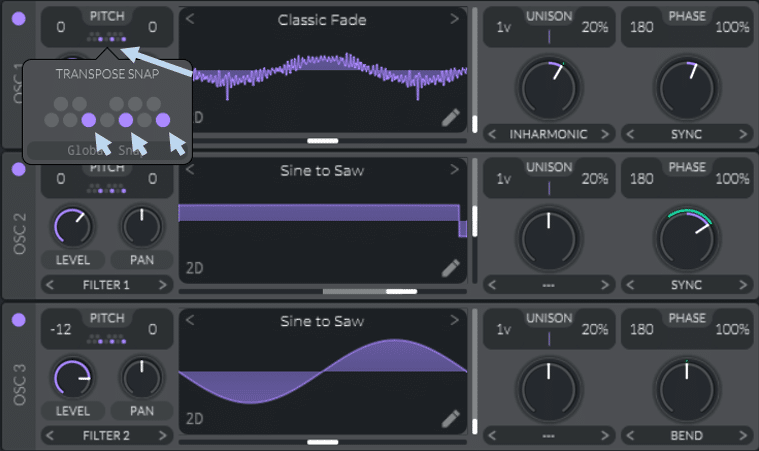
Retained observation
The transpose-snap grid shows selectable pitch classes and Global Snap. It can constrain pitch modulation into steps, independently of wavetable extraction. Retain which oscillators use which snap choices rather than assuming every pitch motion should be continuous vibrato.
Source SHA-256: 848972af53919d9c9217e858e108c903c62c05e80e464949d1f8325b229da29d
Image SHA-256: 394ee620cd6d2d9be0413e7d0389e6dbe43a121b88c8cfc01831a0d2f1b44aa4
Original URL: https://www.edmprod.com/wp-content/uploads/2022/01/pic42.png
T48 | Vital synth sample and hold modulation
download (1).html | documentation and visible configuration; not a new native test
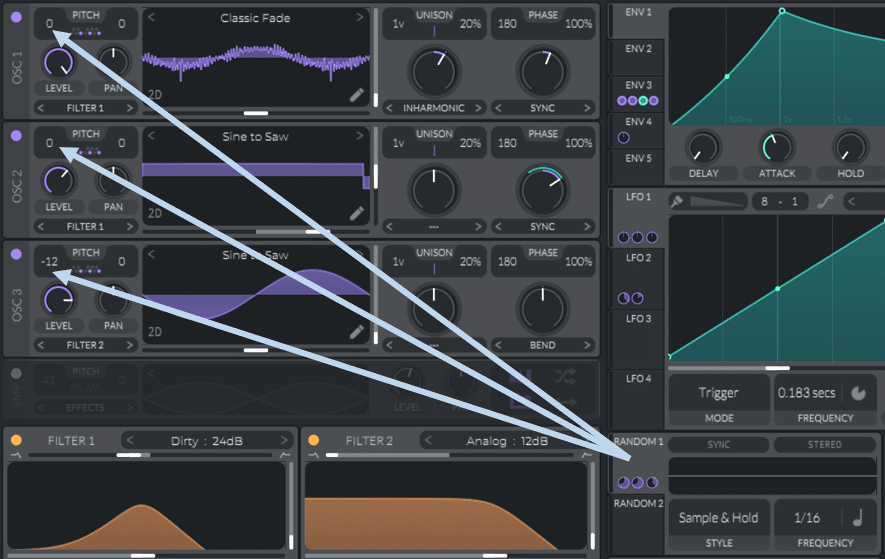
Retained observation
The arrows connect one Sample & Hold Random source to the transpose controls of all three oscillators. Shared control coordinates their pitch changes; individual modulation depths and snap settings still matter. This is not three independent random generators or merely a widened unison sound.
Source SHA-256: 848972af53919d9c9217e858e108c903c62c05e80e464949d1f8325b229da29d
Image SHA-256: 512c49b2609b7074945ac953ddbcfb02642aa2cd827deb740ad6c6cda1ad2b8b
Original URL: https://www.edmprod.com/wp-content/uploads/2022/01/pic43.png
T49 | Note tracking and velocity tracking
download (1).html | documentation and visible configuration; not a new native test
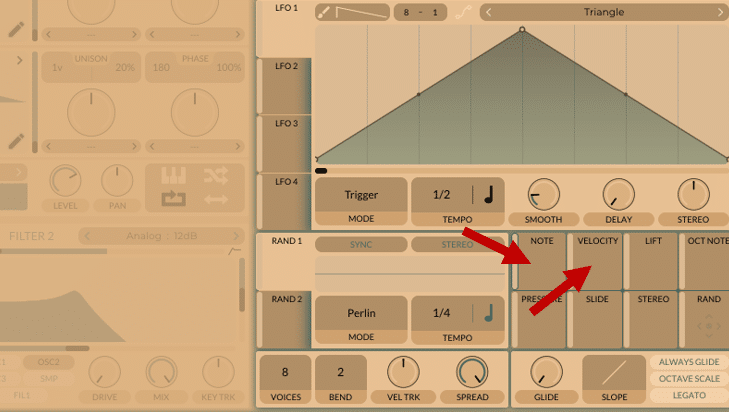
Retained observation
The arrows identify Note and Velocity as separate modulation sources, distinct from the global velocity-to-level tracking knob below. Performance-dependent timbre can therefore be assigned explicitly instead of treating velocity as only loudness or treating note tracking as only oscillator pitch.
Source SHA-256: 848972af53919d9c9217e858e108c903c62c05e80e464949d1f8325b229da29d
Image SHA-256: b87d7d2b5d81665827fe3478fbac6a8a83cf807d0fb0cdb3aa0e1e0613f68eaa
Original URL: https://www.edmprod.com/wp-content/uploads/2024/03/image-41.png
T50 | Adding note tracking to the reverb amount
download (1).html | documentation and visible configuration; not a new native test
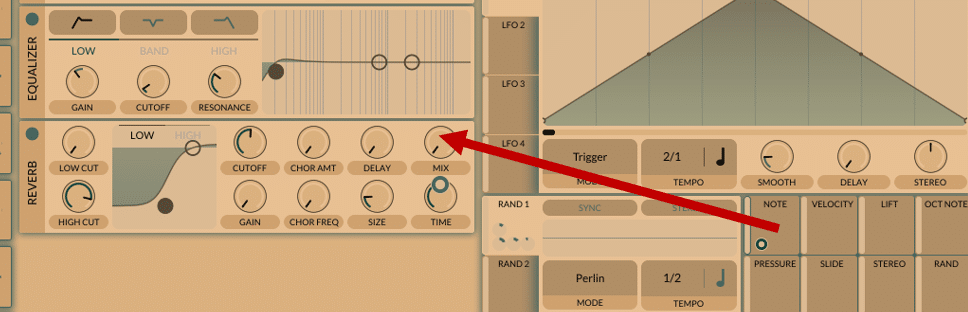
Retained observation
Note is connected to Reverb Mix. This documents register-dependent effect control, not just register-dependent source tuning. Base amount, modulation depth, remapping and the FX destination's mono/poly combination behavior matter; the screenshot alone does not establish independent reverbs for simultaneous notes.
Source SHA-256: 848972af53919d9c9217e858e108c903c62c05e80e464949d1f8325b229da29d
Image SHA-256: 6946601a4e92bb2446e0e9b483490c614112fd2642dfddbb5d8b53b2c5075f01
Original URL: https://www.edmprod.com/wp-content/uploads/2024/03/image-42.png
T51 | Modulating the filter with a velocity tracker
download (1).html | documentation and visible configuration; not a new native test
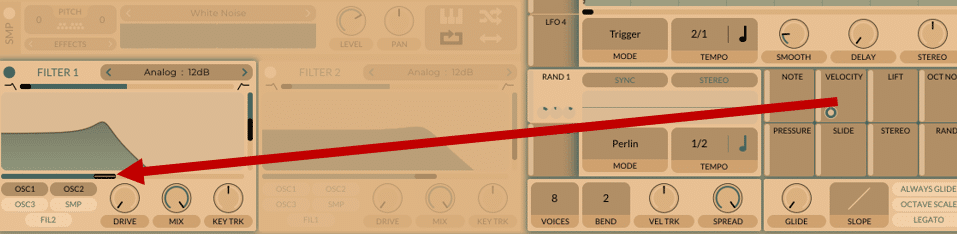
Retained observation
Velocity is connected to Filter1 cutoff. Note intensity can affect the spectral response while amplitude follows a different control. This is a useful native relationship to preserve in an editable instrument, rather than baking one velocity's brightness into its wavetable.
Source SHA-256: 848972af53919d9c9217e858e108c903c62c05e80e464949d1f8325b229da29d
Image SHA-256: bb5d0c9116b8b80be46f2ed8c344d6e3cfba10a7952d89250ed4c038227e944a
Original URL: https://www.edmprod.com/wp-content/uploads/2024/03/image-43.png
T52 | Adjusting the note velocity in the piano roll
download (1).html | documentation and visible configuration; not a new native test
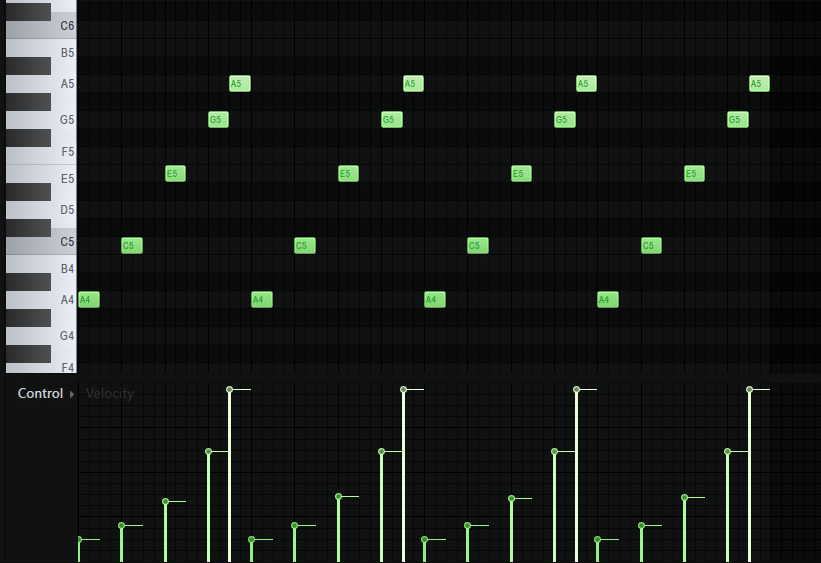
Retained observation
The piano roll shows a repeated sequence with differing note velocities. Coupled with T51, it illustrates how performance drives filter response without editing the preset between notes. The screenshot gives an example performance, not a requirement for supplied MIDI as a final-product input or an audio comparison.
Source SHA-256: 848972af53919d9c9217e858e108c903c62c05e80e464949d1f8325b229da29d
Image SHA-256: 318f16145e09b02a36af559ac35a40215b4c0bbff02ed2b87133a3a7e77185d6
Original URL: https://www.edmprod.com/wp-content/uploads/2024/03/image-44.png
T53 | Enabling Glide
download (1).html | documentation and visible configuration; not a new native test
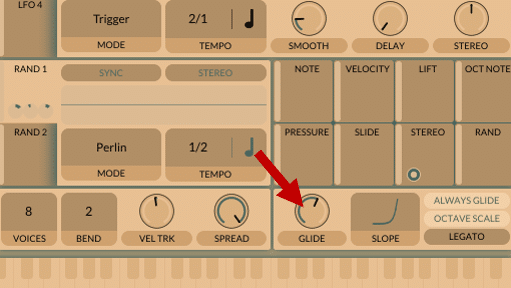
Retained observation
Glide has an amount control, an adjacent slope display and Always Glide, Octave Scale and Legato options. Its behavior is conditional on note transitions and voice settings, not just an isolated pitch curve. These controls belong in the instrument/performance interaction record.
Source SHA-256: 848972af53919d9c9217e858e108c903c62c05e80e464949d1f8325b229da29d
Image SHA-256: a85839a557ab2cd198ccd9f5fa424b3cf7c5c22a5e135b094524f86da3eafc71
Original URL: https://www.edmprod.com/wp-content/uploads/2024/03/image-45.png
T54 | Glide and slop shape
download (1).html | documentation and visible configuration; not a new native test
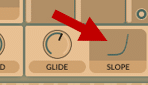
Retained observation
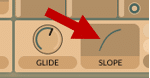
The highlighted glide slope rises slowly before a faster terminal change. Changing this curve changes the distribution of pitch movement during a glide, independently of the glide amount. The tiny crop is qualitative, not a calibrated timing or pitch measurement.
Source SHA-256: 848972af53919d9c9217e858e108c903c62c05e80e464949d1f8325b229da29d
Image SHA-256: 6e6b7aa598f1a34b45e34998662896076ae7142575515fad0a0bb73b597fbc30
Original URL: https://www.edmprod.com/wp-content/uploads/2024/03/image-46.png
T55 | Glide and slop shape
download (1).html | documentation and visible configuration; not a new native test
Retained observation
The alternate glide slope rises quickly and then flattens. It contrasts with T54's curve while preserving the same type of control. Glide shape can affect articulation even when endpoints match; this is not an amplitude-envelope edit.
Source SHA-256: 848972af53919d9c9217e858e108c903c62c05e80e464949d1f8325b229da29d
Image SHA-256: 2ef2b9e7d02a03b60042bf482de9c2ca320df37699fd2ef93b8497a10b9c87b6
Original URL: https://www.edmprod.com/wp-content/uploads/2024/03/image-47.png
T56 | Accessing the wavetable editor
download (1).html | documentation and visible configuration; not a new native test
Retained observation
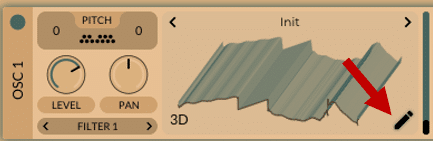
The pencil opens the wavetable editor from a 3D resource display. The displayed frame landscape is available resource content, not proof of a time scan. The more detailed V16-V34 editor figures preserve how sources, keyframes and modifiers construct that resource; runtime motion remains a separate layer.
Source SHA-256: 848972af53919d9c9217e858e108c903c62c05e80e464949d1f8325b229da29d
Image SHA-256: 5a09b6ba2acf4cb893b137a8aecf425f15e7ffecffb2b44e62169b93905d0b41
Original URL: https://www.edmprod.com/wp-content/uploads/2024/03/image-39.png
T57 | Adjusting oversampling settings
download (1).html | documentation and visible configuration; not a new native test
Retained observation
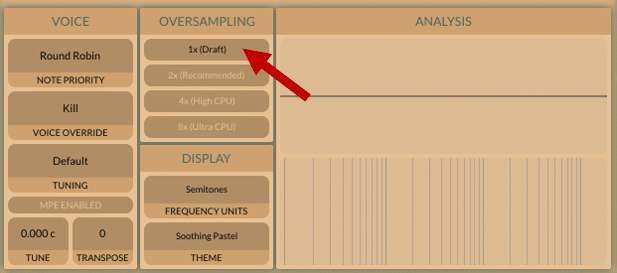
The Advanced panel exposes 1x, 2x, 4x and 8x oversampling, with 1x highlighted in the illustration. Quality configuration is separate from tuning, voice policy and theme. Retain it when comparing nonlinear/high-frequency behavior; the image does not establish that every patch needs the highest setting or quantify its audible benefit.
Source SHA-256: 848972af53919d9c9217e858e108c903c62c05e80e464949d1f8325b229da29d
Image SHA-256: 243f4bfc9523e3a458665ddd89b637fb5f7b5ff598a81a3970e5a67b1d740fa1
Original URL: https://www.edmprod.com/wp-content/uploads/2024/03/image-40.png