FM Synthesis: The Beginner's Guide to Crazy Sounds (2025)
Preserved third-party source, not an ORMAN project instruction. Complete extracted article text is followed by every retained figure and its separately labeled project observation. Original files remain unchanged. For PDFs, use the original page images when extracted glyphs are unclear. Linked external audio/video and external repository trees were not part of the retained snapshot.
Unchanged original document | Complete extracted text
F01 | waveforms with different frequencies
download.html | documentation and visible configuration; not a new native test

Retained observation
Two sine traces show different cycle counts over comparable widths. Carrier frequency and modulator frequency are independent inputs to FM construction; their relationship is not encoded by the word "sine" alone.
Source SHA-256: 2c18aa1465a318a1104c73f4ea4f27d2add7ea8cf339cd24356915c768555576
Image SHA-256: eb3df9d5dee6cab350e3568b2d61a3c842059316d2cfc07ec962e51ac6918921
Original URL: https://www.edmprod.com/wp-content/uploads/2023/04/image.png
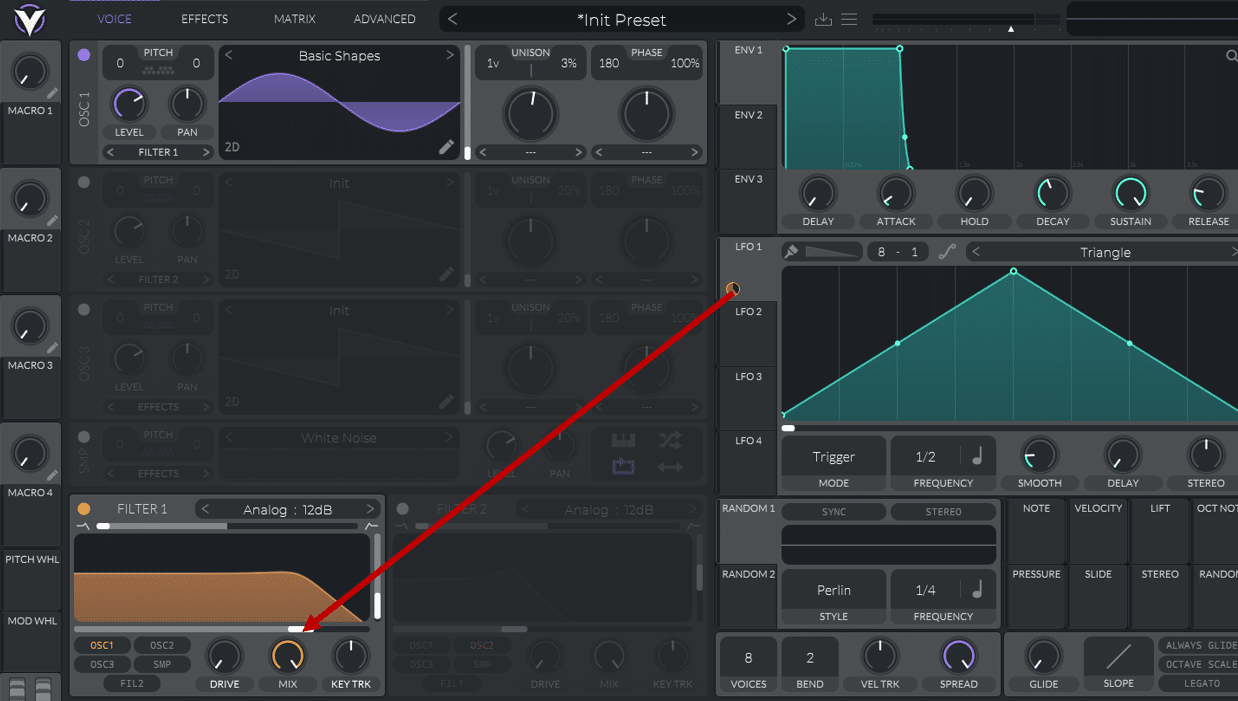
F02 | assign an LFO to a filter in Vital
download.html | documentation and visible configuration; not a new native test
Retained observation
An explicit arrow maps LFO1 to a Vital voice-filter cutoff while oscillator shape remains Basic Shapes. Timbre motion can be placed in a downstream filter, leaving the source simple and independently editable.
Source SHA-256: 2c18aa1465a318a1104c73f4ea4f27d2add7ea8cf339cd24356915c768555576
Image SHA-256: f168052358f068bd221c66a1dfe279c0107c28861204385d0c8c9b69190656b4
Original URL: https://www.edmprod.com/wp-content/uploads/2023/04/image-1.png
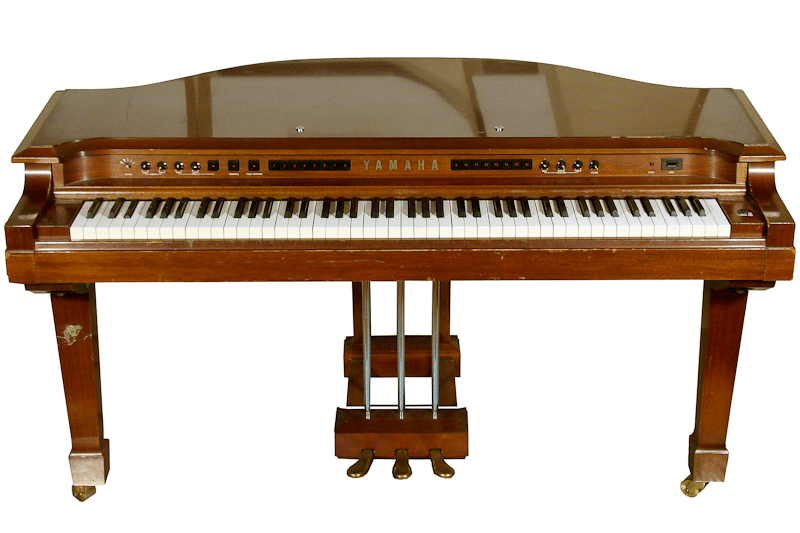
F03 | The Yamaha GS-1 released in 1980
download.html | documentation and visible configuration; not a new native test
Retained observation
The GS-1 instrument photograph is historical context. It contains no visible operator-routing diagram or transferable numerical Vital settings. Preserved without inventing synthesis details from the photograph.
Source SHA-256: 2c18aa1465a318a1104c73f4ea4f27d2add7ea8cf339cd24356915c768555576
Image SHA-256: 4888eced162d5c0d5210d03cf15a0f0a552e56ef5a49003ef77b50d98a0c878b
Original URL: https://www.edmprod.com/wp-content/uploads/2023/04/image-2.png
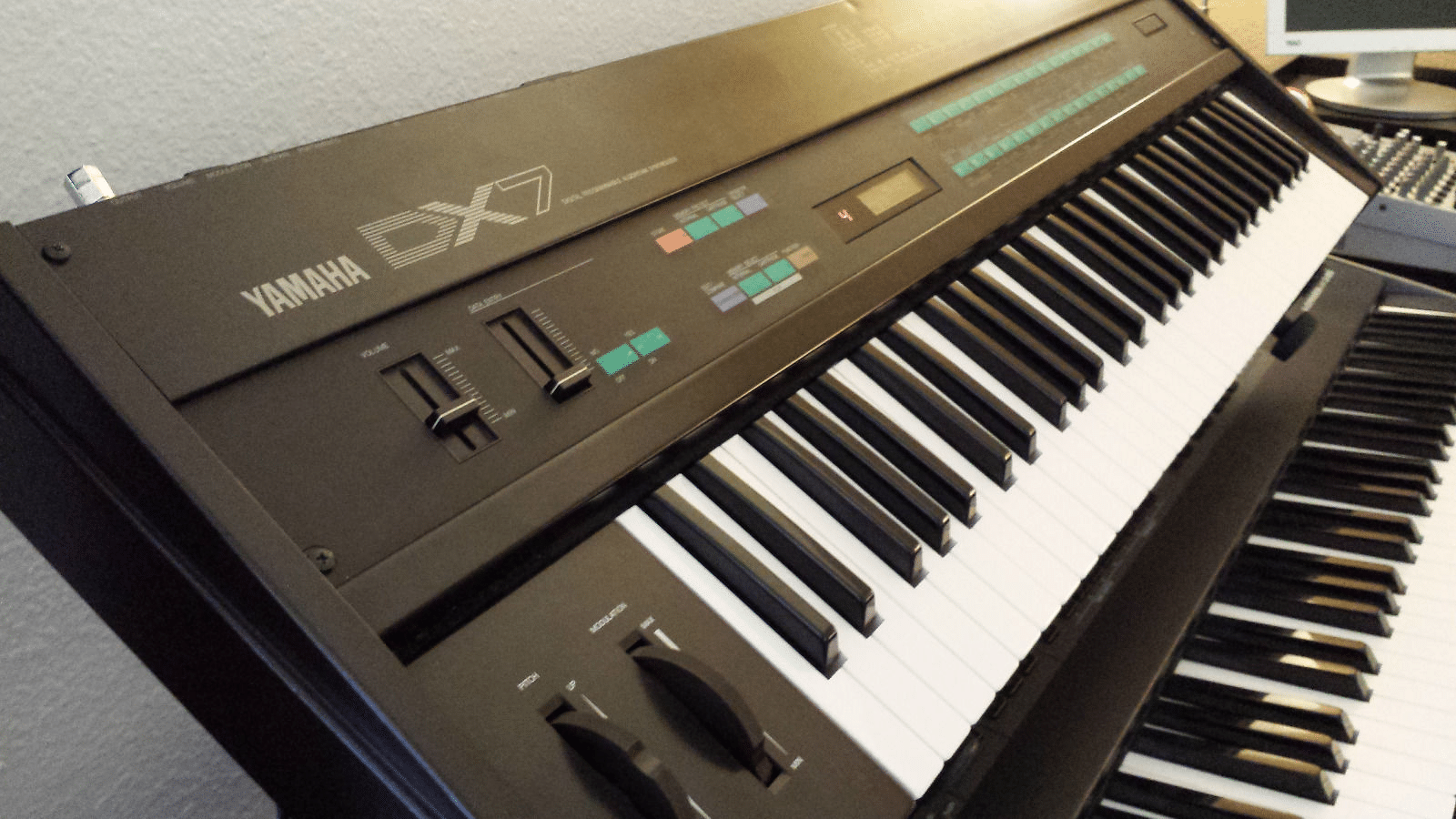
F04 | The Yamaha DX7
download.html | documentation and visible configuration; not a new native test
Retained observation
The DX7 photograph supplies historical instrument context, not a readable patch algorithm. Its presence is not evidence that a particular Vital graph matches its synthesis or sound.
Source SHA-256: 2c18aa1465a318a1104c73f4ea4f27d2add7ea8cf339cd24356915c768555576
Image SHA-256: 97b00a2d9c37063b3b6a187dd8430c20161e0fd6e3d86fa57b78fadb7a4bc40b
Original URL: https://www.edmprod.com/wp-content/uploads/2023/04/image-3.png
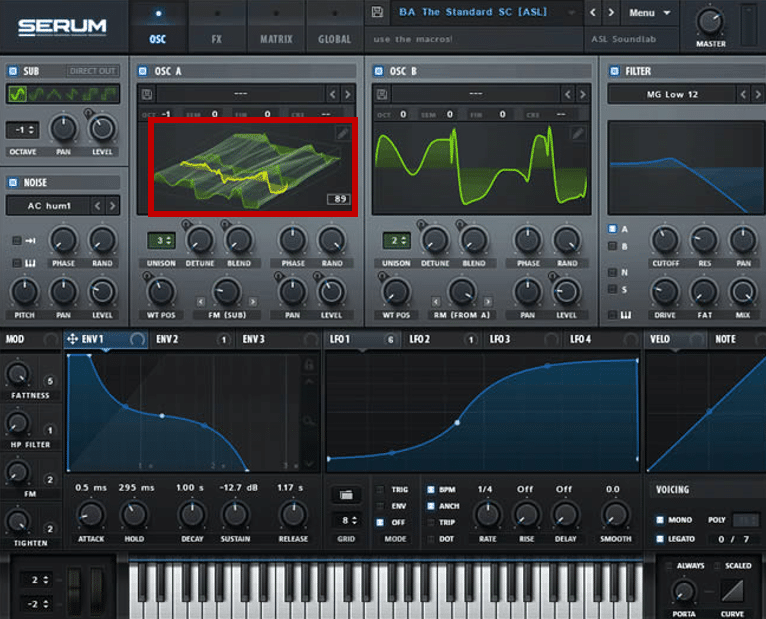
F05 | A wavetable in Serum
download.html | documentation and visible configuration; not a new native test
Retained observation
A Serum screenshot highlights one oscillator's wavetable while showing another source, sub/noise, filter and modulation sections. Retain the conceptual separation of ingredient and surrounding instrument; this is not a new Serum product target.
Source SHA-256: 2c18aa1465a318a1104c73f4ea4f27d2add7ea8cf339cd24356915c768555576
Image SHA-256: c0fabe7b155ada2954101aa8e67bf67068aa8fca105fc46cd94f0d24f5863867
Original URL: https://www.edmprod.com/wp-content/uploads/2023/04/image-5.png
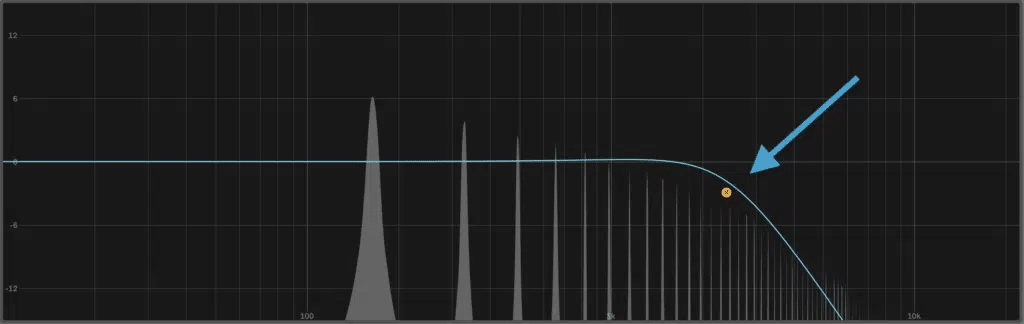
F06 | Filtering out harmonics with a low-pass filter
download.html | documentation and visible configuration; not a new native test
Retained observation
A low-pass response overlays a harmonic spectrum and slopes down above cutoff. This illustrates changing relative partial strength without replacing the source. The static plot does not demonstrate note-triggered motion; that requires the connection shown in F02 or an envelope mapping.
Source SHA-256: 2c18aa1465a318a1104c73f4ea4f27d2add7ea8cf339cd24356915c768555576
Image SHA-256: 74ed7ec402a5224c51fe039ce462fbb06229d42027d0f5519ce26e56229cee85
Original URL: https://www.edmprod.com/wp-content/uploads/2023/04/image-6.png
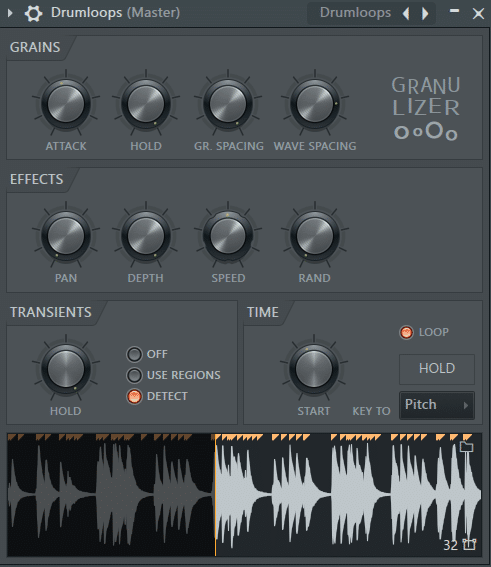
F07 | Using Fruity Granulizer for granular synthesis
download.html | documentation and visible configuration; not a new native test
Retained observation
Fruity Granulizer exposes grain spacing, wave spacing, speed and transient/time controls around a sample. It illustrates a different synthesis representation. These controls are not silently available in Vital's ordinary sample player.
Source SHA-256: 2c18aa1465a318a1104c73f4ea4f27d2add7ea8cf339cd24356915c768555576
Image SHA-256: 6d1dec73900aa1bf0993bac96344634af91b38978d8b284939db39aba3f31330
Original URL: https://www.edmprod.com/wp-content/uploads/2023/04/image-7.png
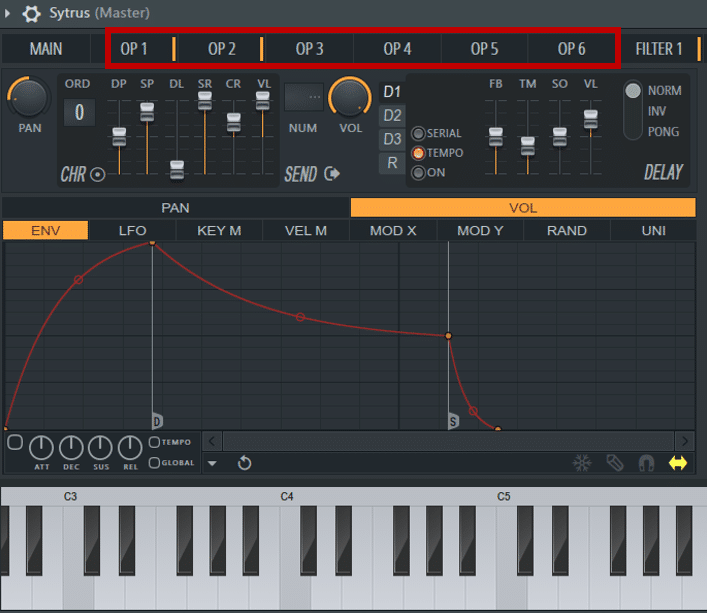
F08 | Operators in FL Studio's Sytrus
download.html | documentation and visible configuration; not a new native test
Retained observation
Sytrus displays six operator tabs and an operator volume envelope. The transferable idea is independently articulated modulation sources/carriers. Six visible Sytrus operators do not establish six audio oscillators or identical routing in Vital.
Source SHA-256: 2c18aa1465a318a1104c73f4ea4f27d2add7ea8cf339cd24356915c768555576
Image SHA-256: 6a43ca3d65c3dad87526a35db7b5e1d59488e62f90e798daea6b37538e8ad4c8
Original URL: https://www.edmprod.com/wp-content/uploads/2023/04/image-8.png
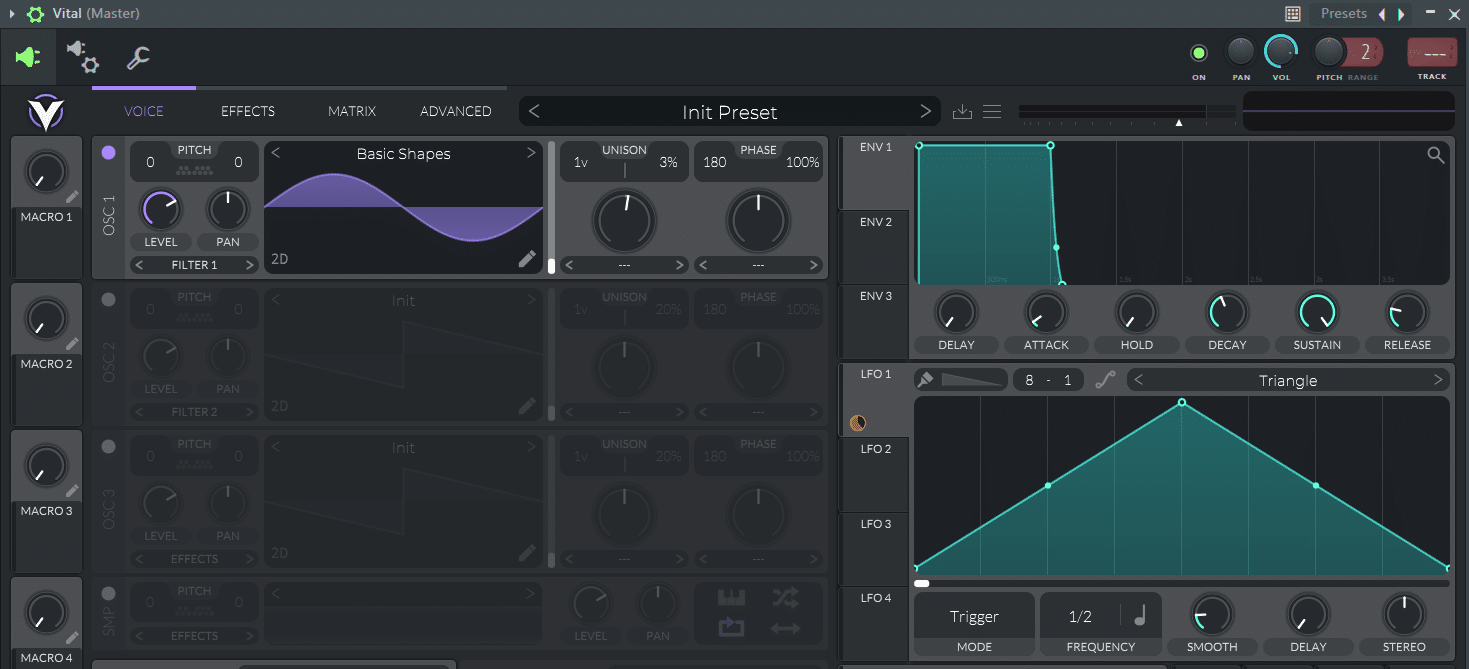
F09 | A screenshot of the synth Vital
download.html | documentation and visible configuration; not a new native test
Retained observation
The initial Vital example uses a Basic Shapes sine with ordinary ENV1 and LFO1. This is the simple starting state for the article's construction sequence, not a reason to reset useful existing Replica candidates.
Source SHA-256: 2c18aa1465a318a1104c73f4ea4f27d2add7ea8cf339cd24356915c768555576
Image SHA-256: d12ee5450968ff915d147442d27c30a72299ba89acd0ee7c8b3d3af7eeb4717c
Original URL: https://www.edmprod.com/wp-content/uploads/2023/04/image-9.png
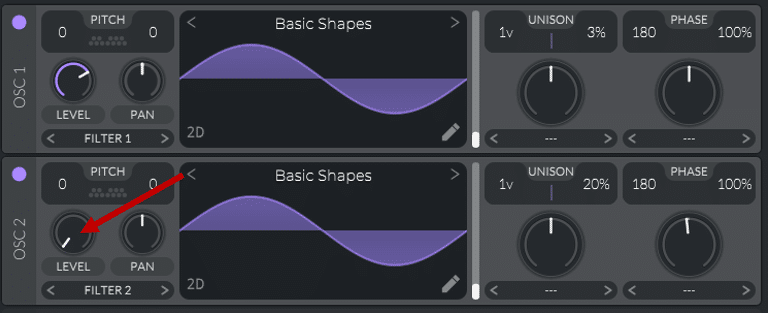
F10 | choosing oscillators in Vital
download.html | documentation and visible configuration; not a new native test
Retained observation
Two Basic Shapes sine oscillators are enabled; OSC2's audible level is reduced. They have different roles, not one per stereo side. An ingredient can exist to modulate another oscillator without requiring an independently audible layer.
Source SHA-256: 2c18aa1465a318a1104c73f4ea4f27d2add7ea8cf339cd24356915c768555576
Image SHA-256: 3bb868326536a1446a15653f8a6205ae8b97ec18b4284d3804a7391f72ecc2c3
Original URL: https://www.edmprod.com/wp-content/uploads/2023/04/image-10.png
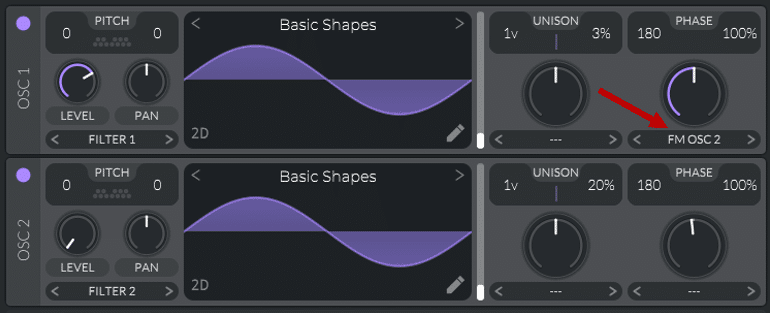
F11 | routing an oscillator as an FM modulator
download.html | documentation and visible configuration; not a new native test
Retained observation
OSC1 selects FM OSC2 while OSC2 remains the sine modulator. The dependency is OSC2->OSC1's FM input, not OSC1->OSC2. Preserve carrier, modulator, their tuning, phase and amount; treating the pair as two summed waves loses the construction.
Source SHA-256: 2c18aa1465a318a1104c73f4ea4f27d2add7ea8cf339cd24356915c768555576
Image SHA-256: a11f6b10a3f7e15a6a5851383cafe837def4ec5e2bc2ba1b0f0af6c311130c00
Original URL: https://www.edmprod.com/wp-content/uploads/2023/04/image-12.png
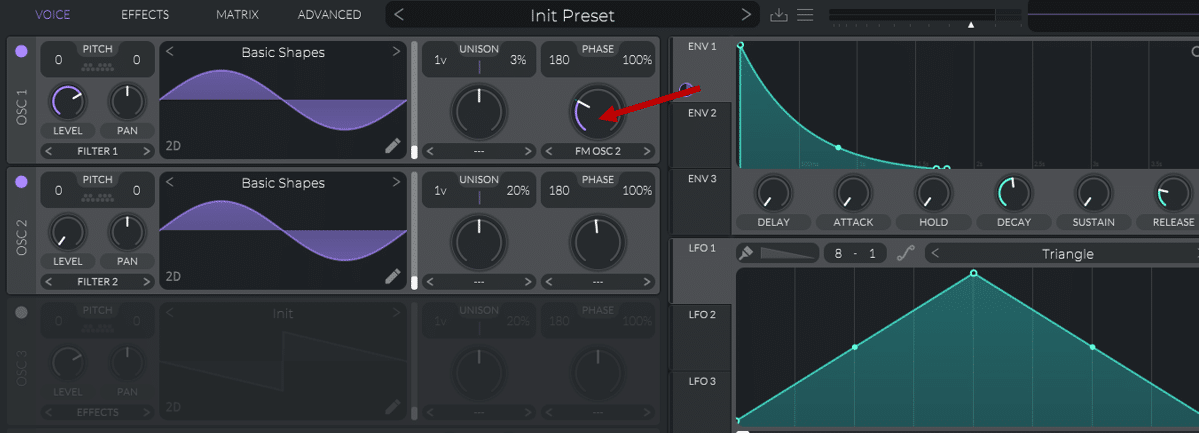
F12 | routing an envelope to the frequency modulation amount
download.html | documentation and visible configuration; not a new native test
Retained observation
ENV2's decaying contour maps to OSC1 FM amount. This makes the spectral interaction stronger/weaker through the note without requiring the amplitude envelope to have the same shape. A transient spectral gesture can be synthesized, not only sampled.
Source SHA-256: 2c18aa1465a318a1104c73f4ea4f27d2add7ea8cf339cd24356915c768555576
Image SHA-256: 30baf0a8d058ab866db48ac6282f6ce7212b856a550299bf2eff11c94a17ffc8
Original URL: https://www.edmprod.com/wp-content/uploads/2023/04/image-13.png
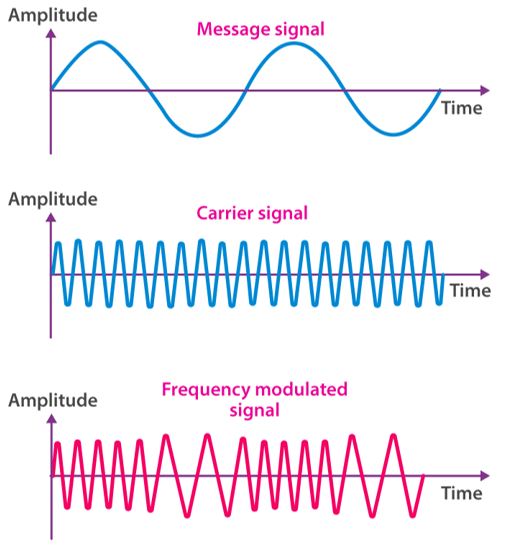
F13 | Frequency or Phase Modulation
download.html | documentation and visible configuration; not a new native test
Retained observation
The conceptual FM graphic shows a slow message, faster carrier and changing cycle spacing at roughly constant height. It distinguishes pitch/phase motion from amplitude modulation, but does not establish identical numerical FM and PM equations or Vital's exact scaling.
Source SHA-256: 2c18aa1465a318a1104c73f4ea4f27d2add7ea8cf339cd24356915c768555576
Image SHA-256: c5d63c18466a921b48f7ffe14ecf611891dcc795960d2d170124f2c6e51d3d0c
Original URL: https://www.edmprod.com/wp-content/uploads/2023/04/image-14.png
F14 | Ring Modulation
download.html | documentation and visible configuration; not a new native test
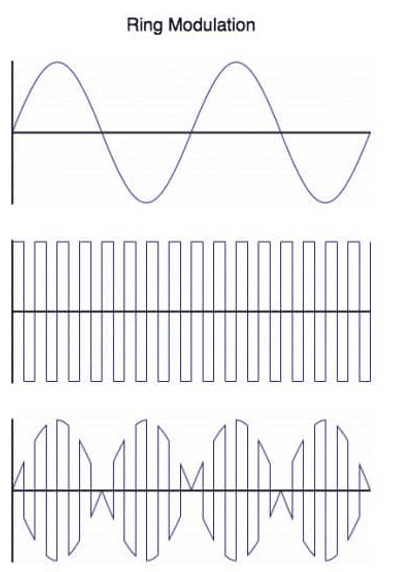
Retained observation
The ring-modulation illustration combines a sine and bipolar square into an amplitude/polarity-changing product. Retain RM as a different interaction from FM: changing oscillator ratios and source shapes affects their products differently.
Source SHA-256: 2c18aa1465a318a1104c73f4ea4f27d2add7ea8cf339cd24356915c768555576
Image SHA-256: 6ffbd53f22bf265487086777f788bed2c7f99af28638df4d623cfd73e48fbb62
Original URL: https://www.edmprod.com/wp-content/uploads/2023/04/image-15.png
F15 | the different types of modulation available in Vital
download.html | documentation and visible configuration; not a new native test
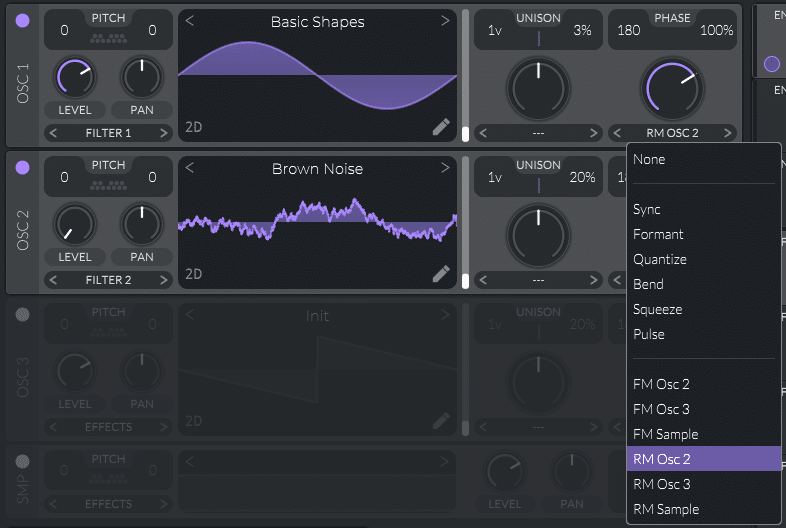
Retained observation
Vital's wave-morph menu explicitly lists FM and RM from OSC2, OSC3 or Sample; the shown state selects RM OSC2 with a Brown Noise table in OSC2. Noise-like material can participate in oscillator interaction, not only a parallel hiss layer.
Source SHA-256: 2c18aa1465a318a1104c73f4ea4f27d2add7ea8cf339cd24356915c768555576
Image SHA-256: c476a1c8ac662b9de83ff2bf3b3b20de1d8e5142f29715e1c53e3e69f0803ff8
Original URL: https://www.edmprod.com/wp-content/uploads/2023/04/image-16.png
F16 | choosing waveforms in Vital
download.html | documentation and visible configuration; not a new native test
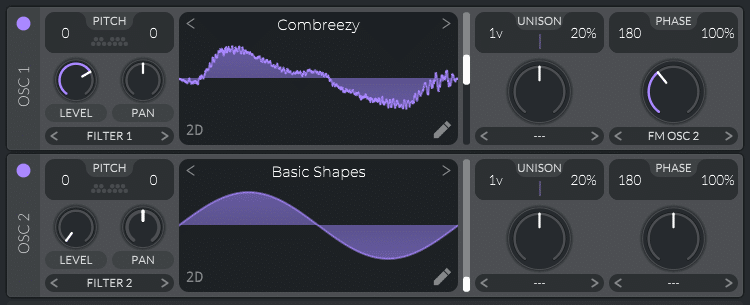
Retained observation
The carrier changes to Combreezy while OSC2 stays a sine and FM OSC2 remains selected. Complex carrier plus simple modulator is another available allocation; not every useful FM construction needs both resources to be complex.
Source SHA-256: 2c18aa1465a318a1104c73f4ea4f27d2add7ea8cf339cd24356915c768555576
Image SHA-256: 4ed0dc70758080a7ed57f4609e31b78bec700d333d0fc3879c90d6e37672eb3c
Original URL: https://www.edmprod.com/wp-content/uploads/2023/04/image-17.png
F17 | routing an LFO to a filter in Vital
download.html | documentation and visible configuration; not a new native test
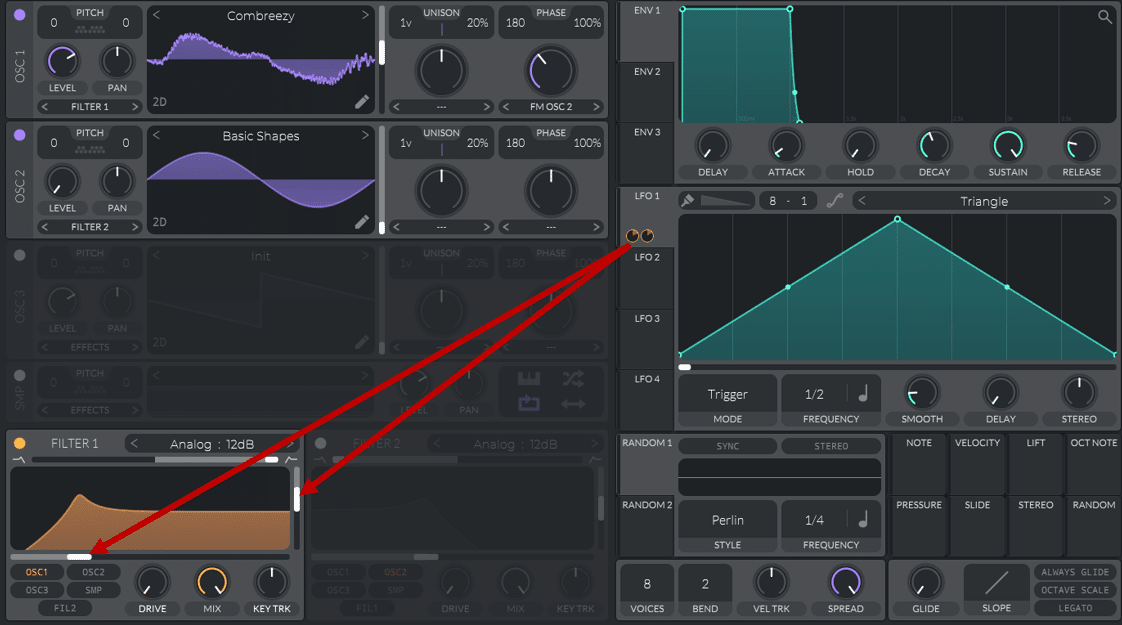
Retained observation
Two arrows connect the same LFO1 to filter cutoff and resonance. One gesture can coordinate spectral position and emphasis, with separate depths. This is a coupled motion recipe that a single cutoff trajectory does not fully preserve.
Source SHA-256: 2c18aa1465a318a1104c73f4ea4f27d2add7ea8cf339cd24356915c768555576
Image SHA-256: c79fe16ef4d03cccff9e382d8de99c6fcc235aca3c2677d5d2ad8cde5218b186
Original URL: https://www.edmprod.com/wp-content/uploads/2023/04/image-18.png
F18 | changing the shape of an LFO in Vital
download.html | documentation and visible configuration; not a new native test
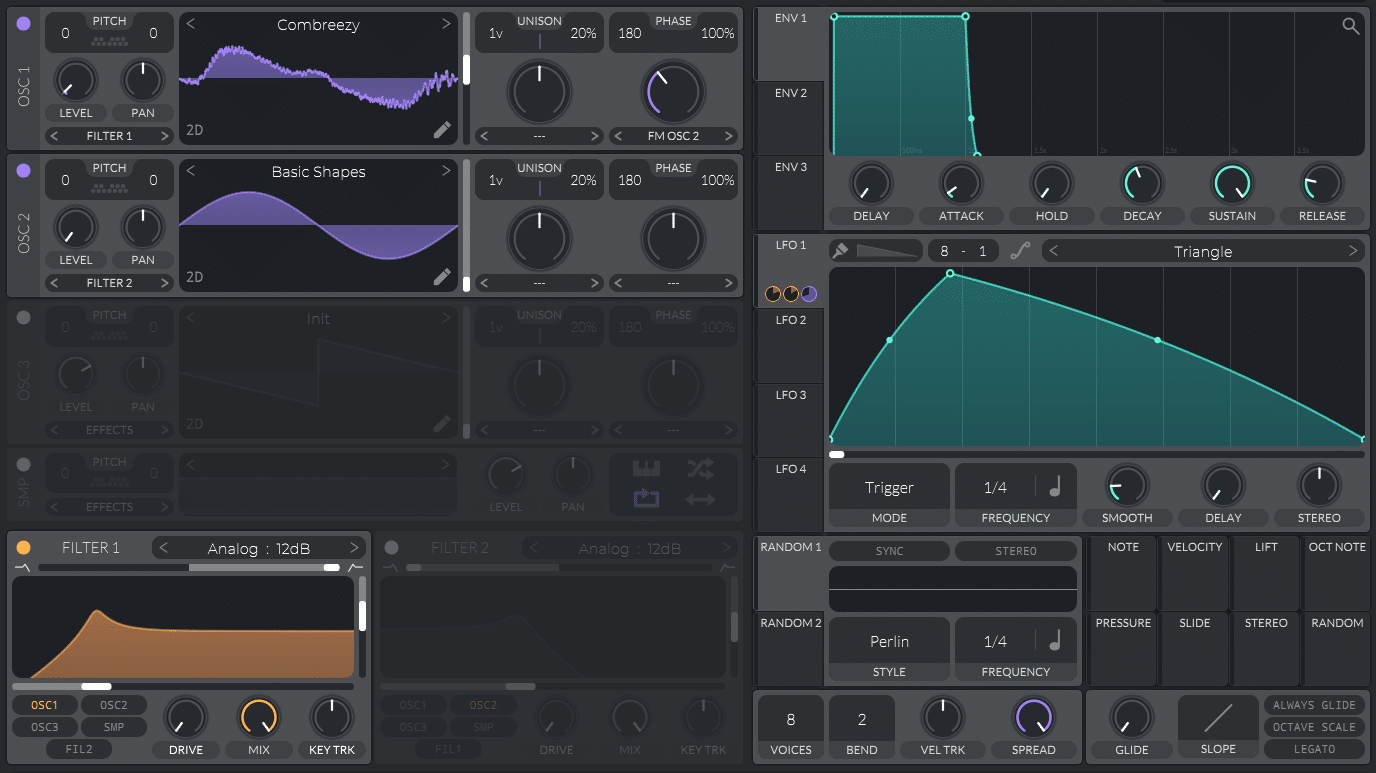
Retained observation
The LFO peak moves earlier and the return becomes longer; rate also changes from the preceding screenshot. The recipe illustrates articulation via curve geometry and timing, but the pair is not a controlled one-variable comparison.
Source SHA-256: 2c18aa1465a318a1104c73f4ea4f27d2add7ea8cf339cd24356915c768555576
Image SHA-256: fa6cd0741cdd7b27743701f2a62060c9749d87183ec8e00ad3bf0de3dc875555
Original URL: https://www.edmprod.com/wp-content/uploads/2023/04/image-19.png
F19 | setting a low-pass filter in Vital
download.html | documentation and visible configuration; not a new native test
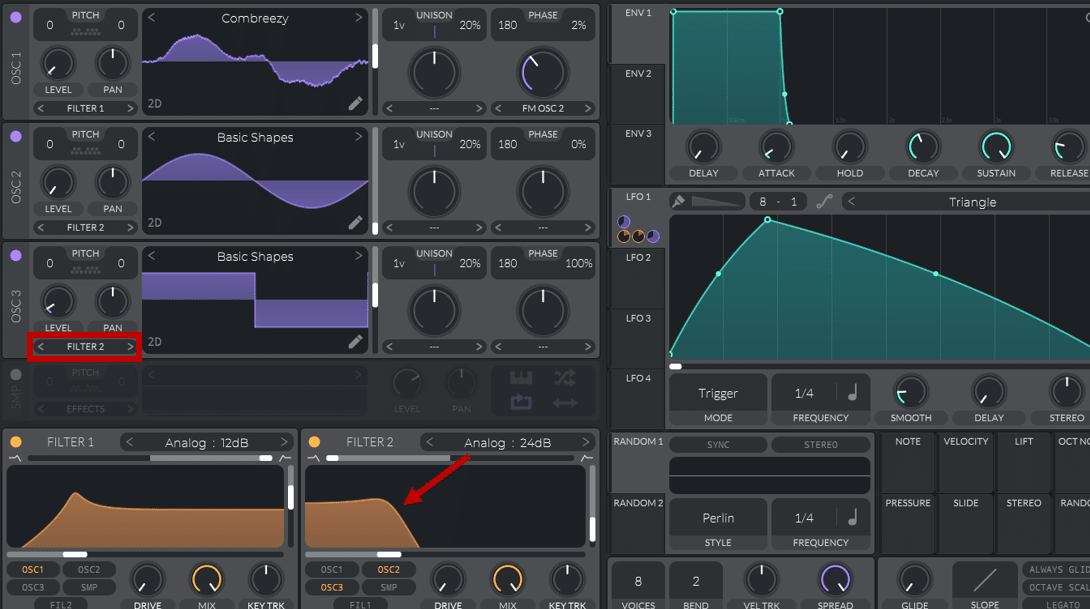
Retained observation
An additional square-like OSC3 routes to Filter2, whose low-pass differs from Filter1 processing the FM carrier. Independent branch filtering lets a support component keep its own spectral shape while the primary layer moves.
Source SHA-256: 2c18aa1465a318a1104c73f4ea4f27d2add7ea8cf339cd24356915c768555576
Image SHA-256: 105c8510f531820e8b9a3296c91846c9bacc00dcccd427e5b05a4d5aedd9acf5
Original URL: https://www.edmprod.com/wp-content/uploads/2023/04/image-20.png
F20 | routing two different FM modulations in Vital
download.html | documentation and visible configuration; not a new native test
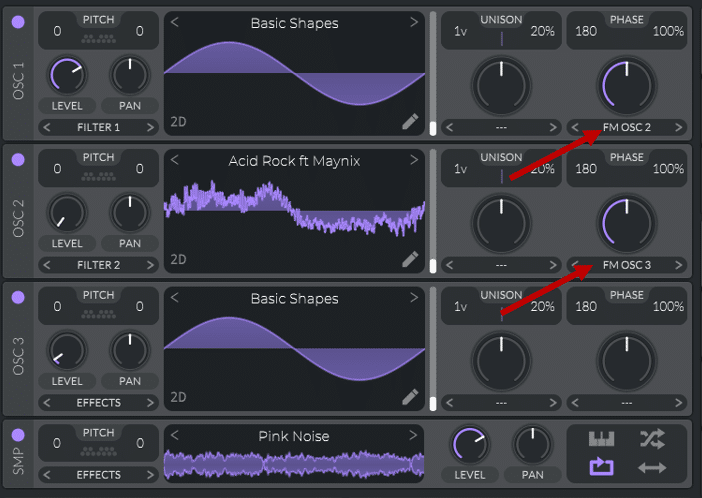
Retained observation
The arrows form a serial FM dependency OSC3->OSC2->OSC1, with a sine carrier, different OSC2 resource and an additional noise sample. Preserve dependency order and distinguish which sources are audible. This spends the three oscillator roles differently from unison, stereo tables or three parallel layers.
Source SHA-256: 2c18aa1465a318a1104c73f4ea4f27d2add7ea8cf339cd24356915c768555576
Image SHA-256: da150c5d098bc477814ef8ca3f9411ecf80507bb2c9dc0f32509c0e0ad45341f
Original URL: https://www.edmprod.com/wp-content/uploads/2023/04/image-21.png
F21 | changing the shape of an LFO in Vital for FM synthesis
download.html | documentation and visible configuration; not a new native test
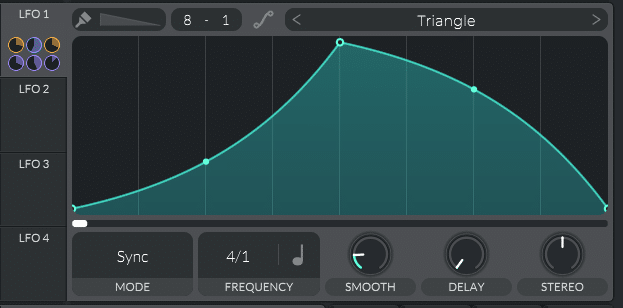
Retained observation
A curved LFO in Sync mode at 4/1 displays six assignment indicators. One global gesture can coordinate many destinations. Indicators alone do not identify all six mappings; retain the surrounding article/patch context instead of guessing.
Source SHA-256: 2c18aa1465a318a1104c73f4ea4f27d2add7ea8cf339cd24356915c768555576
Image SHA-256: 14d75a549f1785efcd7644754387ca1c9ab903f4d95a27e43022def9b7b5fc2c
Original URL: https://www.edmprod.com/wp-content/uploads/2023/04/image-22.png
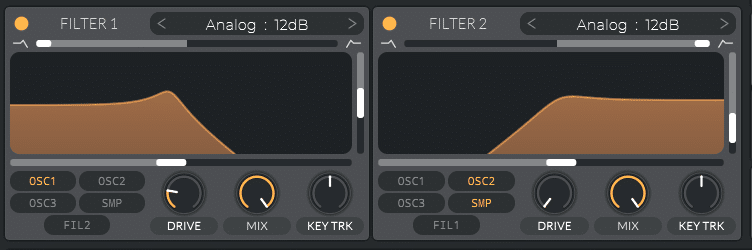
F22 | usign filters in Vital for FM synthesis
download.html | documentation and visible configuration; not a new native test
Retained observation
Filter1 low-passes OSC1, while Filter2 high-passes OSC2 and Sample. This is a specific complementary branch arrangement: body and upper texture can be shaped independently. It is not simply an EQ on the final summed waveform.
Source SHA-256: 2c18aa1465a318a1104c73f4ea4f27d2add7ea8cf339cd24356915c768555576
Image SHA-256: b438b956087217e26058dfbd29bd50a9800d3de06a06b7f317c36a1961caa555
Original URL: https://www.edmprod.com/wp-content/uploads/2023/04/image-25.png
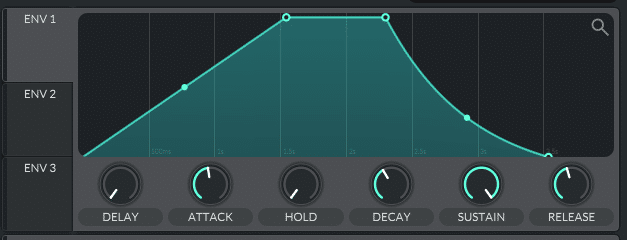
F23 | drawing a pad-like envelope in Vital for FM synthesis
download.html | documentation and visible configuration; not a new native test
Retained observation
ENV1 shows a gradual attack, a high sustained stage and a curved release. Amplitude articulation is independent of the FM network in F20. Long attack does not mean the FM depth or filter motion must rise at the same rate.
Source SHA-256: 2c18aa1465a318a1104c73f4ea4f27d2add7ea8cf339cd24356915c768555576
Image SHA-256: 92475369c9a31171d27065abbe7b78c9b6e5ce7d0457331227d460f1ee87cc03
Original URL: https://www.edmprod.com/wp-content/uploads/2023/04/image-23.png
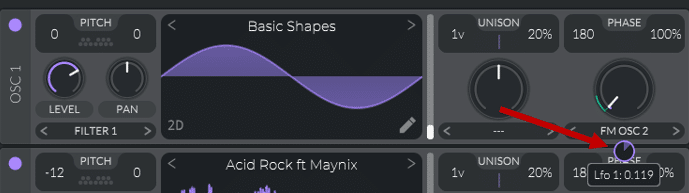
F24 | enabling FM modulation in Vital
download.html | documentation and visible configuration; not a new native test
Retained observation
An LFO assignment ring is visible on OSC1 FM amount; OSC2 tuning is shifted. The carrier/modulator relationship can evolve periodically, unlike F12's decaying envelope. Retain both tuning ratio and depth trajectory.
Source SHA-256: 2c18aa1465a318a1104c73f4ea4f27d2add7ea8cf339cd24356915c768555576
Image SHA-256: 2653f12cfde053844f2dedc6663d092f8bb557ad9687b31fc64f18a8b8fbfd52
Original URL: https://www.edmprod.com/wp-content/uploads/2023/04/image-24.png
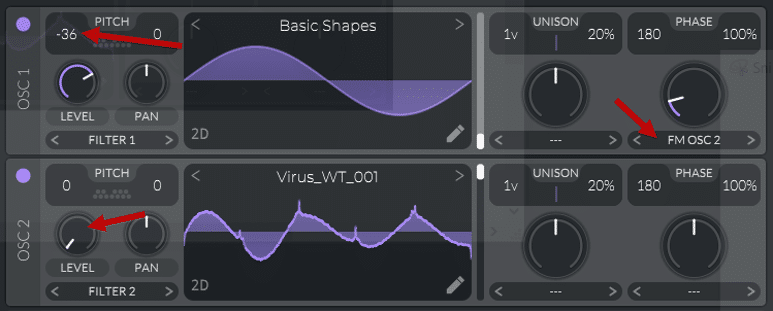
F25 | setting the waveforms in Vital for FM synthesis
download.html | documentation and visible configuration; not a new native test
Retained observation
The next recipe uses a sine carrier transposed -36 semitones, Virus_WT_001 modulator and FM OSC2, with low audible modulator level. The relative tuning is part of the timbre, not necessarily an error in the supplied MIDI.
Source SHA-256: 2c18aa1465a318a1104c73f4ea4f27d2add7ea8cf339cd24356915c768555576
Image SHA-256: 974172e4b4a16b3c6a2c389f2dae10cd8541348a15a9140c910f5300a9e079a6
Original URL: https://www.edmprod.com/wp-content/uploads/2023/04/image-26.png
F26 | drawing an LFO in Vital for FM synthesis
download.html | documentation and visible configuration; not a new native test
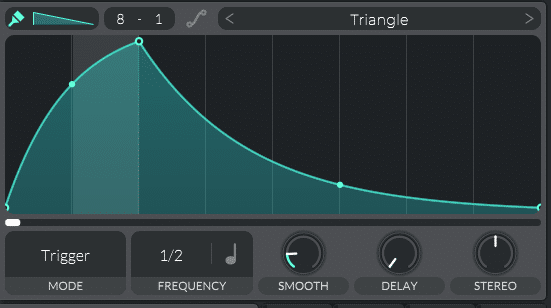
Retained observation
A rapid curved rise followed by a long curved fall is drawn in Trigger mode. The shape remains named Triangle despite being edited, so resource names alone cannot describe the actual contour. Preserve points and curvature.
Source SHA-256: 2c18aa1465a318a1104c73f4ea4f27d2add7ea8cf339cd24356915c768555576
Image SHA-256: 3cf2df644b51d015d288b3ae40ff5cefaff319d456fdb0e5732cc024ebf8e17f
Original URL: https://www.edmprod.com/wp-content/uploads/2023/04/image-27.png
F27 | assigning an LFO in Vital for FM synthesis
download.html | documentation and visible configuration; not a new native test
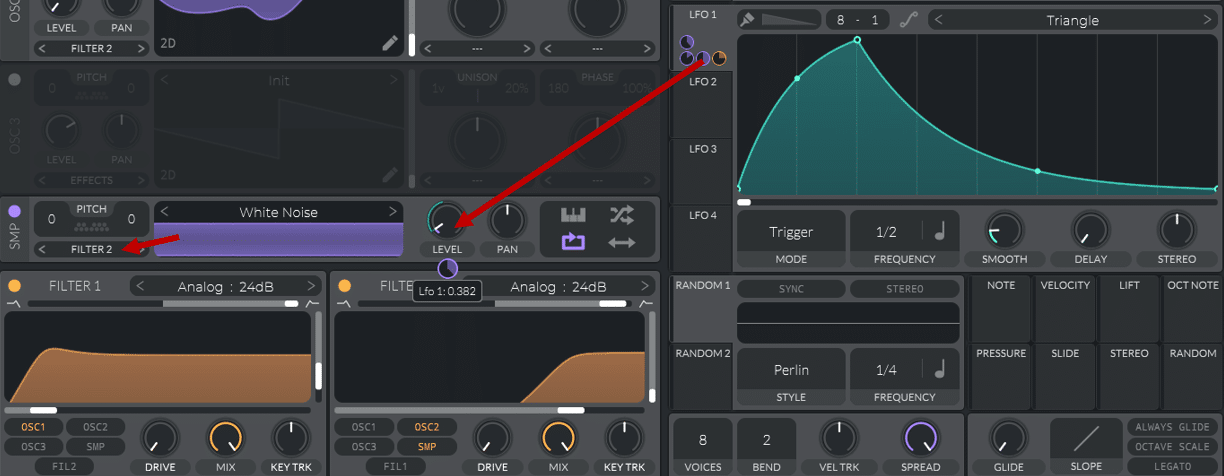
Retained observation
LFO1 is assigned to the White Noise sample's level; the sample routes to Filter2, which high-passes its branch while Filter1 shapes OSC1. This couples textured attack/body motion to a separate filtered ingredient instead of baking it into the carrier table.
Source SHA-256: 2c18aa1465a318a1104c73f4ea4f27d2add7ea8cf339cd24356915c768555576
Image SHA-256: 7cc28befcc88a10967668e92bd439572d732bf21623e1b5c6da450d0a2d4f2c7
Original URL: https://www.edmprod.com/wp-content/uploads/2023/04/image-28.png
F28 | applying some compression and distortion in Vital
download.html | documentation and visible configuration; not a new native test
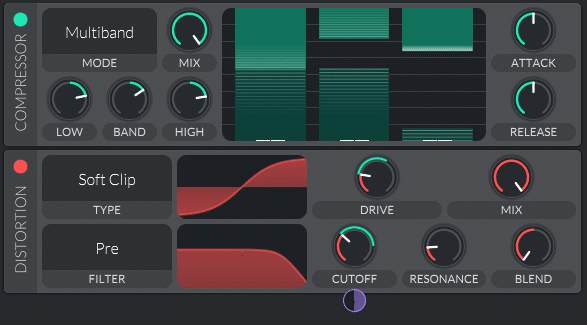
Retained observation
Multiband compression precedes Soft Clip distortion with its filter set Pre; a modulation indicator also appears at the filter cutoff. This sequence combines dynamic shaping with an input-dependent nonlinear stage. Preserve order and modulation, not merely the two effect names.
Source SHA-256: 2c18aa1465a318a1104c73f4ea4f27d2add7ea8cf339cd24356915c768555576
Image SHA-256: da6890f3487be4418f5ec9a285f6b9caedde8bbfa520d1ba698d65c7f509058d
Original URL: https://www.edmprod.com/wp-content/uploads/2023/04/image-29.png
F29 | applying some EQ and filtering in Vital
download.html | documentation and visible configuration; not a new native test
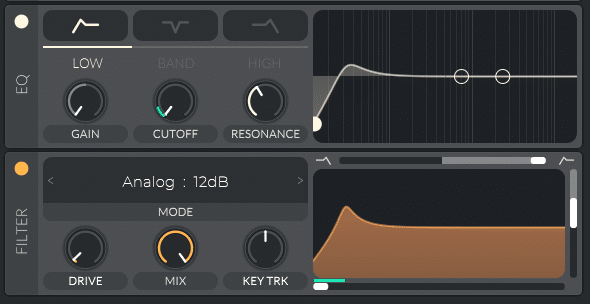
Retained observation
EQ low-cut shaping precedes an Analog FX filter, and cutoff modulation indicators are visible. Static balance and moving final shaping can coexist with the voice filters and FM network. This is a multi-stage recipe, not proof that every stage is necessary for every sound.
Source SHA-256: 2c18aa1465a318a1104c73f4ea4f27d2add7ea8cf339cd24356915c768555576
Image SHA-256: 44888cf45d14a64cef471040e06d9dc53331d0121d15013a3040b92685455590
Original URL: https://www.edmprod.com/wp-content/uploads/2023/04/image-30.png
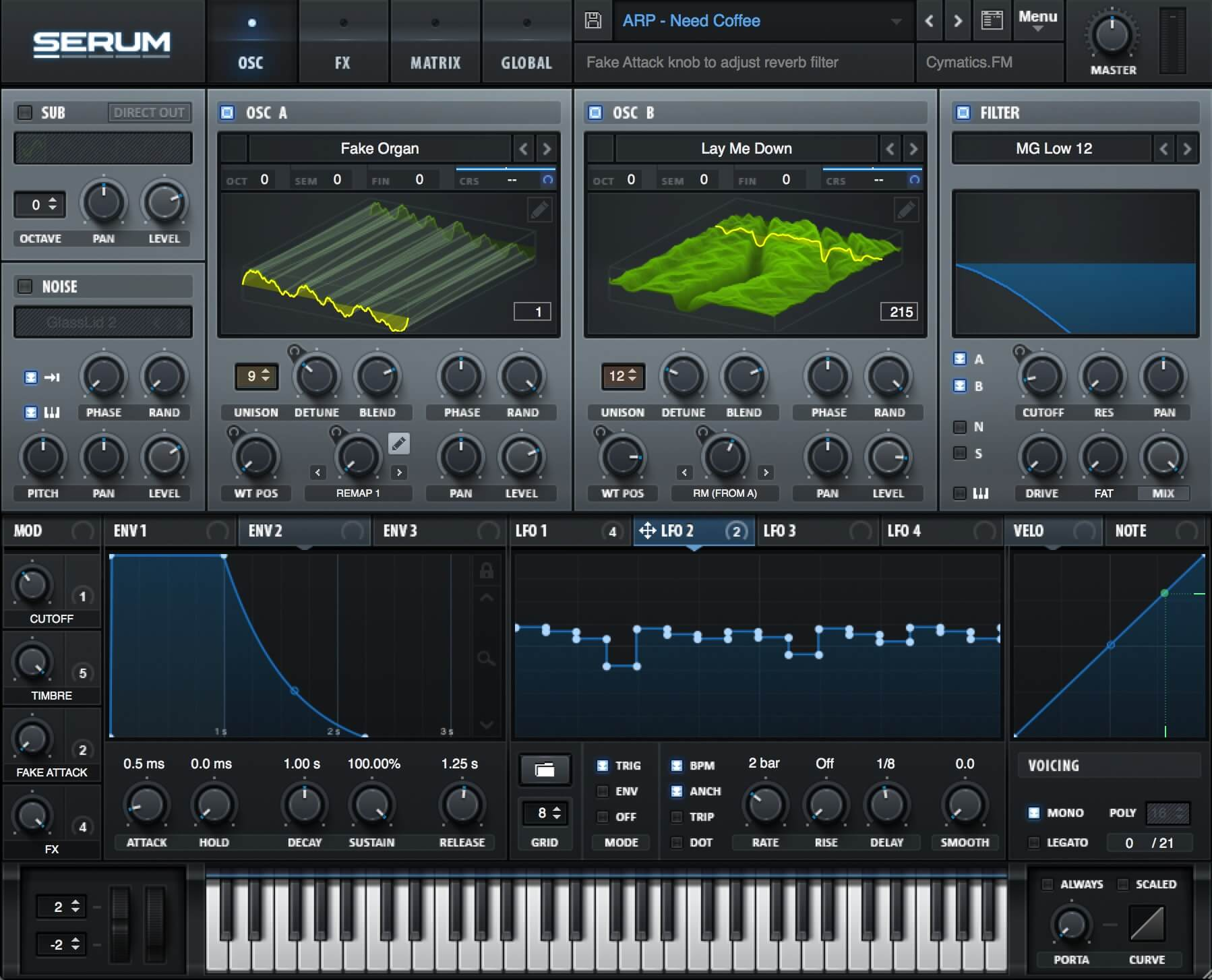
F30 | Serum synth
download.html | documentation and visible configuration; not a new native test
Retained observation
The Serum example uses different tables, RM from A, a patterned LFO and macros. It is cross-synth illustration of connected tools, not evidence of identical DSP or a requirement to switch our output target.
Source SHA-256: 2c18aa1465a318a1104c73f4ea4f27d2add7ea8cf339cd24356915c768555576
Image SHA-256: 2bf192287e244437c90d8b4166d210a6fd4f52e7b516fd257d0173303852ec9c
Original URL: https://www.edmprod.com/wp-content/uploads/2023/11/Serum-3099718384.jpg
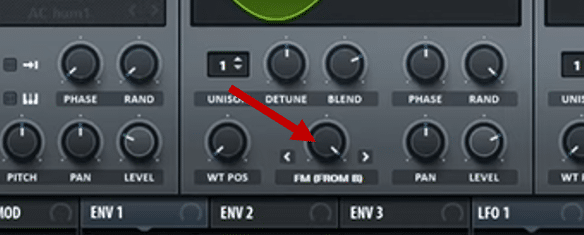
F31 | Setting up FM synthesis in Serum
download.html | documentation and visible configuration; not a new native test
Retained observation
The crop points to Serum's FM FROM B on oscillator A. The transferable dependency direction corresponds conceptually to a modulator feeding a carrier; parameter amounts and internal scaling must not be copied numerically into Vital.
Source SHA-256: 2c18aa1465a318a1104c73f4ea4f27d2add7ea8cf339cd24356915c768555576
Image SHA-256: fdc67cb2359a56c0d597576ad639749f5f7713686c93320791c2fa93d796c1df
Original URL: https://www.edmprod.com/wp-content/uploads/2023/11/image-80.png
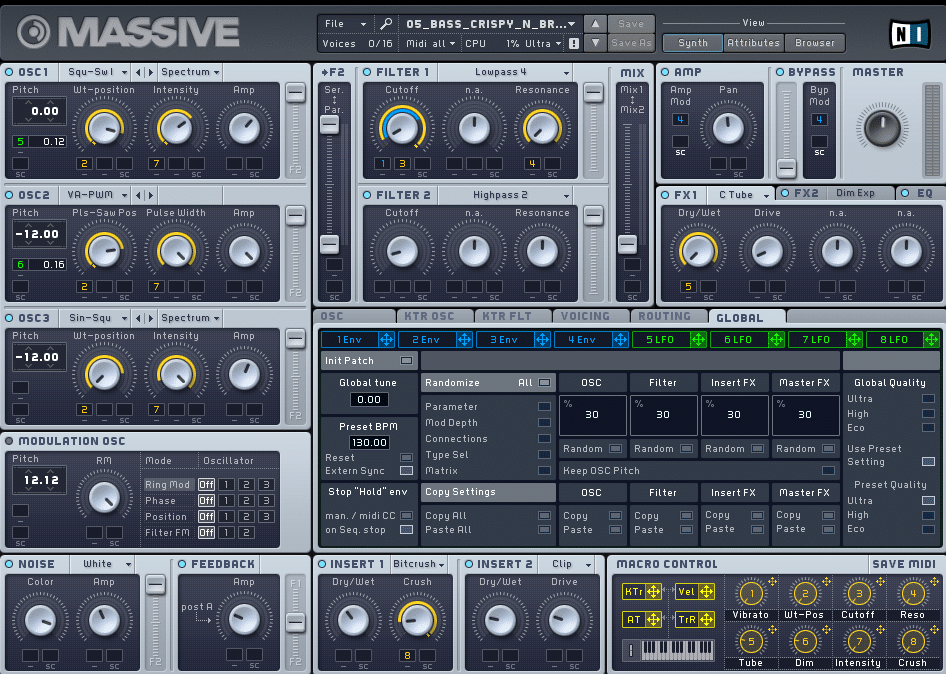
F32 | FM Synthesis in Massive
download.html | documentation and visible configuration; not a new native test
Retained observation
Massive separates three oscillators, a dedicated Modulation OSC, two filters, inserts and FX. The displayed architecture reinforces that audio sources and control routes are distinct. It does not expand Vital's native oscillator budget.
Source SHA-256: 2c18aa1465a318a1104c73f4ea4f27d2add7ea8cf339cd24356915c768555576
Image SHA-256: 390fd40786af6ee6deccec18d9c32365550ac53d42ce46089c023a0bdf7dc48a
Original URL: https://www.edmprod.com/wp-content/uploads/2023/11/image-81.png
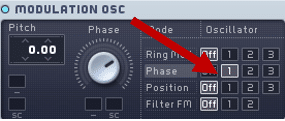
F33 | FM Synthesis in Massive
download.html | documentation and visible configuration; not a new native test
Retained observation
The zoomed Massive panel highlights Phase modulation with oscillator-selection buttons, separate from Ring Mod, Position and Filter FM. Preserve the exact target domain rather than using FM as a label for every modulation operation.
Source SHA-256: 2c18aa1465a318a1104c73f4ea4f27d2add7ea8cf339cd24356915c768555576
Image SHA-256: c5f5891ccb685236393ec9929eec2a767610bd4cfb87016ba4fcdcb9e1602f10
Original URL: https://www.edmprod.com/wp-content/uploads/2023/11/image-82.png
F34 | FM Synthesis in Massive X
download.html | documentation and visible configuration; not a new native test
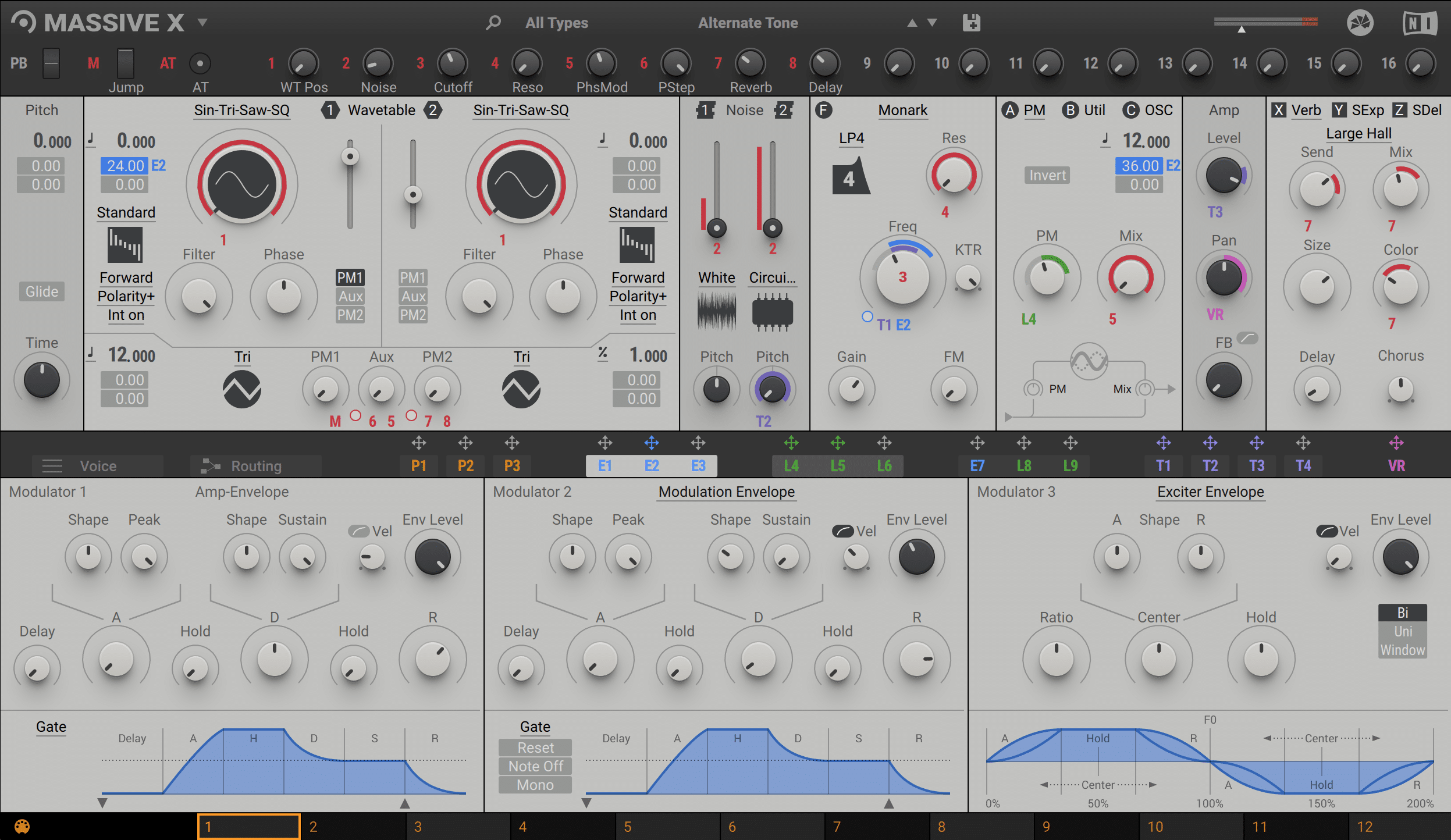
Retained observation
Massive X displays two main wavetable sources with PM inputs, noise and distinct modulator envelopes. This is a reference architecture, not a Vital control map. Independent spectral and amplitude trajectories remain the reusable principle.
Source SHA-256: 2c18aa1465a318a1104c73f4ea4f27d2add7ea8cf339cd24356915c768555576
Image SHA-256: c4d5ff277f4b1d8e74332e1ad21e0c6d8566610cd2b36df655f0d907c2c6787d
Original URL: https://www.edmprod.com/wp-content/uploads/2023/11/massivex-2736225806.png
F35 | Enabling FM synthesis
download.html | documentation and visible configuration; not a new native test
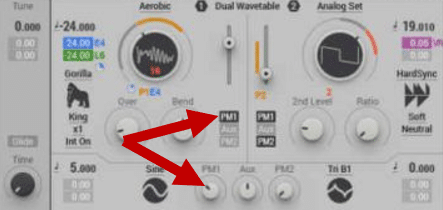
Retained observation
The Massive X crop highlights PM1 enable and its amount/source controls. Routing availability and modulation depth are separate choices. A mode label or enabled button alone does not establish a consequential modulation amount.
Source SHA-256: 2c18aa1465a318a1104c73f4ea4f27d2add7ea8cf339cd24356915c768555576
Image SHA-256: c2fe57a05c3c09769d5686107503786e9564d1e3fb896b7ea1db4ba53a9a32aa
Original URL: https://www.edmprod.com/wp-content/uploads/2023/11/image-83.png
F36 | Phase Plant synth
download.html | documentation and visible configuration; not a new native test
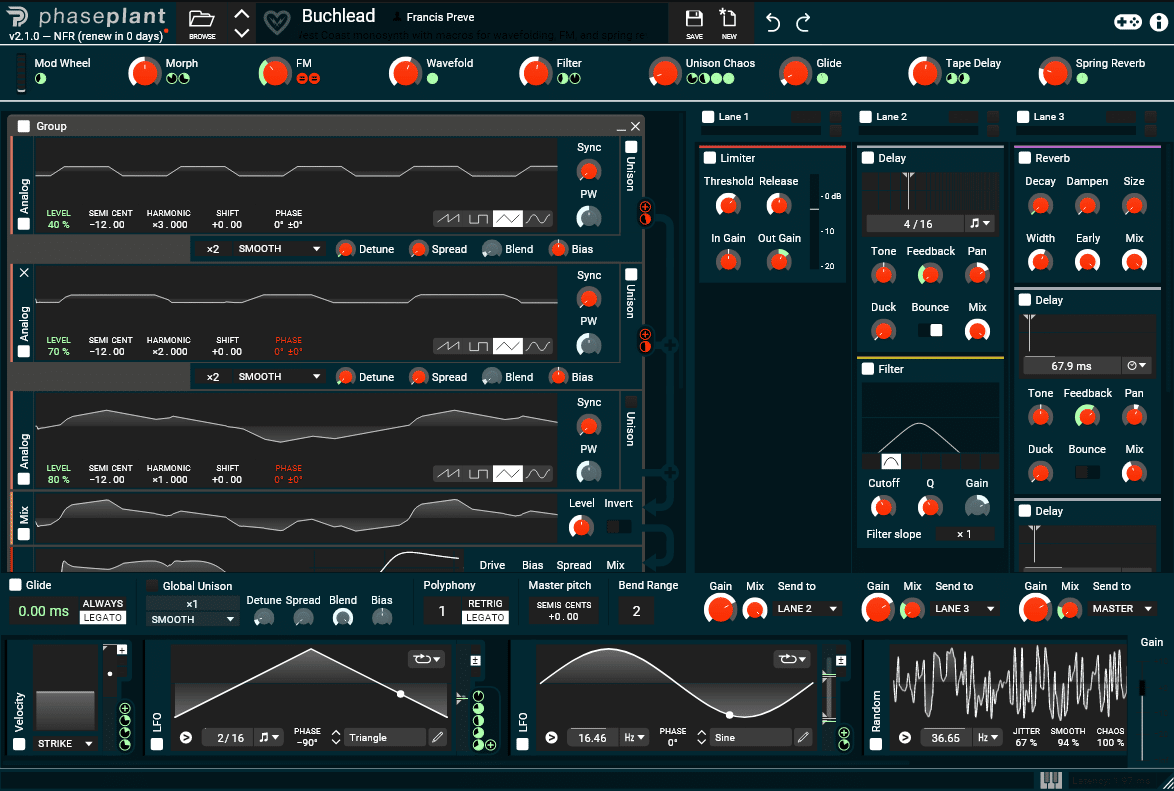
Retained observation
Phase Plant shows multiple generators and three FX lanes with macros and motion sources. It illustrates graph composition, while its lane/oscillator capacities must not be assumed to exist identically in Vital.
Source SHA-256: 2c18aa1465a318a1104c73f4ea4f27d2add7ea8cf339cd24356915c768555576
Image SHA-256: 4f54f4e49d99982512c096039fdcab1dbf77b277d2cffd38d906e5c5e013755f
Original URL: https://www.edmprod.com/wp-content/uploads/2023/11/image-84.png
F37 | FM synthesis in Phase Plant
download.html | documentation and visible configuration; not a new native test
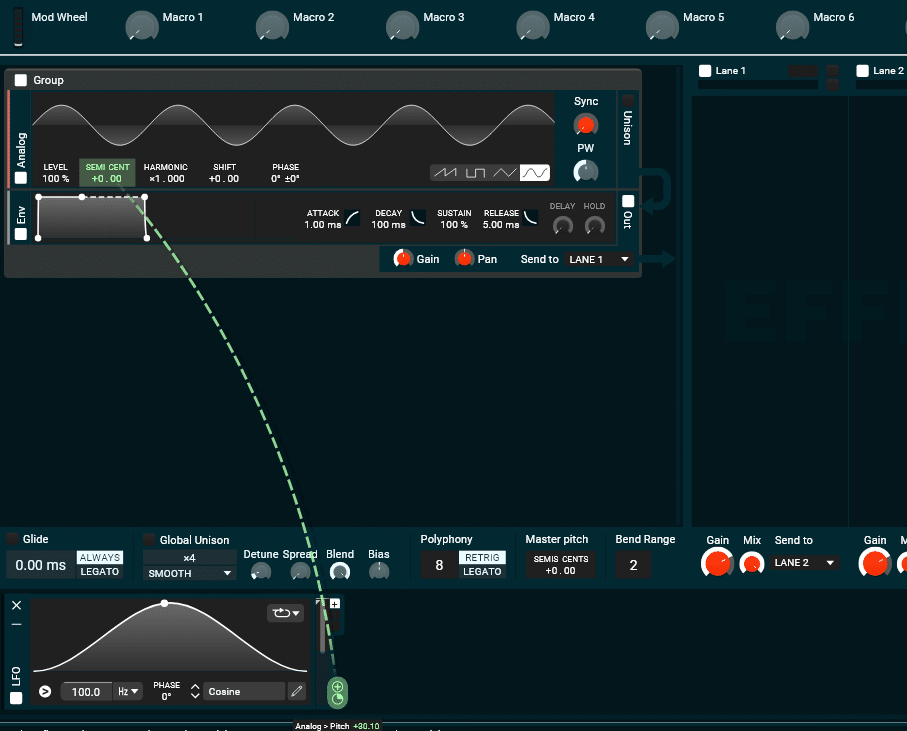
Retained observation
A 100 Hz LFO visibly maps to an analog oscillator pitch control in Phase Plant. This is a different route from an oscillator-to-oscillator dependency. Do not generalize its update behavior to Vital's ordinary modulation matrix without using the existing native/source distinctions.
Source SHA-256: 2c18aa1465a318a1104c73f4ea4f27d2add7ea8cf339cd24356915c768555576
Image SHA-256: 8178baf623fc1f72f2e1e16187a8e43fb4b1e139bd9b3b56f888e6e618e2ef8d
Original URL: https://www.edmprod.com/wp-content/uploads/2023/11/image-85.png
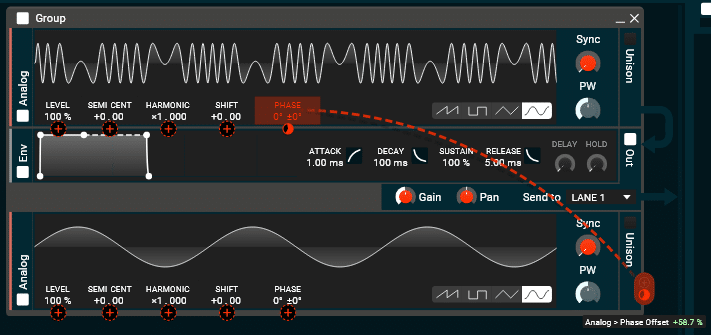
F38 | Modulating the frequency of OSC 1 with OSC 2
download.html | documentation and visible configuration; not a new native test
Retained observation
The caption says frequency modulation, but the highlighted target and tooltip read Phase Offset. Preserve the actual screenshot as phase-target modulation between oscillators, not literal proof of a frequency-input connection. This clarification retains the technique without copying an imprecise label.
Source SHA-256: 2c18aa1465a318a1104c73f4ea4f27d2add7ea8cf339cd24356915c768555576
Image SHA-256: 2b152eacb7bfb6312a63f40ee820e4c80b44293858961f395b397350a014f086
Original URL: https://www.edmprod.com/wp-content/uploads/2023/11/image-86.png